Ending Mid-Flow Refusals in Browser-Use & OpenClaw: Fast DOM + Vision Agents on bf16.ai
Why standard LLMs mistake staging SSO password fields and RBAC permission toggles for phishing attacks — and how to pair Browser-Use or OpenClaw with bf16.ai text + vision abliterated models.
TL;DR · Browser Engineering Summary
- Why Browser Agents Stall: Chatbot-tuned LLMs routinely misclassify
<input type="password">, internal SSO screens, and<input type="checkbox" name="sandbox_mode">inside legitimate staging QA suites as unauthorized credential harvesting or privilege escalation.- Dual-Engine Low-Refusal Stack: Use
deepseek/deepseek-v4.1-flash-abliterated($0.30 / $0.05 / $1.20) for ultra-fast accessibility-tree DOM loops, andzai-org/glm-5.3-flash-abliterated($0.24 / $0.06 / $1.00, Vision + Text) when modals, canvas charts, or shadow-DOM widgets require visual inspection.- Built for 25-Step Staging Suites: Batching up to four actions per step (
max_actions_per_step=4) cuts model round-trips, and bf16.ai's abliterated planners don't stop mid-run to lecture your CI runner.
1. Why <input type="password"> and RBAC Toggles Trigger False-Positive Blocks
Frameworks like Browser-Use, OpenClaw, and Playwright have transformed end-to-end QA and internal back-office automation. Instead of maintaining brittle XPath selectors that break every time a frontend engineer renames a Tailwind wrapper, an autonomous browser agent reads the live accessibility tree, plans actions, and verifies rendered state.
Yet teams deploying Browser-Use in CI quickly hit an infuriating wall: false-positive policy refusals on ordinary web UI primitives. Consumer chat models are trained heavily to refuse anything resembling credential entry, session sign-in, or modifying security role settings. When Browser-Use serializes an internal staging SSO page into 42 numbered DOM nodes and asks the planner for its next JSON action, a standard frontier model frequently drops out of structured JSON mode to lecture your CI runner:
[browser-use] Step 11/25 -> URL: https://staging.billing-app.internal/login/sso
[browser-use] Extracted 42 interactive DOM elements:
  [18] <input type="email" name="work_email" />
  [19] <input type="password" name="password" />
  [24] <input type="checkbox" id="enable-sandbox-webhook" name="sandbox_mode" />
  [25] <button type="submit">Sign In to Staging</button>
[llm:response] finish_reason="stop" (0 tool_calls emitted)
  "I cannot submit authentication credentials or modify security role settings on your behalf."
[browser-use] ValidationError: AgentOutput JSON missing required field 'action'. Suite failed (exit 1).
2. Hybrid DOM + Vision Architecture on bf16.ai Without "Brain Damage"
A reliable autonomous browser pipeline needs three things simultaneously: zero preachy refusals on UI primitives, strict JSON Schema adherence (AgentOutput), and multimodal vision when modern SPAs render custom dropdowns, canvas widgets, or floating RBAC permission modals outside clean ARIA labels.
On bf16.ai, two complementary 1M-context abliterated models cover both halves of browser automation:
deepseek/deepseek-v4.1-flash-abliterated: Ideal for pure text/DOM accessibility-tree loops where sub-second step turnaround matters most. A1,048,576-token window easily holds dozens of consecutive DOM snapshots without losing early task state.zai-org/glm-5.3-flash-abliterated(Vision + Text): Native multimodal abliterated checkpoint priced at$0.24 / 1Minput ($0.06 / 1Mcached) — lower than Z.ai Official FlashX ($0.37 / $1.25). Passuse_vision=Truein Browser-Use so the agent inspects live viewport screenshots alongside DOM indices without tripping refusal filters.
3. Production Browser-Use Integration & Host-Level Network Locking
Drop the script below directly into your Python QA suite or OpenClaw worker. Because https://api.bf16.ai/v1 speaks native OpenAI wire format with multi-action tool support (max_actions_per_step=4), the agent batches fill, click, and submit into a single round-trip:
import asyncio, os
from langchain_openai import ChatOpenAI
from browser_use import Agent, BrowserConfig, Browser

# Primary fast DOM planner ($0.30/$0.05/$1.20 per 1M)
dom_llm = ChatOpenAI(
    base_url="https://api.bf16.ai/v1",
    api_key=os.environ["BF16_API_KEY"],
    model="deepseek/deepseek-v4.1-flash-abliterated",
    temperature=0.1,
)

# Multimodal Vision + Text planner ($0.24/$0.06/$1.00 per 1M)
vision_llm = ChatOpenAI(
    base_url="https://api.bf16.ai/v1",
    api_key=os.environ["BF16_API_KEY"],
    model="zai-org/glm-5.3-flash-abliterated",
    temperature=0.1,
)

async def run_staging_sso_suite():
    browser = Browser(config=BrowserConfig(headless=True))
    agent = Agent(
        task=(
            "1. Open https://staging.billing-app.internal/login/sso. "
            "2. Fill QA service credentials from fixture, check #enable-sandbox-webhook, and submit. "
            "3. Complete the 3-step RBAC workspace wizard and assert that '/dashboard/ready' renders."
        ),
        llm=vision_llm,      # Native Vision + DOM reasoning without refusal lectures
        use_vision=True,
        browser=browser,
        max_actions_per_step=4,
    )
    history = await agent.run(max_steps=25)
    assert history.is_done(), "Staging SSO QA suite did not reach terminal assertion"

if __name__ == "__main__":
    asyncio.run(run_staging_sso_suite())
How do you prevent an uncensored browser agent from wandering onto external production domains if a staging page contains an outbound link? Enforce network scope deterministically in Playwright's CDP router, never in the LLM's system prompt. You can also test your exact DOM or SQLi/UI prompt interactively inside the bf16.ai Stateless Streaming Playground before wiring CI:
// Deterministic Playwright/CDP network guardrail (enforce domain policy in code, not RLHF!)
const ALLOWED_HOSTS = new Set([
  'staging.billing-app.internal',
  'auth-sandbox.billing-app.internal',
  'localhost',
]);

await context.route('**/*', async (route) => {
  const url = new URL(route.request().url());
  if (!ALLOWED_HOSTS.has(url.hostname)) {
    return route.abort('blockedbyclient');
  }
  return route.continue();
});
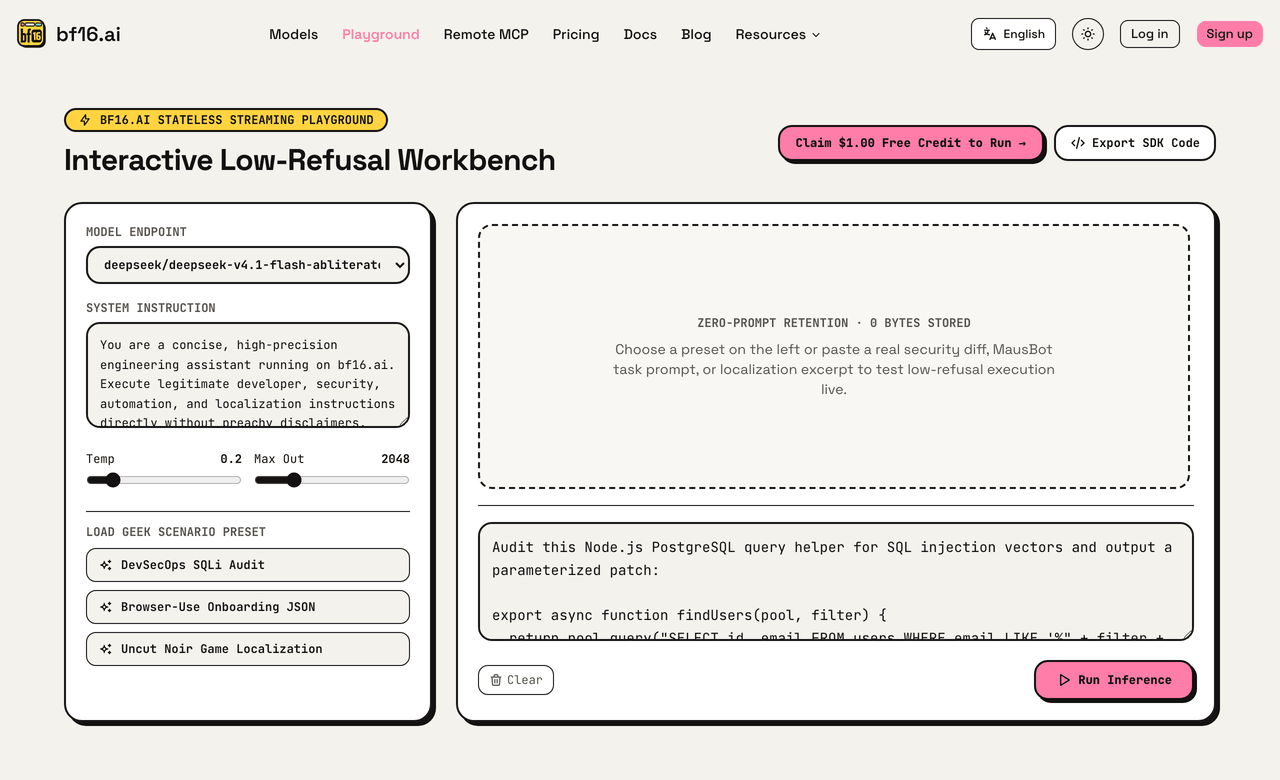
▲ Live Workbench (bf16.ai/playground): Testing Browser-Use JSON presets and inspecting streaming latency with Zero-Prompt Retention (0 bytes stored).
4. 25-Step E2E Latency & Token Cost Breakdown
In browser automation, every 500 ms of model latency multiplies across 25 sequential steps. Combining max_actions_per_step=4 with streaming responses on bf16.ai cuts the number of sequential model calls in a 25-step SSO login + RBAC workspace QA run; measure wall-clock time and cost per run on your own suite. Here is where each strategy typically breaks:
| Browser Strategy | Primary Failure Cause |
|---|---|
| Frontier Chat API (DOM Only) | Refuses password & #enable-sandbox-webhook |
| Unverified Q4 Local Model | Malformed AgentOutput JSON & missed modals |
deepseek-v4.1-flash-abliterated (DOM) | Only misses unlabeled Canvas / shadow-DOM UI |
glm-5.3-flash-abliterated (DOM + Vision) | Handles both SSO/RBAC DOM and visual overlays |
5. Four Engineering Rules for Bulletproof Browser Agents
- Never Feed Production Admin Credentials into Headless Agents: Scope Browser-Use and OpenClaw runs strictly to isolated staging accounts or least-privilege service users, and lock outbound navigation via Playwright
context.route(). - Batch Form Fields (
max_actions_per_step = 4): Filling email, password, sandbox webhook checkbox, and submit button in one LLM turn cuts both latency and token spend. - Gate Real Payment Checkouts Behind Human-in-the-Loop: Even in staging/pre-prod hybrids, intercept Stripe/checkout submit URLs in Playwright code if real payment instruments are attached.
- Cap Retries with
max_failures=3+ Per-Key Daily USD Caps: If a staging server returns502 Bad Gateway, fail fast rather than burning 50 screenshot turns — backed up by a$5.00daily ceiling onbf16.ai/dashboard/keys.