Self-Hosted Uncensored AI Teammates: One-Command Setup for OpenBot, Rakazo, OpenClaw, and ZeroClaw
Why autonomous personal bots stall on stock cloud APIs, how to keep execution boundaries inside local Docker/OS sandboxes, and one-command setups for OpenBot, Rakazo, OpenClaw, ZeroClaw, nanobot, and AstrBot.
Architecture Summary
- Separate Permissions from Refusals: In persistent personal bots, safety belongs in deterministic local sandboxes (Docker Team Computers, Landlock/Seatbelt profiles, and human payment/message approval gates) — not unpredictable model-side lectures that abort 30-step queues mid-run.
- Built for Computer-Use Screenshots & 1M Logs: bf16.ai automatically normalizes oversized inline desktop/browser PNG screenshots in RAM and caches repeated
SOUL.md/ tool-schema prefixes at$0.045 / 1Mondeepseek/deepseek-v4.1-flash-uncensored.- Dedicated Illustrated Guides & 1-Command Setup: Copy-paste setups are now live for OpenBot, Rakazo, OpenClaw, ZeroClaw, nanobot, and AstrBot.
1. The Architectural Flaw in Cloud-Managed Personal Bots
The fastest-growing wave in open-source software in late 2026 is self-hosted persistent AI teammates: tools like OpenBot (nightly-labs/openbot), Rakazo (elie222/rakazo, an open-source self-hosted alternative to Grok Bot), OpenClaw, ZeroClaw, nanobot, and AstrBot.
Unlike a single-turn chat window, these daemons run unattended queues across hours or days: watching staging dashboards inside an isolated Chromium desktop, triaging server error logs, parsing PDF attachments from Telegram or Slack, and delegating subtasks across multiple bots.
When wired to heavily filtered consumer APIs, two failure modes surface immediately:
- Mid-Queue Refusal Stalls: When step 18 of a weekday QA routine encounters a staging auth form, a raw stack trace containing security headers, or an unredacted legal/medical document you own, the model emits a prose refusal instead of a structured
tool_call, halting the worker queue until a human intervenes. - Retina Screenshot Payload Rejections: Desktop Computer-Use drivers (
cua-driverin OpenBot, Docker virtual screens in Rakazo) capture crisp Retina PNGs (4–6 MBper frame). Within five turns, uncompressed base64 history blows past strict body-size or text-only model constraints.
bf16.ai solves both at the gateway layer: every served model has had its refusal direction orthogonally edited out of the weights while preserving strict JSON tool calling, and our in-memory sharp image normalizer transparently bounds oversized inline screenshots (≤ 2048×2048) without touching disk or breaking prefix caches.
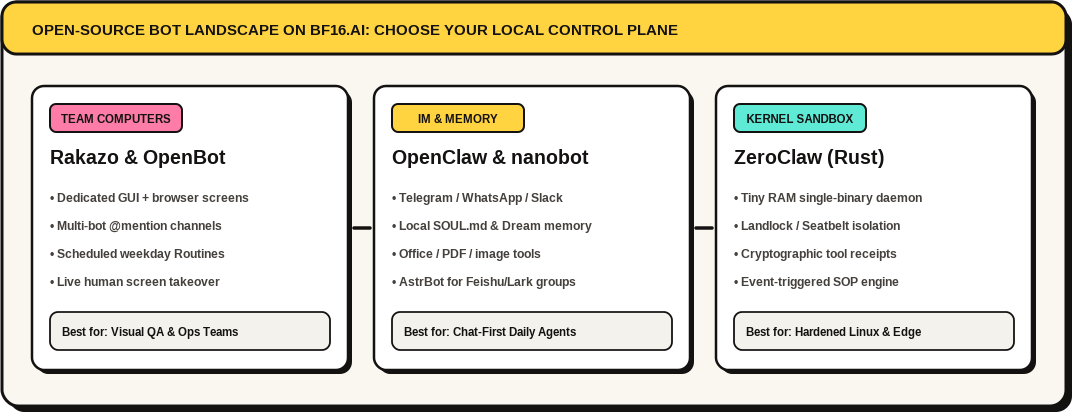
Picking the right open-source control plane for bf16.ai: Rakazo and OpenBot for full GUI desktop computers and multi-bot channels, OpenClaw/nanobot/AstrBot for messaging-first workflows, and ZeroClaw for kernel-sandboxed Rust edge hosts.
2. Which Open-Source Autonomous Bot Should You Run?
| Project | Runtime & Isolation | Standout Strength | Dedicated Setup Guide |
|---|---|---|---|
Rakazo (elie222/rakazo) | Docker Compose + isolated Linux Team Computers | Every bot gets its own live virtual desktop, browser, scheduled Routines, @mention group chats, and explicit Settings → Approvals | /docs/clients/rakazo |
OpenBot (nightly-labs/openbot) | Native macOS/Win/Linux app or Docker server + cua-driver | Local FIFO queues, embedded Chromium control, multi-agent channels, and automatic sync with local OpenCode / Hermes configs | /docs/clients/openbot |
OpenClaw (openclaw/openclaw) | Node.js local daemon | Non-interactive CLI onboarding bridging WhatsApp, Telegram, Signal, and Discord with local SOUL.md & MEMORY.md | /docs/clients/openclaw |
ZeroClaw (zeroclaw-labs/zeroclaw) | Single Rust binary + Landlock / Seatbelt / Bubblewrap | Minimal RAM footprint, cryptographic tool receipts, and webhook/MQTT/cron SOP engine under supervised autonomy | /docs/clients/zeroclaw |
nanobot (HKUDS/nanobot) | Python 3.11+ + WebUI & multi-IM | Readable codebase with built-in DOCX/XLSX/PDF readers, Dream memory consolidation, and named modelPresets | /docs/clients/nanobot |
AstrBot (AstrBotDevs/AstrBot) | Python / Docker + Agent Sandbox | 1000+ plugins across Telegram, Slack, Discord, Feishu/Lark, and WeChat Work with Docker code execution | /docs/clients/astrbot |
3. Quick Example: Bootstrapping Rakazo with bf16.ai in One Block
Rakazo’s RAKAZO_LOCAL_MODELS_* environment configuration lets both rakazo-api and rakazo-worker serve bf16.ai models across Web, Desktop, iOS, and Android while enabling screenshot Computer-Use tools (RAKAZO_LOCAL_VISION_MODELS) and thinking-effort selectors (RAKAZO_LOCAL_REASONING_MODELS):
export BF16_API_KEY="sk-bf16-v1-..."
mkdir -p rakazo && cd rakazo
curl -fsSLO https://raw.githubusercontent.com/elie222/rakazo/main/infra/compose/install-images.sh
bash install-images.sh --prepare-only

cat <<EOF >> .env
RAKAZO_LOCAL_MODELS=deepseek/deepseek-v4.1-flash-uncensored,zai-org/glm-5.3-flash-uncensored,zai-org/glm-5.3-uncensored,moonshotai/kimi-k3.1-pro-uncensored
RAKAZO_LOCAL_MODELS_URL=https://api.bf16.ai/v1
RAKAZO_LOCAL_MODELS_API_KEY=$BF16_API_KEY
RAKAZO_LOCAL_CONTEXT_WINDOW=1048576
RAKAZO_LOCAL_MAX_TOKENS=65536
RAKAZO_LOCAL_VISION_MODELS=deepseek/deepseek-v4.1-flash-uncensored,zai-org/glm-5.3-flash-uncensored,moonshotai/kimi-k3.1-pro-uncensored
RAKAZO_LOCAL_REASONING_MODELS=zai-org/glm-5.3-uncensored,deepseek/deepseek-v4.1-flash-uncensored,moonshotai/kimi-k3.1-pro-uncensored
PI_DEFAULT_PROVIDER=local
PI_DEFAULT_MODEL=deepseek/deepseek-v4.1-flash-uncensored
PI_DEFAULT_CREDENTIALS=host
EOF

bash install-images.sh
4. Three Mandatory Guardrails for Unattended Bots
Because an uncensored model will execute the instructions you give it without second-guessing your intent, your local host configuration must enforce hard engineering boundaries:
- One Scoped Key Per Bot Host (
Daily Spend Cap): In/dashboard/keys, mint a separatesk-bf16-v1-*key for each daemon (rakazo-prod,openbot-mac,zeroclaw-vps) with an explicit daily USD cap ($5.00/day) so a runaway cron loop halts deterministically at your budget ceiling. - Keep Approval Gates ON for Payments & External Messages: In Rakazo (
Settings → Approvals), OpenClaw, and ZeroClaw (autonomy = "supervised"), always require human confirmation before sending external emails/messages, pushing to production branches, or authorizing purchases. - Route Loops to Flash, Escalations to Flagship: Use
deepseek/deepseek-v4.1-flash-uncensored($0.26 / $0.045 cached / $1.00) for high-frequency browser/screenshot steps, and reservezai-org/glm-5.3-uncensoredormoonshotai/kimi-k3.1-pro-uncensoredfor complex code synthesis and approval verification.