AnythingLLM
All-in-one desktop and Docker RAG workspace turning PDFs, codebases, and internal docs into private AI agents.
https://api.bf16.ai/v1openai-completionsWho this is for
Teams and individuals running local document RAG over legal, security, or technical archives without cloud retention.
Architecture & Why Pair with bf16.ai
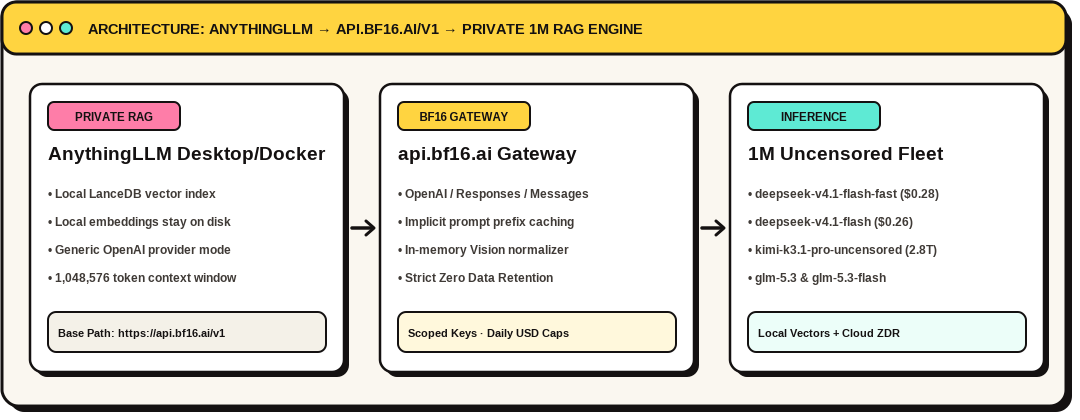
AnythingLLM pairs local LanceDB vector indexing with an easy desktop or Docker UI. Feeding large unredacted security reports, contracts, or archives into stock cloud APIs often triggers unnecessary safety refusals or violates internal data-retention policies.
Connecting AnythingLLM’s Generic OpenAI provider to bf16.ai gives every workspace a 1,048,576-token window, strict zero prompt retention, and discounted prompt caching.
Commands show $BF16_API_KEY. Sign in to fill in your own key automatically.
Docker Env Block for AnythingLLM + bf16.ai
Pre-configures AnythingLLM’s Generic OpenAI provider via environment variables.
export BF16_API_KEY="sk-bf16-v1-..."
LLM_PROVIDER=generic-openai \
GENERIC_OPEN_AI_BASE_PATH="https://api.bf16.ai/v1" \
GENERIC_OPEN_AI_API_KEY="$BF16_API_KEY" \
GENERIC_OPEN_AI_MODEL_PREF="deepseek/deepseek-v4.1-flash-uncensored" \
GENERIC_OPEN_AI_MODEL_TOKEN_LIMIT=1048576 \
curl https://api.bf16.ai/v1/models -H "Authorization: Bearer $BF16_API_KEY"- 1
Select Generic OpenAI in AnythingLLM Settings
Open Settings → AI Providers → LLM → select Generic OpenAI.
- 2
Configure Base Path, Key, Model, and 1M Context Limit
Enter https://api.bf16.ai/v1, paste your key, set Chat Model Name to deepseek/deepseek-v4.1-flash-uncensored, and set Token Context Window to 1048576.
Base Path: https://api.bf16.ai/v1
API Key:   $BF16_API_KEY
Model:     deepseek/deepseek-v4.1-flash-uncensored
Context:   1048576
Exact Field-by-Field Reference
https://api.bf16.ai/v1sk-bf16-v1-••••••••••••deepseek/deepseek-v4.1-flash-uncensored1048576 (Max Tokens: 16384+)Recommended Uncensored Model Tiering
Route complex planning to Flagship models and high-frequency subagents or screenshots to Flash.
| Workflow Role | Model ID | Why This Model | USD / 1M Tokens |
|---|---|---|---|
| High-Volume Document RAG & Q&A | deepseek/deepseek-v4.1-flash-uncensored | Fast, low-cost retrieval synthesis across huge multi-document workspaces. | $0.26 in / $0.045 cached / $1.00 out |
| Deep Legal, Security & Technical Synthesis | moonshotai/kimi-k3.1-pro-uncensored | 2.8T MoE reasoning over dense long-context source citations. | $1.95 in / $0.28 cached / $6.90 out |
How to know it worked
- Save settings and run a workspace query against an uploaded document.
- curl https://api.bf16.ai/v1/models -H "Authorization: Bearer $BF16_API_KEY"
Production Guardrails & Budget Isolation
- Use local embeddings inside AnythingLLM and ZDR inference on bf16.ai for end-to-end zero retention.