Goose
Open-source Rust engineering agent (Linux Foundation / Block) with MCP extensions, local shell automation, and multi-file edits.
https://api.bf16.ai/v1openai-completionsWho this is for
Engineers running autonomous local refactors, test loops, and MCP toolchains in Goose CLI or Desktop without mid-run safety interruptions.
Architecture & Why Pair with bf16.ai
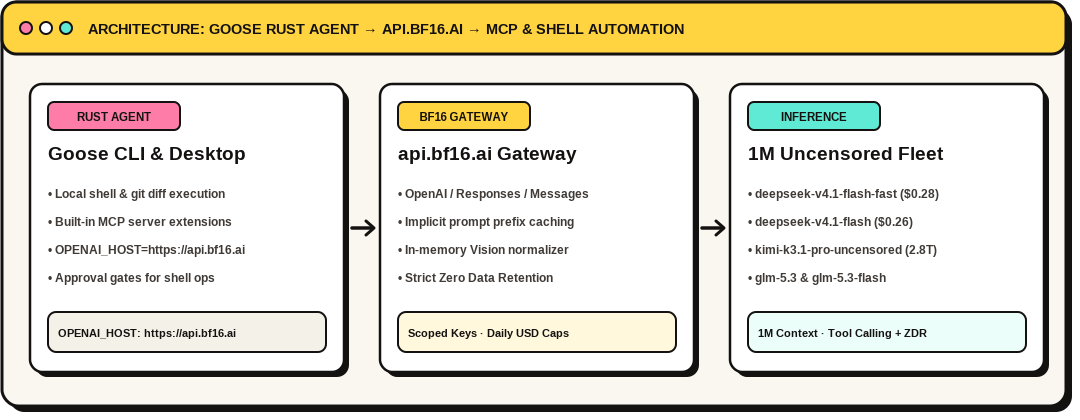
Goose is a high-speed Rust autonomous coding agent backed by the Linux Foundation that orchestrates local shells, git diffs, browsers, and MCP servers end to end.
Pointing Goose at bf16.ai via its OpenAI-compatible environment variables unlocks DeepSeek V4.1 Flash Uncensored Fast ($0.28/$1.12) for rapid tool loops and 2.8T Kimi K3.1 Pro Uncensored ($1.95/$6.90) for deep architectural audits — with zero false refusals on security code or legacy systems.
Commands show $BF16_API_KEY. Sign in to fill in your own key automatically.
One-Command Goose Session with bf16.ai
Starts an isolated Goose session wired to DeepSeek V4.1 Flash Uncensored Fast without touching your existing provider profile.
export BF16_API_KEY="sk-bf16-v1-..."
GOOSE_PROVIDER=openai \
OPENAI_HOST="https://api.bf16.ai" \
OPENAI_API_KEY="$BF16_API_KEY" \
GOOSE_MODEL="deepseek/deepseek-v4.1-flash-uncensored-fast" \
goose session- 1
Export your bf16.ai API key
Mint a dedicated key in your console with an explicit daily USD spend cap for autonomous Goose runs.
export BF16_API_KEY="sk-bf16-v1-..." - 2
Configure Goose to point at api.bf16.ai
Set OPENAI_HOST to the origin without /v1 and select a 1M-context uncensored model.
GOOSE_PROVIDER=openai \
OPENAI_HOST="https://api.bf16.ai" \
OPENAI_API_KEY="$BF16_API_KEY" \
GOOSE_MODEL="deepseek/deepseek-v4.1-flash-uncensored-fast" \
goose session
Exact Field-by-Field Reference
openaihttps://api.bf16.aisk-bf16-v1-••••••••••••deepseek/deepseek-v4.1-flash-uncensored-fastOr switch to moonshotai/kimi-k3.1-pro-uncensored for 2.8T planning
Recommended Uncensored Model Tiering
Route complex planning to Flagship models and high-frequency subagents or screenshots to Flash.
| Workflow Role | Model ID | Why This Model | USD / 1M Tokens |
|---|---|---|---|
| Fast MCP & Shell Tool Loops | deepseek/deepseek-v4.1-flash-uncensored-fast | Low-latency tool execution and $0.055/1M cached prefix reads keep multi-turn Goose sessions fast and cheap. | $0.28 in / $0.055 cached / $1.12 out |
| 2.8T Deep Architecture & Audits | moonshotai/kimi-k3.1-pro-uncensored | Handles 1M-token cross-repository design reviews and multimodal screenshot debugging. | $1.95 in / $0.28 cached / $6.90 out |
How to know it worked
- Goose boots into the interactive prompt showing provider: openai and model: deepseek/deepseek-v4.1-flash-uncensored-fast.
- Ask Goose to inspect your git status and verify the tool call appears in your bf16.ai request logs.
- curl https://api.bf16.ai/v1/models -H "Authorization: Bearer $BF16_API_KEY"
Production Guardrails & Budget Isolation
- Use Goose’s approval mode (GOOSE_MODE=approve) when running destructive shell commands or database migrations.
- Assign a per-key daily spend cap in /dashboard/keys before running long unattended Goose recipes.