n8n
Leading open-source workflow automation platform with native AI Agent, LangChain, and Structured Output nodes.
https://api.bf16.ai/v1openai-completionsWho this is for
Automation builders running 24/7 webhook, scraper, content localization, and alert-triage pipelines in n8n.
Architecture & Why Pair with bf16.ai
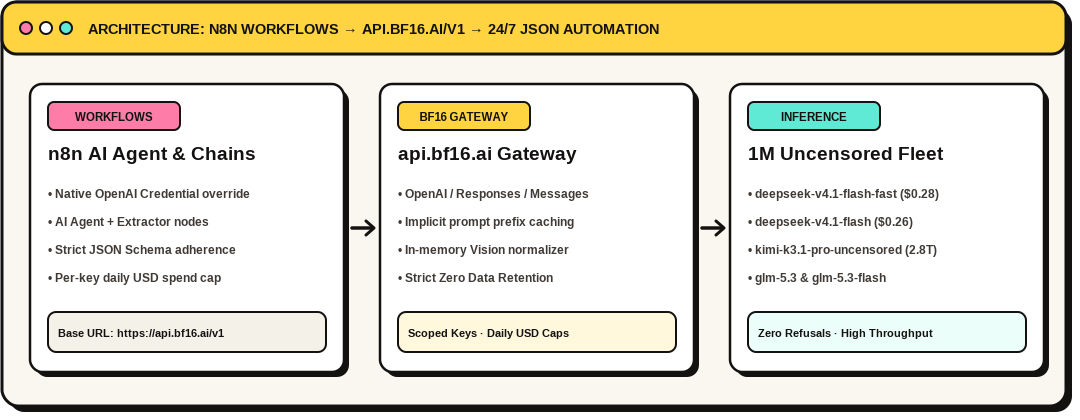
n8n workflows run unattended across thousands of webhook executions per day — summarizing tickets, parsing scraped pages, moderating user content, and triggering downstream APIs. A single false-positive safety refusal returns prose instead of JSON and crashes the entire workflow branch.
Pointing n8n’s native OpenAI Chat Model credential to https://api.bf16.ai/v1 gives every AI Agent and Basic LLM Chain node strict JSON Schema adherence, 1M context, zero false refusals, and $0.26/$1.00 Flash economics.
Commands show $BF16_API_KEY. Sign in to fill in your own key automatically.
Smoke-Test Your n8n Key & Structured Output Endpoint
Verifies API key authentication and model discovery from your n8n host before activating workflows.
export BF16_API_KEY="sk-bf16-v1-..."
curl https://api.bf16.ai/v1/models -H "Authorization: Bearer $BF16_API_KEY"- 1
Create an OpenAI Credential in n8n
In n8n, open Credentials → Add Credential → OpenAI. Paste your API key and set Base URL to https://api.bf16.ai/v1.
API Key: $BF16_API_KEY Base URL: https://api.bf16.ai/v1 - 2
Attach to OpenAI Chat Model / AI Agent Node
Select your bf16 OpenAI credential inside any OpenAI Chat Model node and pick deepseek/deepseek-v4.1-flash-uncensored from the dynamic model list.
Exact Field-by-Field Reference
sk-bf16-v1-••••••••••••https://api.bf16.ai/v1deepseek/deepseek-v4.1-flash-uncensoredAlso supports zai-org/glm-5.3-flash-uncensored for strict JSON extraction
Zero Prompt Retention · 1M ContextRecommended Uncensored Model Tiering
Route complex planning to Flagship models and high-frequency subagents or screenshots to Flash.
| Workflow Role | Model ID | Why This Model | USD / 1M Tokens |
|---|---|---|---|
| 24/7 Webhook & Batch Automation | deepseek/deepseek-v4.1-flash-uncensored | High throughput (~155 tok/s) and $0.045/1M cached prompt reads keep 10,000-run workflows affordable. | $0.26 in / $0.045 cached / $1.00 out |
| Strict JSON Schema Extraction | zai-org/glm-5.3-flash-uncensored | Rock-solid structured JSON outputs + vision for invoice, UI, and document pipelines. | $0.30 in / $0.065 cached / $1.12 out |
How to know it worked
- Clicking Save in n8n Credentials displays "Connection tested successfully".
- Execute one test workflow run and confirm clean JSON output with zero safety blocks.
- curl https://api.bf16.ai/v1/models -H "Authorization: Bearer $BF16_API_KEY"
Production Guardrails & Budget Isolation
- Create a dedicated API key with a daily USD spend cap in /dashboard/keys for every production n8n instance to guard against infinite webhook loops.