Orca
Open-source Agent Development Environment & multi-agent fleet IDE (stablyai/orca) — install our official bf16.ai plugin (bf16-ai.bf16) for a live 1M model catalog, 1-click agent launch, and built-in MCP server.
https://api.bf16.ai/v1openai-completionsWho this is for
Engineering teams and solo builders running fleets of Claude Code, Codex, Hermes Agent, OpenCode, or unattended Orca Bots (Slack, Linear, GitHub PR reviews) across isolated Git worktrees who need zero-refusal 1M-context inference and strict ZDR.
Architecture & Why Pair with bf16.ai
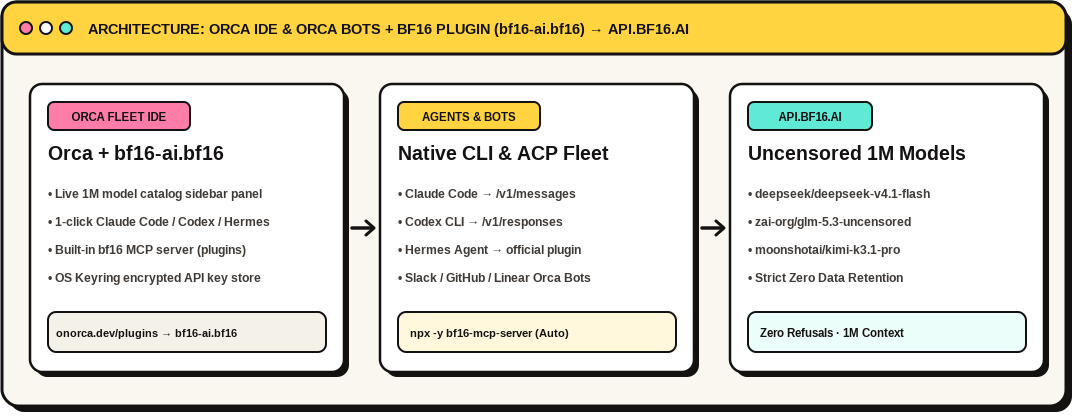
Orca (stablyai/orca, 142k+ ★) is an open-source Agent Development Environment for running fleets of coding agents (Claude Code, Codex, Hermes Agent, OpenCode, Cline, Pi, Goose) in parallel Git worktrees — plus unattended Orca Bots triggered from Slack, Linear, and GitHub.
Install our official open-source Orca plugin (`bf16-ai.bf16`, repo `BF16-AI/bf16-orca-plugin`) directly from Settings → Plugins to get a native bf16.ai sidebar panel with live 1M-context pricing, OS-keyring key checks, 1-click workspace launchers, and the official `bf16` MCP server (`npx -y bf16-mcp-server`) automatically available to every agent Orca spawns.
For unattended Orca Bots and native Orca Chat, pair Orca with our merged Nous Research Hermes Agent plugin (`hermes plugins install bf16-provider --enable`) or point Claude Code (`ANTHROPIC_BASE_URL=https://api.bf16.ai`) and Codex (`OPENAI_BASE_URL=https://api.bf16.ai/v1`) at bf16.ai so parallel agent runs never stall on false-positive safety refusals.
Commands show $BF16_API_KEY. Sign in to fill in your own key automatically.
Wire Hermes Agent + Orca Bots & Verify Your Key
Installs the official Hermes bf16-provider plugin (recognized automatically by Orca Chat and Orca Bots) and verifies your bf16.ai API key against live 1M-context endpoints.
export BF16_API_KEY="sk-bf16-v1-..."
hermes plugins install bf16-provider --enable
hermes config set model.default "deepseek/deepseek-v4.1-flash-uncensored"
curl https://api.bf16.ai/v1/models -H "Authorization: Bearer $BF16_API_KEY"- 1
Install the Official bf16.ai Plugin in Orca (bf16-ai.bf16)
Open Orca → Settings → Plugins, search for bf16.ai in the community directory (onorca.dev/plugins) or click Install from Git URL and paste https://github.com/BF16-AI/bf16-orca-plugin. This adds the live bf16.ai sidebar panel, Command Palette actions, status bar indicator, and built-in bf16 MCP server.
https://github.com/BF16-AI/bf16-orca-plugin - 2
Save Your Key & Enable the Built-in bf16 MCP Server
Open the bf16.ai panel → Account tab to store your BF16_API_KEY in Orca’s OS keyring and click Test Connection. Under Settings → MCP servers → From plugins, toggle bf16 on for the workspaces and agents you want.
- 3
Launch Claude Code, Codex, or Hermes Agent on bf16.ai
Use the Setup tab (or Command Palette ⌘K → bf16.ai: Launch ...) to spin up Claude Code or Codex in the focused workspace, or install the official Hermes plugin so Orca Chat and unattended Orca Bots run directly on bf16.ai.
# Claude Code in any Orca workspace
export ANTHROPIC_BASE_URL="https://api.bf16.ai"
export ANTHROPIC_AUTH_TOKEN="$BF16_API_KEY"
export ANTHROPIC_MODEL="deepseek/deepseek-v4.1-flash-uncensored"
claude

# Hermes Agent (native Orca Chat & Orca Bots)
hermes plugins install bf16-provider --enable
Exact Field-by-Field Reference
https://github.com/BF16-AI/bf16-orca-plugin (bf16-ai.bf16)bf16 → npx -y bf16-mcp-server (Settings → MCP → From plugins)https://api.bf16.ai (Anthropic) · https://api.bf16.ai/v1 (OpenAI)hermes plugins install bf16-provider --enableAuto-discovered by Orca native Chat and Orca Bots
Recommended Uncensored Model Tiering
Route complex planning to Flagship models and high-frequency subagents or screenshots to Flash.
| Workflow Role | Model ID | Why This Model | USD / 1M Tokens |
|---|---|---|---|
| Parallel Worktree Workers & Orca Bots (Fast + Vision) | deepseek/deepseek-v4.1-flash-uncensored | 1M context, ~155 tok/s throughput, multimodal screenshots, and $0.045/1M cached prompt reads keep multi-worker Orca fleets fast and affordable. | $0.26 in / $0.045 cached / $1.00 out |
| Coordinator Agent, Security Audits & Complex PR Reviews | zai-org/glm-5.3-uncensored | Native Anthropic Messages + OpenAI Responses tool calling with zero false-positive refusals on auth, crypto, and security diffs. | $1.35 in / $0.25 cached / $4.20 out |
| Zero-Markup Fleet Router | bf16/auto:coding | Automatically picks the highest tool-and-code adherence uncensored endpoint across your Orca workspaces. | Model rate · $0 router fee |
How to know it worked
- The bf16.ai sidebar panel lists all live 1M-context models and the bottom status bar shows `bf16 · 10 models`.
- Settings → MCP servers → From plugins displays `bf16` (`npx -y bf16-mcp-server`).
- Running `Test Connection` in the Account tab returns HTTP 200 with live latency and Strict ZDR status.
- curl https://api.bf16.ai/v1/models -H "Authorization: Bearer $BF16_API_KEY"
Production Guardrails & Budget Isolation
- Create a dedicated API key with a daily USD spend cap in /dashboard/keys before assigning unattended Orca Bots to high-volume GitHub or Slack triggers.
- Orca runs each worker in an isolated Git worktree — pairing Orca’s workspace isolation with bf16.ai weight-level uncensored models keeps security boundaries inside Orca rather than upstream safety filters.