Windsurf
Agentic AI IDE with Cascade multi-file editing and custom OpenAI-compatible BYOK model routing.
https://api.bf16.ai/v1openai-completionsWho this is for
Windsurf users who want pay-as-you-go 1M-context uncensored models without burning monthly Cascade prompt credits.
Architecture & Why Pair with bf16.ai
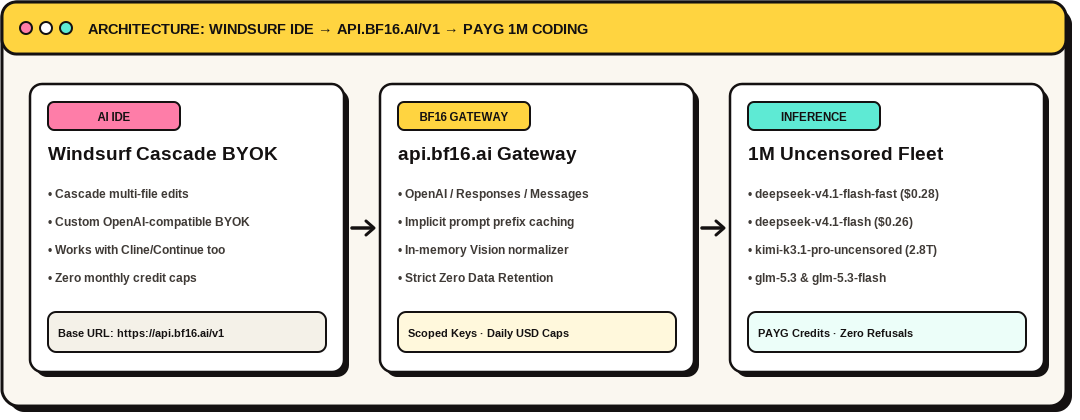
Windsurf combines IDE context indexing with autonomous multi-file workflows. When heavy sprints exhaust built-in Cascade credits — or when security research triggers stock provider guardrails — routing custom BYOK models through bf16.ai keeps you shipping uninterrupted.
Because Windsurf is VS Code-based, you can configure bf16.ai either via Windsurf’s BYOK settings or alongside Cline/Continue extensions using the exact same https://api.bf16.ai/v1 base URL.
Commands show $BF16_API_KEY. Sign in to fill in your own key automatically.
Test Your bf16.ai Key Before Adding to Windsurf
Confirms your key is valid and lists all active 1M-context model IDs ready for Windsurf.
export BF16_API_KEY="sk-bf16-v1-..."
curl https://api.bf16.ai/v1/models -H "Authorization: Bearer $BF16_API_KEY"- 1
Open Windsurf Model / BYOK Settings
Navigate to Windsurf Settings → Models → Custom OpenAI-Compatible Provider (or open your installed Cline/Continue sidebar inside Windsurf).
- 2
Enter Base URL, API Key, and Model ID
Set Base URL to https://api.bf16.ai/v1, paste your API key, and enter deepseek/deepseek-v4.1-flash-uncensored-fast.
Base URL: https://api.bf16.ai/v1
API Key:  $BF16_API_KEY
Model:    deepseek/deepseek-v4.1-flash-uncensored-fast
Exact Field-by-Field Reference
https://api.bf16.ai/v1sk-bf16-v1-••••••••••••deepseek/deepseek-v4.1-flash-uncensored-fast1,048,576 tokens · ZDRRecommended Uncensored Model Tiering
Route complex planning to Flagship models and high-frequency subagents or screenshots to Flash.
| Workflow Role | Model ID | Why This Model | USD / 1M Tokens |
|---|---|---|---|
| Fast Multi-File Edits | deepseek/deepseek-v4.1-flash-uncensored-fast | Snappy token streaming at a fraction of commercial IDE credit overages. | $0.28 in / $0.055 cached / $1.12 out |
| Complex Architecture & Code Audits | zai-org/glm-5.3-uncensored | Strong multi-file refactor fidelity with 1M context and zero false refusals. | $1.35 in / $0.25 cached / $4.20 out |
How to know it worked
- Test a multi-file refactor prompt in Windsurf and verify usage logs appear in your bf16.ai dashboard.
- curl https://api.bf16.ai/v1/models -H "Authorization: Bearer $BF16_API_KEY"
Production Guardrails & Budget Isolation
- Enable prompt caching automatically by keeping your workspace rules stable between turns.