Zed
GPU-accelerated Rust code editor with a built-in OpenAI-compatible Agent Panel and inline edit assistant.
https://api.bf16.ai/v1openai-completionsWho this is for
Developers using Zed who want instant 1M-context uncensored reasoning and streaming diffs without subscription lock-in.
Architecture & Why Pair with bf16.ai
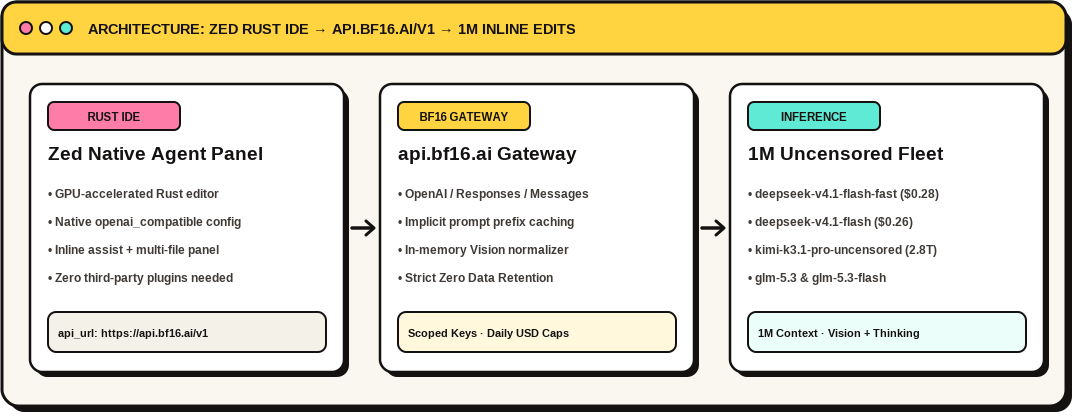
Zed’s native Agent Panel supports custom OpenAI-compatible providers directly in settings.json with zero plugins required.
Pairing Zed with DeepSeek V4.1 Flash Uncensored Fast ($0.28/$1.12) gives sub-second inline code completions, while Kimi K3.1 Pro Uncensored ($1.95/$6.90) handles complex multi-file architecture threads across a full 1M token window.
Commands show $BF16_API_KEY. Sign in to fill in your own key automatically.
Verify Your Key & Print Zed Provider JSON
Tests your API key and outputs the exact openai_compatible block to paste into ~/.config/zed/settings.json.
export BF16_API_KEY="sk-bf16-v1-..."
curl https://api.bf16.ai/v1/models -H "Authorization: Bearer $BF16_API_KEY"- 1
Add bf16 to ~/.config/zed/settings.json
Open Zed settings (⌘,) and add the openai_compatible block below.
~/.config/zed/settings.json{ "language_models": { "openai_compatible": { "bf16": { "api_url": "https://api.bf16.ai/v1", "available_models": [ { "name": "deepseek/deepseek-v4.1-flash-uncensored-fast", "display_name": "DeepSeek V4.1 Flash Fast (bf16)", "max_tokens": 1048576, "max_output_tokens": 130000, "capabilities": { "tools": true, "images": true, "thinking": true } }, { "name": "moonshotai/kimi-k3.1-pro-uncensored", "display_name": "Kimi K3.1 Pro 2.8T (bf16)", "max_tokens": 1048576, "max_output_tokens": 131072, "capabilities": { "tools": true, "images": true, "thinking": true } } ] } } } } - 2
Enter your API key in Zed’s Agent Panel
Open the Agent Panel → Configure Providers → select bf16 and paste your sk-bf16-v1-... key.
Exact Field-by-Field Reference
https://api.bf16.ai/v1BF16_API_KEY (or Zed keychain)1048576deepseek/deepseek-v4.1-flash-uncensored-fast, moonshotai/kimi-k3.1-pro-uncensoredRecommended Uncensored Model Tiering
Route complex planning to Flagship models and high-frequency subagents or screenshots to Flash.
| Workflow Role | Model ID | Why This Model | USD / 1M Tokens |
|---|---|---|---|
| Interactive Inline Edits & Agent Turns | deepseek/deepseek-v4.1-flash-uncensored-fast | Matches Zed’s low-latency editing feel with 1M context and $0.055 cached reads. | $0.28 in / $0.055 cached / $1.12 out |
| Heavy Refactoring & Design Reviews | moonshotai/kimi-k3.1-pro-uncensored | 2.8T MoE reasoning with native vision for UI screenshot debugging inside Zed. | $1.95 in / $0.28 cached / $6.90 out |
How to know it worked
- Both bf16 models appear in Zed’s Agent Panel model picker.
- Running an inline assist (Ctrl+Enter) streams edits directly with zero refusal stalls.
- curl https://api.bf16.ai/v1/models -H "Authorization: Bearer $BF16_API_KEY"
Production Guardrails & Budget Isolation
- Keep max_tokens set to 1048576 so Zed never truncates large file trees prematurely.