全部客户端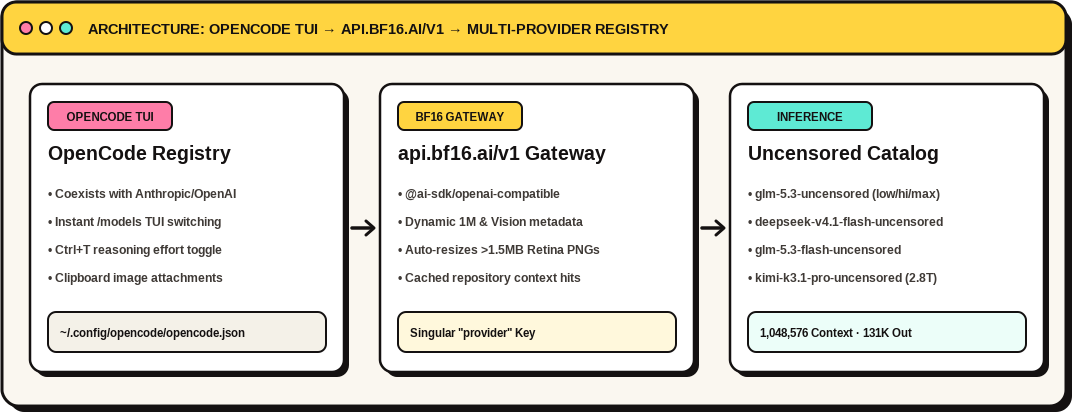
OpenCode 从 ~/.config/opencode/opencode.json 并行加载 bf16 与你原有的提供商,支持 /models 秒切模型与 Ctrl+T 切换推理挡位。
多提供商终端 TUI · 1M 上下文与思考挡位1M Context · ZDR
OpenCode
支持多提供商并存的开源终端编码智能体。
接口地址
https://api.bf16.ai/v1协议
openai-completions适用对象
同时维护多个模型提供商配置、随时按任务切换模型的开发者。
架构原理与接入优势
OpenCode 围绕声明式提供商注册表(`~/.config/opencode/opencode.json`)设计,非常适合把 Anthropic、OpenAI 与 bf16 并排配好:平时正常写业务代码,一旦遇到代码安全审计、逆向分析或敏感语料处理触发拒答,敲 `/models` 一秒切到 bf16 的 1M 上下文免审查模型继续推进。
登录本页后,下方代码块会动态拉取你账户下全部可用模型,并自动补齐 `attachment: true`(多模态识图)、`1,048,576` 上下文上限与 `low / high / max` 推理强度挡位。
命令默认显示 $BF16_API_KEY。登录并创建密钥后会自动填入你的真实密钥。
终端一键配置
一键无损合并 OpenCode `provider.bf16` 配置
自动备份现有 opencode.json,仅合并写入 `provider.bf16` 节点而不覆盖你的其他提供商配置,并校验接口可用性。
export BF16_API_KEY="sk-bf16-v1-..."
mkdir -p ~/.config/opencode
node -e '
const fs = require("fs"), os = require("os"), path = require("path");
const file = path.join(os.homedir(), ".config/opencode/opencode.json");
const snippet = "{\n  \"$schema\": \"https://opencode.ai/config.json\",\n  \"provider\": {\n    \"bf16\": {\n      \"npm\": \"@ai-sdk/openai-compatible\",\n      \"name\": \"bf16.ai\",\n      \"options\": {\n        \"baseURL\": \"https://api.bf16.ai/v1\",\n        \"apiKey\": \"{env:BF16_API_KEY}\"\n      },\n      \"models\": {\n        \"zai-org/glm-5.3-uncensored\": {\n          \"name\": \"Uncensored GLM-5.3\",\n          \"reasoning\": true,\n          \"temperature\": true,\n          \"tool_call\": true,\n          \"modalities\": { \"input\": [\"text\"], \"output\": [\"text\"] },\n          \"limit\": { \"context\": 1048576, \"output\": 131072 }\n        },\n        \"zai-org/glm-5.3-flash-uncensored\": {\n          \"name\": \"Uncensored GLM-5.3 Flash Vision\",\n          \"attachment\": true,\n          \"reasoning\": true,\n          \"temperature\": true,\n          \"tool_call\": true,\n          \"modalities\": { \"input\": [\"text\", \"image\"], \"output\": [\"text\"] },\n          \"limit\": { \"context\": 1048576, \"output\": 131072 }\n        },\n        \"deepseek/deepseek-v4.1-flash-uncensored\": {\n          \"name\": \"Uncensored DeepSeek V4.1 Flash\",\n          \"attachment\": true,\n          \"reasoning\": true,\n          \"temperature\": true,\n          \"tool_call\": true,\n          \"modalities\": { \"input\": [\"text\", \"image\"], \"output\": [\"text\"] },\n          \"limit\": { \"context\": 1048576, \"output\": 130000 }\n        },\n        \"deepseek/deepseek-v4.1-flash-uncensored-fast\": {\n          \"name\": \"Uncensored DeepSeek V4.1 Flash Fast\",\n          \"attachment\": true,\n          \"reasoning\": true,\n          \"temperature\": true,\n          \"tool_call\": true,\n          \"modalities\": { \"input\": [\"text\", \"image\"], \"output\": [\"text\"] },\n          \"limit\": { \"context\": 1048576, \"output\": 130000 }\n        },\n        \"bf16/deepseek-v4.1-flash-1017-exl3-2.5bpw\": {\n          \"name\": \"DeepSeek V4.1 Flash 1017 EXL3 2.5bpw (bf16)\",\n          \"attachment\": true,\n          \"reasoning\": true,\n          \"temperature\": true,\n          \"tool_call\": true,\n          \"modalities\": { \"input\": [\"text\", \"image\"], \"output\": [\"text\"] },\n          \"limit\": { \"context\": 524288, \"output\": 65536 }\n        },\n        \"moonshotai/kimi-k3.1-pro-uncensored\": {\n          \"name\": \"Uncensored Kimi K3.1 Pro\",\n          \"attachment\": true,\n          \"reasoning\": true,\n          \"temperature\": true,\n          \"tool_call\": true,\n          \"modalities\": { \"input\": [\"text\", \"image\"], \"output\": [\"text\"] },\n          \"limit\": { \"context\": 1048576, \"output\": 131072 }\n        }\n      }\n    }\n  }\n}";
const incoming = JSON.parse(snippet);
let current = { "$schema": "https://opencode.ai/config.json", provider: {} };
if (fs.existsSync(file)) {
  fs.copyFileSync(file, file + ".bak");
  try { current = JSON.parse(fs.readFileSync(file, "utf8")); } catch {}
}
current.provider = Object.assign({}, current.provider || {}, incoming.provider);
fs.writeFileSync(file, JSON.stringify(current, null, 2) + "\n");
console.log("Merged provider.bf16 into " + file);
' && curl -fsS "https://api.bf16.ai/v1/models" -H "Authorization: Bearer $BF16_API_KEY" >/dev/null && echo "Ready! Run: opencode --model bf16/zai-org/glm-5.3-uncensored"- 1
导出你的 API 密钥
OpenCode 从当前终端环境读取 BF16_API_KEY。
export BF16_API_KEY=sk-bf16-v1-... - 2
将 bf16 加入配置文件
全新配置可直接粘贴整份文件;已有配置文件只需将 bf16 块合并进现有的单数 "provider" 对象内。
~/.config/opencode/opencode.json{ "$schema": "https://opencode.ai/config.json", "provider": { "bf16": { "npm": "@ai-sdk/openai-compatible", "name": "bf16.ai", "options": { "baseURL": "https://api.bf16.ai/v1", "apiKey": "{env:BF16_API_KEY}" }, "models": { "zai-org/glm-5.3-uncensored": { "name": "Uncensored GLM-5.3", "reasoning": true, "temperature": true, "tool_call": true, "modalities": { "input": ["text"], "output": ["text"] }, "limit": { "context": 1048576, "output": 131072 } }, "zai-org/glm-5.3-flash-uncensored": { "name": "Uncensored GLM-5.3 Flash Vision", "attachment": true, "reasoning": true, "temperature": true, "tool_call": true, "modalities": { "input": ["text", "image"], "output": ["text"] }, "limit": { "context": 1048576, "output": 131072 } }, "deepseek/deepseek-v4.1-flash-uncensored": { "name": "Uncensored DeepSeek V4.1 Flash", "attachment": true, "reasoning": true, "temperature": true, "tool_call": true, "modalities": { "input": ["text", "image"], "output": ["text"] }, "limit": { "context": 1048576, "output": 130000 } }, "deepseek/deepseek-v4.1-flash-uncensored-fast": { "name": "Uncensored DeepSeek V4.1 Flash Fast", "attachment": true, "reasoning": true, "temperature": true, "tool_call": true, "modalities": { "input": ["text", "image"], "output": ["text"] }, "limit": { "context": 1048576, "output": 130000 } }, "bf16/deepseek-v4.1-flash-1017-exl3-2.5bpw": { "name": "DeepSeek V4.1 Flash 1017 EXL3 2.5bpw (bf16)", "attachment": true, "reasoning": true, "temperature": true, "tool_call": true, "modalities": { "input": ["text", "image"], "output": ["text"] }, "limit": { "context": 524288, "output": 65536 } }, "moonshotai/kimi-k3.1-pro-uncensored": { "name": "Uncensored Kimi K3.1 Pro", "attachment": true, "reasoning": true, "temperature": true, "tool_call": true, "modalities": { "input": ["text", "image"], "output": ["text"] }, "limit": { "context": 1048576, "output": 131072 } } } } } } - 3
指定模型启动并验证
opencode --model bf16/zai-org/glm-5.3-flash-uncensored
OpenCode — ~/.config/opencode/opencode.json
图形界面与配置字段对照表provider.bf16 · @ai-sdk/openai-compatible(注意单数 provider)
核心参数逐项核对清单
配置文件路径 (macOS/Linux)
~/.config/opencode/opencode.jsonWindows: %USERPROFILE%\.config\opencode\opencode.json
options.baseURL
https://api.bf16.ai/v1options.apiKey
{env:BF16_API_KEY}若曾执行过 /connect 绑卡,轮换新密钥后需重新 /connect 覆盖缓存。
切换思考强度快捷键
Ctrl + T (low → high → max)OpenCode 粘贴剪贴板原图不做客户端压缩;bf16.ai 网关会在内存自动缩放超大 PNG,杜绝多轮会话因图片过大报错。
推荐模型分层调度方案
将复杂架构规划交给旗舰模型,将高频并行子任务、浏览器操作与截图识别分流至高性价比 Flash 模型。
| 任务角色 | 推荐模型 ID | 选型理由 | 每百万 Token 定价 |
|---|---|---|---|
| 主力研发与代码安全审计 | zai-org/glm-5.3-uncensored | 支持 Ctrl+T 切换思考深度,跨文件工具调用最稳。 | $1.35 输入 / $0.25 缓存 / $4.20 输出 |
| 2.8T 旗舰多模态与复杂架构 | moonshotai/kimi-k3.1-pro-uncensored | 同时喂入 UI 视觉稿与百万 Token 代码库时的最强多模态模型。 | $1.95 输入 / $0.28 缓存 / $6.90 输出 |
| 高频检索与截图排障 | deepseek/deepseek-v4.1-flash-uncensored | 高吞吐工具循环 + 原生图像输入,综合成本极低。 | $0.26 输入 / $0.045 缓存 / $1.00 输出 |
如何确认配置成功
- 在 OpenCode 内输入 /models 可以看到 bf16 模型列表。
- 发送 "Say ok.",控制台日志中会立即出现对应调用记录。
- curl https://api.bf16.ai/v1/models -H "Authorization: Bearer $BF16_API_KEY"
生产部署安全护栏与预算隔离
- 注意顶层字段名必须是单数 `"provider"`(写成复数 `"providers"` 会被忽略)。
- 若使用过 OpenCode 内部 `/connect` 命令保存密钥,其本地凭据库优先级高于 `{env:BF16_API_KEY}`。
常见错误
现象
轮换新密钥后仍提示 Invalid API key。
原因
OpenCode 单独缓存了此前通过 /connect 输入的旧密钥,优先级高于配置文件。
解法
创建新密钥后,在 OpenCode 内重新执行一次 /connect 更新密钥。
现象
模型列表为空。
原因
baseURL 漏掉了末尾的 /v1 后缀。
解法
请使用 https://api.bf16.ai/v1。