n8n
領先的開源工作流自動化平台,內建 AI Agent 與嚴格結構化輸出節點。
https://api.bf16.ai/v1openai-completions適用對象
運行 24/7 Webhook、爬蟲與多語種處理流程的自動化開發者。
架構原理與接入優勢
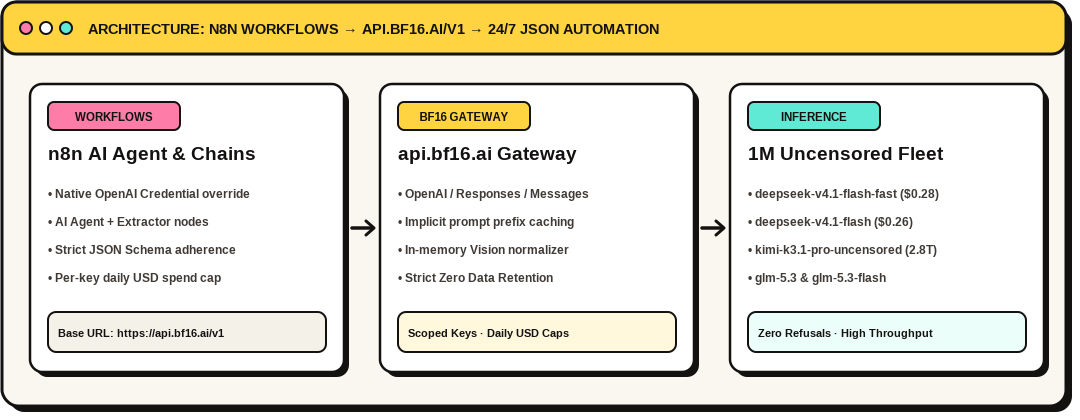
n8n workflows run unattended across thousands of webhook executions per day — summarizing tickets, parsing scraped pages, moderating user content, and triggering downstream APIs. A single false-positive safety refusal returns prose instead of JSON and crashes the entire workflow branch.
Pointing n8n’s native OpenAI Chat Model credential to https://api.bf16.ai/v1 gives every AI Agent and Basic LLM Chain node strict JSON Schema adherence, 1M context, zero false refusals, and $0.26/$1.00 Flash economics.
指令預設顯示 $BF16_API_KEY。登入並建立金鑰後會自動填入你的真實金鑰。
Smoke-Test Your n8n Key & Structured Output Endpoint
Verifies API key authentication and model discovery from your n8n host before activating workflows.
export BF16_API_KEY="sk-bf16-v1-..."
curl https://api.bf16.ai/v1/models -H "Authorization: Bearer $BF16_API_KEY"- 1
設定你的 bf16.ai API 金鑰
In n8n, open Credentials → Add Credential → OpenAI. Paste your API key and set Base URL to https://api.bf16.ai/v1.
API Key: $BF16_API_KEY Base URL: https://api.bf16.ai/v1 - 2
填入 bf16.ai 端點與 1M 免審查模型
使用頁面提供的 Base URL 與 API 金鑰,即可立即存取全系 1M 上下文免審查模型(含零留存政策)。
關鍵參數核對清單
sk-bf16-v1-••••••••••••https://api.bf16.ai/v1deepseek/deepseek-v4.1-flash-uncensoredAlso supports zai-org/glm-5.3-flash-uncensored for strict JSON extraction
Zero Prompt Retention · 1M Context推薦模型分層配置
架構規劃使用旗艦模型,高頻子任務與螢幕截圖使用 Flash 模型以節省開銷。
| 工作流角色 | 模型 ID | 選型說明 | USD / 1M Tokens |
|---|---|---|---|
| 24/7 Webhook & Batch Automation | deepseek/deepseek-v4.1-flash-uncensored | High throughput (~155 tok/s) and $0.045/1M cached prompt reads keep 10,000-run workflows affordable. | $0.26 in / $0.045 cached / $1.00 out |
| Strict JSON Schema Extraction | zai-org/glm-5.3-flash-uncensored | Rock-solid structured JSON outputs + vision for invoice, UI, and document pipelines. | $0.30 in / $0.065 cached / $1.12 out |
如何確認設定成功
- 發送測試訊息後,可在 bf16.ai 控制台請求紀錄中即時查看計費與狀態。
- curl https://api.bf16.ai/v1/models -H "Authorization: Bearer $BF16_API_KEY"
生產環境護欄與預算隔離
- Create a dedicated API key with a daily USD spend cap in /dashboard/keys for every production n8n instance to guard against infinite webhook loops.