AnythingLLM
Espacio RAG privado en escritorio y Docker para PDFs, código y documentos internos.
https://api.bf16.ai/v1openai-completionsPara quién es
Equipos que realizan RAG local sobre archivos sensibles con cero retención en la nube.
Arquitectura y Ventajas con bf16.ai
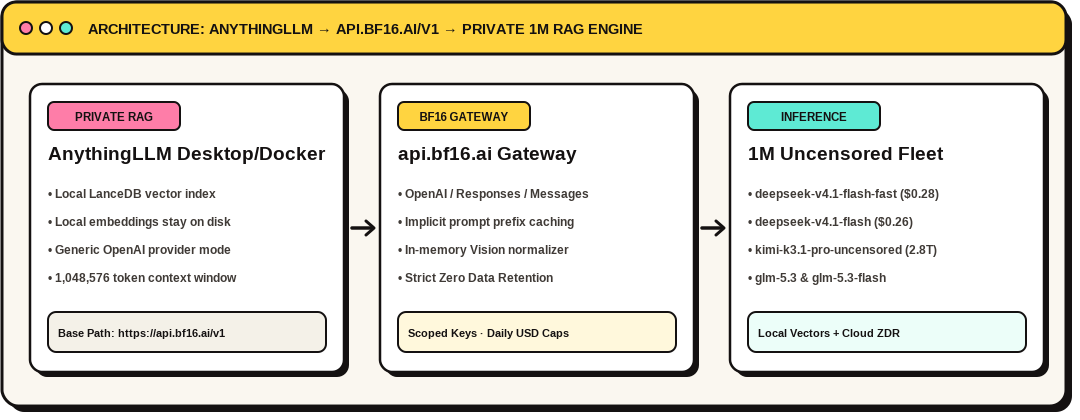
AnythingLLM pairs local LanceDB vector indexing with an easy desktop or Docker UI. Feeding large unredacted security reports, contracts, or archives into stock cloud APIs often triggers unnecessary safety refusals or violates internal data-retention policies.
Connecting AnythingLLM’s Generic OpenAI provider to bf16.ai gives every workspace a 1,048,576-token window, strict zero prompt retention, and discounted prompt caching.
Configuración
Inicia sesión para rellenar tu clave API →Los comandos muestran $BF16_API_KEY. Inicia sesión para rellenar tu clave real automáticamente.
Docker Env Block for AnythingLLM + bf16.ai
Pre-configures AnythingLLM’s Generic OpenAI provider via environment variables.
export BF16_API_KEY="sk-bf16-v1-..."
LLM_PROVIDER=generic-openai \
GENERIC_OPEN_AI_BASE_PATH="https://api.bf16.ai/v1" \
GENERIC_OPEN_AI_API_KEY="$BF16_API_KEY" \
GENERIC_OPEN_AI_MODEL_PREF="deepseek/deepseek-v4.1-flash-uncensored" \
GENERIC_OPEN_AI_MODEL_TOKEN_LIMIT=1048576 \
curl https://api.bf16.ai/v1/models -H "Authorization: Bearer $BF16_API_KEY"- 1
Configura tu clave API de bf16.ai
Open Settings → AI Providers → LLM → select Generic OpenAI.
- 2
Conecta el endpoint de bf16.ai y los modelos de 1M
Usa la Base URL y tu clave API para activar al instante los modelos sin censura de 1M de contexto con cero retención (ZDR).
Base Path: https://api.bf16.ai/v1
API Key:   $BF16_API_KEY
Model:     deepseek/deepseek-v4.1-flash-uncensored
Context:   1048576
Referencia Campo por Campo
https://api.bf16.ai/v1sk-bf16-v1-••••••••••••deepseek/deepseek-v4.1-flash-uncensored1048576 (Max Tokens: 16384+)Selección Recomendada de Modelos
Asigna planificación compleja a modelos Flagship y subtareas o capturas a modelos Flash.
| Rol | Model ID | Justificación | USD / 1M Tokens |
|---|---|---|---|
| High-Volume Document RAG & Q&A | deepseek/deepseek-v4.1-flash-uncensored | Fast, low-cost retrieval synthesis across huge multi-document workspaces. | $0.26 in / $0.045 cached / $1.00 out |
| Deep Legal, Security & Technical Synthesis | moonshotai/kimi-k3.1-pro-uncensored | 2.8T MoE reasoning over dense long-context source citations. | $1.95 in / $0.28 cached / $6.90 out |
Cómo saber que funcionó
- Envía un mensaje de prueba y verifica la llamada en tiempo real en los registros de bf16.ai.
- curl https://api.bf16.ai/v1/models -H "Authorization: Bearer $BF16_API_KEY"
Controles de Producción y Presupuesto
- Use local embeddings inside AnythingLLM and ZDR inference on bf16.ai for end-to-end zero retention.