Herdr
Runtime Rust persistente en terminal para agentes de código (herdrdev/herdr): ejecuta enjambres locales y SSH en segundo plano sobre bf16.ai.
https://api.bf16.ai/v1openai-completionsPara quién es
Ingenieros que corren flotas de agentes desconectadas multi-máquina sin cortes por límites o rechazos.
Arquitectura y Ventajas con bf16.ai
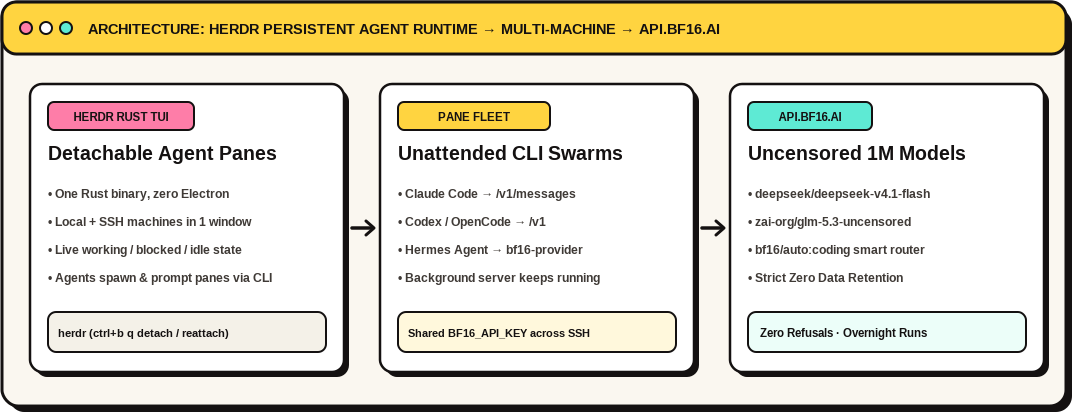
Herdr (herdrdev/herdr, 53k+ ★) is a lightweight single-binary Rust runtime built specifically for coding agents: detach with `ctrl+b q` while background agents keep running, combine local and SSH machines in one window, and instantly spot which pane is `working`, `blocked`, or `idle`.
Because Herdr does not wrap or lock you into one vendor — it owns the terminals running Claude Code, Codex, OpenCode, and Hermes Agent, and even lets agents spawn and prompt each other through the Herdr CLI and socket API — exporting your bf16.ai environment once powers every pane across every connected machine.
Overnight detached swarms are where upstream safety refusals and 5-hour consumer subscription caps hurt most. Running Herdr panes on bf16.ai gives every machine 1M-context uncensored inference, transparent concurrency tiers, and strict ZDR under a single prepaid USD balance.
Configuración
Inicia sesión para rellenar tu clave API →Los comandos muestran $BF16_API_KEY. Inicia sesión para rellenar tu clave real automáticamente.
Export bf16.ai Dual-Protocol Env for Herdr Agent Panes
Configures both native Anthropic (/v1/messages) and OpenAI (/v1) variables for every agent pane Herdr spawns and verifies live API access.
export BF16_API_KEY="sk-bf16-v1-..."
export ANTHROPIC_BASE_URL="https://api.bf16.ai"
export ANTHROPIC_AUTH_TOKEN="$BF16_API_KEY"
export ANTHROPIC_MODEL="deepseek/deepseek-v4.1-flash-uncensored"
export OPENAI_BASE_URL="https://api.bf16.ai/v1"
export OPENAI_API_KEY="$BF16_API_KEY"
curl https://api.bf16.ai/v1/models -H "Authorization: Bearer $BF16_API_KEY"- 1
Configura tu clave API de bf16.ai
Install the single Rust binary via Homebrew, mise, or the official install script.
brew install herdr # Or on Linux / remote SSH hosts: curl -fsSL https://herdr.dev/install.sh | sh - 2
Conecta el endpoint de bf16.ai y los modelos de 1M
Usa la Base URL y tu clave API para activar al instante los modelos sin censura de 1M de contexto con cero retención (ZDR).
~/.zshrc (or ~/.bashrc on SSH hosts)export BF16_API_KEY="sk-bf16-v1-..." export ANTHROPIC_BASE_URL="https://api.bf16.ai" export ANTHROPIC_AUTH_TOKEN="$BF16_API_KEY" export ANTHROPIC_MODEL="deepseek/deepseek-v4.1-flash-uncensored" export OPENAI_BASE_URL="https://api.bf16.ai/v1" export OPENAI_API_KEY="$BF16_API_KEY" - 3
Launch Herdr, Split Panes, and Detach Safely
Start `herdr`, spawn Claude Code, Codex, OpenCode, or Hermes in parallel panes, and detach anytime with `ctrl+b q` — your agents keep running against api.bf16.ai in the background.
herdr
# Inside panes: launch claude, codex, opencode, or hermes
# Detach without stopping agents: ctrl+b q
Referencia Campo por Campo
brew install herdr (or curl -fsSL https://herdr.dev/install.sh | sh)ANTHROPIC_BASE_URL=https://api.bf16.ai · ANTHROPIC_AUTH_TOKEN=$BF16_API_KEYOPENAI_BASE_URL=https://api.bf16.ai/v1 · OPENAI_API_KEY=$BF16_API_KEYherdr · ctrl+b q (detach without stopping agents)Live working / blocked / idle pane indicators across SSH hosts
Selección Recomendada de Modelos
Asigna planificación compleja a modelos Flagship y subtareas o capturas a modelos Flash.
| Rol | Model ID | Justificación | USD / 1M Tokens |
|---|---|---|---|
| Multi-Pane Parallel Swarms (Fast + Low Cost) | deepseek/deepseek-v4.1-flash-uncensored | 1M context, ~155 tok/s throughput, and $0.045/1M cached prompt reads keep 5–10 simultaneous Herdr panes fast and inexpensive. | $0.26 in / $0.045 cached / $1.00 out |
| Coordinator Pane & Security / Systems Audits | zai-org/glm-5.3-uncensored | Strongest 1M coding and reasoning flagship with zero false-positive refusals on kernel, crypto, or pentest panes. | $1.35 in / $0.25 cached / $4.20 out |
| Zero-Markup Fleet Router | bf16/auto:coding | Routes panes automatically to the highest code-adherence uncensored model at base token cost. | Model rate · $0 router fee |
Cómo saber que funcionó
- Envía un mensaje de prueba y verifica la llamada en tiempo real en los registros de bf16.ai.
- curl https://api.bf16.ai/v1/models -H "Authorization: Bearer $BF16_API_KEY"
Controles de Producción y Presupuesto
- When running 4+ parallel agent panes across local and SSH hosts, check your bf16.ai concurrency tier (`GET /v1/me` — Tier L1 unlocks 10 concurrent requests).
- Create per-host API keys with daily USD spend caps at /dashboard/keys before launching unattended overnight swarms.