LiteLLM
Run a local or internal LiteLLM Proxy (`litellm_config.yaml`) or Python SDK pointed at bf16.ai with per-request price ceilings.
https://api.bf16.ai/v1openai-completionsPara quién es
Backend and platform engineers integrating bf16.ai into Python pipelines, DSPy, CrewAI, LangGraph, or internal team gateways via LiteLLM.
Arquitectura y Ventajas con bf16.ai
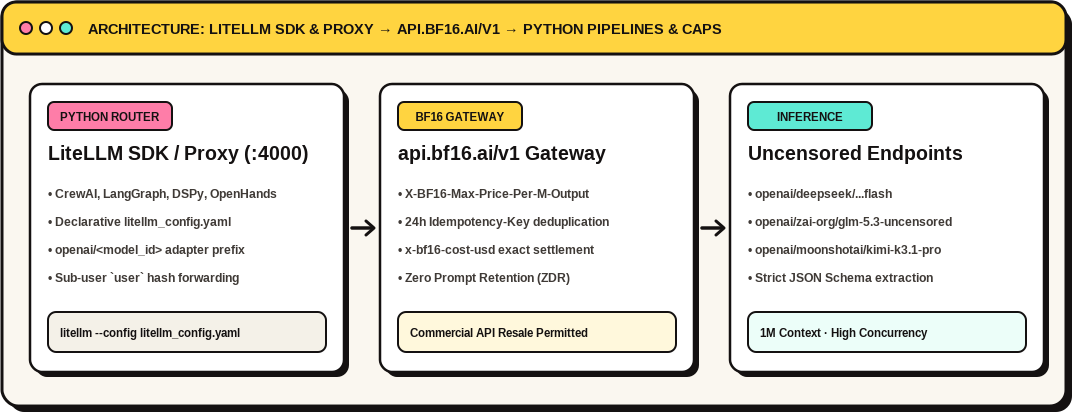
LiteLLM powers model routing inside dozens of Python AI frameworks (DSPy, CrewAI, AutoGen, OpenHands, Aider) and runs standalone as an internal YAML-configured proxy gateway.
Prefixing model IDs with `openai/` in `litellm_config.yaml` tells LiteLLM to forward standard OpenAI Chat Completions (including streaming `usage`, `reasoning_content`, Vision images, and structured JSON Schema) straight to `https://api.bf16.ai/v1`.
Configuración
Inicia sesión para rellenar tu clave API →Los comandos muestran $BF16_API_KEY. Inicia sesión para rellenar tu clave real automáticamente.
One-Command `litellm_config.yaml` Generator & Smoke Test
Writes a production-ready `litellm_config.yaml` in your current directory with all active bf16.ai 1M-context models and verifies gateway connectivity.
export BF16_API_KEY="sk-bf16-v1-..."
cat <<'EOF' > ./litellm_config.yaml
model_list:
  - model_name: glm-5.3-uncensored
    litellm_params:
      model: openai/zai-org/glm-5.3-uncensored
      api_base: https://api.bf16.ai/v1
      api_key: os.environ/BF16_API_KEY
    model_info:
      max_input_tokens: 1048576
      max_output_tokens: 131072
      supports_function_calling: true
  - model_name: deepseek-v4.1-flash-uncensored
    litellm_params:
      model: openai/deepseek/deepseek-v4.1-flash-uncensored
      api_base: https://api.bf16.ai/v1
      api_key: os.environ/BF16_API_KEY
    model_info:
      max_input_tokens: 1048576
      max_output_tokens: 65536
      supports_vision: true
      supports_function_calling: true
  - model_name: kimi-k3.1-pro-uncensored
    litellm_params:
      model: openai/moonshotai/kimi-k3.1-pro-uncensored
      api_base: https://api.bf16.ai/v1
      api_key: os.environ/BF16_API_KEY
    model_info:
      max_input_tokens: 1048576
      max_output_tokens: 131072
      supports_vision: true
      supports_function_calling: true
EOF
curl -fsS "https://api.bf16.ai/v1/models" -H "Authorization: Bearer $BF16_API_KEY" >/dev/null && echo "Wrote ./litellm_config.yaml — start with: litellm --config litellm_config.yaml --port 4000"- 1
Call Directly from Python via `litellm.completion`
Prefix the model ID with `openai/` and point `api_base` to https://api.bf16.ai/v1.
import os from litellm import completion res = completion( model="openai/deepseek/deepseek-v4.1-flash-uncensored", api_base="https://api.bf16.ai/v1", api_key=os.environ["BF16_API_KEY"], messages=[{"role": "user", "content": "Summarize CWE-416 remediation steps in strict JSON."}], temperature=0.1, ) print(res.choices[0].message.content) - 2
Or Launch LiteLLM Proxy with `litellm_config.yaml`
Generate `litellm_config.yaml` using the One-Command block above and start the proxy on port 4000.
./litellm_config.yamlexport BF16_API_KEY=sk-bf16-v1-... litellm --config ./litellm_config.yaml --port 4000
Referencia Campo por Campo
openai/zai-org/glm-5.3-uncensoredLeading `openai/` tells LiteLLM to use OpenAI-compatible wire format.
https://api.bf16.ai/v1os.environ/BF16_API_KEYX-BF16-Max-Price-Per-M-Output: "4.50"Selección Recomendada de Modelos
Asigna planificación compleja a modelos Flagship y subtareas o capturas a modelos Flash.
| Rol | Model ID | Justificación | USD / 1M Tokens |
|---|---|---|---|
| Batch Localization, Extraction & Agent Loops | deepseek/deepseek-v4.1-flash-uncensored | High throughput + Vision + JSON schema adherence for automated Python pipelines. | $0.26 in / $0.045 cached / $1.00 out |
| Security Triage & Code Generation | zai-org/glm-5.3-uncensored | Flagship analytical accuracy across multi-step LangGraph / DSPy chains. | $1.35 in / $0.25 cached / $4.20 out |
Cómo saber que funcionó
- Python completion() or GET http://127.0.0.1:4000/v1/models returns 200 OK.
- Settled usage and cached token counts match bf16.ai/dashboard/logs.
- curl https://api.bf16.ai/v1/models -H "Authorization: Bearer $BF16_API_KEY"
Controles de Producción y Presupuesto
- Pass `user="end_user_opaque_id"` on multi-tenant commercial integrations per /legal/terms §4.4 so abuse isolation targets sub-users first.
- Attach `extra_headers={"X-BF16-Max-Price-Per-M-Output": "1.50"}` on batch Flash workers as a hard unit-price circuit breaker.