Cline
Autonomous VS Code and terminal coding agent with direct browser-less local execution, 1M context, and screenshot Vision.
https://api.bf16.ai/v1openai-completionsÀ qui cela s’adresse
VS Code and Cline CLI developers who want direct workstation-to-bf16 streaming (zero third-party relay) with full 1,048,576-token context.
Architecture & Intégration avec bf16.ai
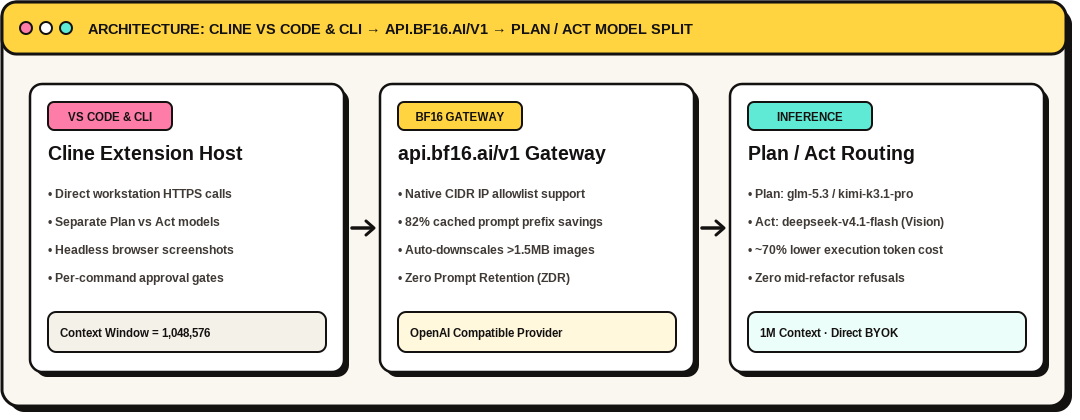
Unlike cloud-proxied IDE extensions, Cline sends requests directly from your local VS Code extension host (or `cline` CLI) to `https://api.bf16.ai/v1`, preserving end-to-end IP allowlisting and zero prompt retention.
Cline’s **Plan / Act** split pairs naturally with bf16.ai: enable "Use different models for Plan and Act modes" in Cline Settings, bind **Plan** to `zai-org/glm-5.3-uncensored` (or `moonshotai/kimi-k3.1-pro-uncensored`), and bind **Act** to `deepseek/deepseek-v4.1-flash-uncensored` for fast, low-cost file edits and headless browser screenshots.
Configuration
Se connecter pour insérer votre clé API →Les commandes affichent $BF16_API_KEY. Connectez-vous pour insérer automatiquement votre vraie clé.
One-Command Cline CLI & API Key Verification
Installs the Cline CLI if needed and verifies your bf16.ai key + 1M model catalog metadata.
export BF16_API_KEY="sk-bf16-v1-..."
curl -fsS "https://api.bf16.ai/v1/models" -H "Authorization: Bearer $BF16_API_KEY" | grep -o '"id":"[^"]*uncensored[^"]*"'
echo "Paste Base URL https://api.bf16.ai/v1 into Cline → Settings → OpenAI Compatible."- 1
Select OpenAI Compatible in Cline Settings
Open Cline in VS Code, click the Settings gear icon, set API Provider to "OpenAI Compatible", enter Base URL https://api.bf16.ai/v1, and paste your API key.
API Provider: OpenAI Compatible Base URL: https://api.bf16.ai/v1 API Key: $BF16_API_KEY Model ID: zai-org/glm-5.3-uncensored - 2
Unlock 1,048,576 Context & Image Support
Expand "Model Configuration" directly below Model ID: set Context Window Size to 1048576, Max Output Tokens to 65536, and check "Supports Images" when using deepseek/deepseek-v4.1-flash-uncensored, zai-org/glm-5.3-flash-uncensored, or moonshotai/kimi-k3.1-pro-uncensored.
- 3
Optional: Split Plan vs Act Models to Cut Spend by ~70%
Check "Use different models for Plan and Act modes": keep zai-org/glm-5.3-uncensored on Plan and set Act to deepseek/deepseek-v4.1-flash-uncensored.
Référence Champ par Champ
OpenAI Compatiblehttps://api.bf16.ai/v1sk-bf16-v1-••••••••••••Plan: zai-org/glm-5.3-uncensored · Act: deepseek/deepseek-v4.1-flash-uncensored1048576Expand Model Configuration to override Cline’s 128K default to 1M.
Checked (✓) on Flash & Kimi K3.1 ProRépartition Recommandée des Modèles
Confiez l’architecture aux modèles Flagship et les sous-agents ou captures d’écran aux modèles Flash.
| Rôle | ID du Modèle | Pourquoi ce choix | USD / 1M Tokens |
|---|---|---|---|
| Plan Mode (Architecture & Audit) | zai-org/glm-5.3-uncensored | Thorough repository planning and security vulnerability reasoning across 1M context. | $1.35 in / $0.25 cached / $4.20 out |
| Act Mode (Edits, Terminal & Browser Vision) | deepseek/deepseek-v4.1-flash-uncensored | Fast XML/tool-call execution + Puppeteer browser screenshot support at $0.045/1M cached input. | $0.26 in / $0.045 cached / $1.00 out |
| 2.8T Multimodal Plan Alternative | moonshotai/kimi-k3.1-pro-uncensored | Ideal when Plan mode needs to inspect design mockups or architecture diagrams. | $1.95 in / $0.28 cached / $6.90 out |
Comment savoir si tout fonctionne
- Cline displays a 1.0M context progress bar at the top of the task pane.
- Start a Plan → Act task and confirm both calls settle in bf16.ai/dashboard/logs.
- curl https://api.bf16.ai/v1/models -H "Authorization: Bearer $BF16_API_KEY"
Garde-fous de Production & Plafonds Budgétaires
- Keep Cline’s Auto-Approve settings restricted to read-only file operations and workspace edits; leave arbitrary shell execution gated.