Cursor
Connect Cursor Composer, Agent, and Chat to bf16.ai uncensored models via Override OpenAI Base URL.
https://api.bf16.ai/v1openai-completionsÀ qui cela s’adresse
Cursor IDE users who hit safety refusals during vulnerability patching, decompilation, or game/novel localization and want an uncensored model in Composer.
Architecture & Intégration avec bf16.ai
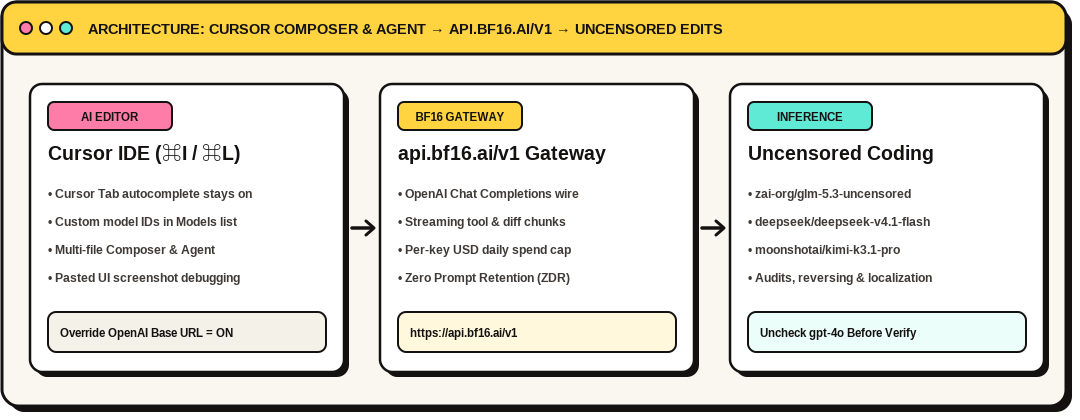
Cursor allows you to bring your own OpenAI-compatible API key and override the OpenAI Base URL inside Cursor Settings → Models. This lets you keep Cursor Tab autocomplete running as usual while switching Composer / Agent chat to `zai-org/glm-5.3-uncensored` or `deepseek/deepseek-v4.1-flash-uncensored` whenever a stock model refuses to inspect obfuscated code, security exploits in your own repo, or mature narrative scripts.
Important Cursor quirk: when you click "Verify" on the OpenAI API Key section, Cursor sends a test request using whichever model sits first in your enabled Models list. Adding a bf16.ai model ID and temporarily unchecking stock `gpt-*` entries ensures Cursor’s Verify button passes immediately.
Configuration
Se connecter pour insérer votre clé API →Les commandes affichent $BF16_API_KEY. Connectez-vous pour insérer automatiquement votre vraie clé.
One-Command Endpoint & Key Smoke Check for Cursor
Verifies that your bf16.ai API key can reach zai-org/glm-5.3-uncensored over Chat Completions before pasting into Cursor Settings → Models.
export BF16_API_KEY="sk-bf16-v1-..."
curl -fsS "https://api.bf16.ai/v1/chat/completions" \
  -H "Authorization: Bearer $BF16_API_KEY" \
  -H "Content-Type: application/json" \
-d '{"model":"deepseek/deepseek-v4.1-flash-uncensored","messages":[{"role":"user","content":"Reply OK."}],"max_tokens":16}' && echo ""- 1
Add bf16 Model IDs in Cursor Settings → Models
Press Cmd+Shift+J (macOS) or Ctrl+Shift+J (Windows/Linux) to open Cursor Settings → Models. Click "+ Add model" and add the exact model IDs below, and uncheck stock gpt-4o entries while verifying your custom OpenAI key.
zai-org/glm-5.3-uncensored deepseek/deepseek-v4.1-flash-uncensored moonshotai/kimi-k3.1-pro-uncensored - 2
Set OpenAI API Key & Override OpenAI Base URL
Scroll down to OpenAI API Key, paste your key, expand "Override OpenAI Base URL", enter https://api.bf16.ai/v1, click Save next to the URL, and toggle the switch ON.
OpenAI API Key: $BF16_API_KEY Override OpenAI Base URL: https://api.bf16.ai/v1 - 3
Select the Model in Cursor Composer
Open Composer (Cmd+I) or Chat (Cmd+L), pick zai-org/glm-5.3-uncensored from the model dropdown, and send a prompt.
Référence Champ par Champ
zai-org/glm-5.3-uncensored, deepseek/deepseek-v4.1-flash-uncensored, moonshotai/kimi-k3.1-pro-uncensoredAdd these exact IDs to the Models list and toggle them ON.
sk-bf16-v1-••••••••••••https://api.bf16.ai/v1Must include /v1 and Save before clicking Verify.
Répartition Recommandée des Modèles
Confiez l’architecture aux modèles Flagship et les sous-agents ou captures d’écran aux modèles Flash.
| Rôle | ID du Modèle | Pourquoi ce choix | USD / 1M Tokens |
|---|---|---|---|
| Cursor Agent & Multi-File Composer | zai-org/glm-5.3-uncensored | Reliable file-edit tool calls and deep codebase reasoning. | $1.35 in / $0.25 cached / $4.20 out |
| Fast Inline Chat & Screenshot Debugging | deepseek/deepseek-v4.1-flash-uncensored | Accepts pasted UI screenshots and streams fast edits. | $0.26 in / $0.045 cached / $1.00 out |
| 2.8T Complex Architecture & Vision | moonshotai/kimi-k3.1-pro-uncensored | Flagship multimodal reasoning for hard architectural refactors. | $1.95 in / $0.28 cached / $6.90 out |
Comment savoir si tout fonctionne
- Clicking Verify in Cursor Settings → Models succeeds without model_not_found.
- Composer responses stream cleanly and appear in bf16.ai/dashboard/logs.
- curl https://api.bf16.ai/v1/models -H "Authorization: Bearer $BF16_API_KEY"
Garde-fous de Production & Plafonds Budgétaires
- Cursor relays custom-key requests through Cursor’s backend servers to your custom Base URL; do not restrict IP CIDR on your Cursor key to your home IP.
- Set a daily USD cap on your Cursor key in /dashboard/keys to bound long Composer indexing loops.