Paseo
Démon multi-hôtes pour agents de code (getpaseo/paseo) — installez notre plugin officiel bf16-paseo-plugin pour suivre votre solde USD, palier et concurrence en direct.
https://api.bf16.ai/v1openai-completionsÀ qui cela s’adresse
Développeurs pilotant Claude Code, Codex et OpenCode sur des démons Paseo avec suivi /v1/me temps réel.
Architecture & Intégration avec bf16.ai
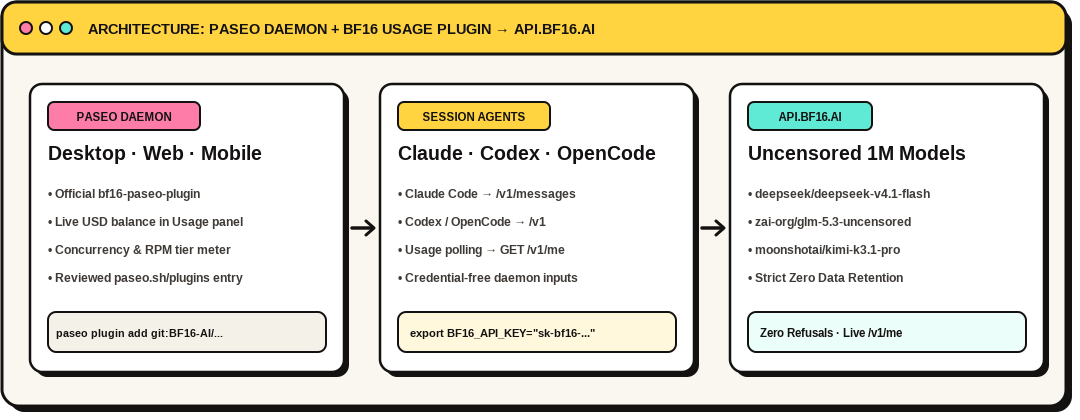
Paseo (getpaseo/paseo, 25k+ ★) runs a persistent agent daemon across your workstation and remote servers, letting you drive coding agents from desktop, web, and mobile clients with a unified Usage panel and reviewed plugin ecosystem (paseo.sh/plugins).
Our official open-source plugin (`BF16-AI/bf16-paseo-plugin`, submitted to the reviewed Paseo registry) registers `bf16` as a native Usage Source querying `GET https://api.bf16.ai/v1/me` — surfacing available prepaid USD balance, rate-limit tier, live concurrency bar (`in_use / limit`), RPM limit, and next-tier unlock progress with zero credentials stored on disk.
Export `BF16_API_KEY` in the Paseo daemon environment and point your Claude Code (`ANTHROPIC_BASE_URL=https://api.bf16.ai`), Codex, or OpenCode sessions at bf16.ai so long unattended mobile-approved runs finish with 1M context and strict ZDR.
Configuration
Se connecter pour insérer votre clé API →Les commandes affichent $BF16_API_KEY. Connectez-vous pour insérer automatiquement votre vraie clé.
Install the Official bf16.ai Paseo Plugin & Verify API Key
Exports your bf16.ai key, installs BF16-AI/bf16-paseo-plugin on your active Paseo daemon, and verifies live /v1/models and /v1/me access.
export BF16_API_KEY="sk-bf16-v1-..."
paseo plugin add git:BF16-AI/bf16-paseo-plugin
curl https://api.bf16.ai/v1/models -H "Authorization: Bearer $BF16_API_KEY"- 1
Configurer votre clé API bf16.ai
Run `paseo plugin add git:BF16-AI/bf16-paseo-plugin` (or paste `git:BF16-AI/bf16-paseo-plugin` in Settings → Plugins → Plugin source). Once approved on paseo.sh/plugins, you can also install via `paseo plugin add bf16-ai/bf16-usage`.
paseo plugin add git:BF16-AI/bf16-paseo-plugin - 2
Connecter le point de terminaison bf16.ai et les modèles 1M
Saisissez la Base URL et votre clé API pour accéder immédiatement aux modèles sans censure 1M de contexte avec zéro rétention (ZDR).
export BF16_API_KEY="sk-bf16-v1-..." # Verify /v1/me responds with your live balance & tier curl -sS https://api.bf16.ai/v1/me -H "Authorization: Bearer $BF16_API_KEY" - 3
Point Paseo Sessions (Claude Code / Codex / OpenCode) at bf16.ai
Configure your agent environment overrides on the Paseo daemon to route inference through api.bf16.ai using the same key.
# Claude Code sessions on Paseo
export ANTHROPIC_BASE_URL="https://api.bf16.ai"
export ANTHROPIC_AUTH_TOKEN="$BF16_API_KEY"
export ANTHROPIC_MODEL="zai-org/glm-5.3-uncensored"

# Codex / OpenCode sessions on Paseo
export OPENAI_BASE_URL="https://api.bf16.ai/v1"
export OPENAI_API_KEY="$BF16_API_KEY"
Référence Champ par Champ
git:BF16-AI/bf16-paseo-pluginBF16_API_KEY=sk-bf16-v1-...https://api.bf16.ai/v1/me (USD balance, tier, concurrency, RPM)https://api.bf16.ai (Anthropic) · https://api.bf16.ai/v1 (OpenAI)Single key shared across Usage panel and all Paseo sessions
Répartition Recommandée des Modèles
Confiez l’architecture aux modèles Flagship et les sous-agents ou captures d’écran aux modèles Flash.
| Rôle | ID du Modèle | Pourquoi ce choix | USD / 1M Tokens |
|---|---|---|---|
| Fast Remote Daemon Sessions & Mobile Approvals | deepseek/deepseek-v4.1-flash-uncensored | 1M context, ~155 tok/s streaming, multimodal vision, and $0.045/1M cached input keep long Paseo sessions responsive over mobile connections. | $0.26 in / $0.045 cached / $1.00 out |
| Deep Architecture & Security Refactors | zai-org/glm-5.3-uncensored | Flagship 1M reasoning and deterministic tool calling on both native Anthropic /v1/messages and OpenAI /v1/chat/completions. | $1.35 in / $0.25 cached / $4.20 out |
| Zero-Markup Coding Smart Router | bf16/auto:coding | Routes automatically to the highest code-adherence uncensored model without extra router fees. | Model rate · $0 router fee |
Comment savoir si tout fonctionne
- Envoyez une requête de test et vérifiez son apparition instantanée dans les journaux bf16.ai.
- curl https://api.bf16.ai/v1/models -H "Authorization: Bearer $BF16_API_KEY"
Garde-fous de Production & Plafonds Budgétaires
- Paseo’s usage plugin inspects `BF16_API_KEY` from the daemon host environment only; never commit API keys into repository files.
- Set a daily spend limit on a dedicated key at /dashboard/keys when running multiple remote Paseo daemons concurrently.