Rakazo
Self-hosted open-source alternative to Grok Bot with isolated Docker computers, scheduled routines, group chats, and explicit approval models.
https://api.bf16.ai/v1openai-completionsÀ qui cela s’adresse
Teams and indie operators self-hosting Rakazo (elie222/rakazo) who want persistent bots with dedicated Linux desktops backed by uncensored 1M-context models.
Architecture & Intégration avec bf16.ai
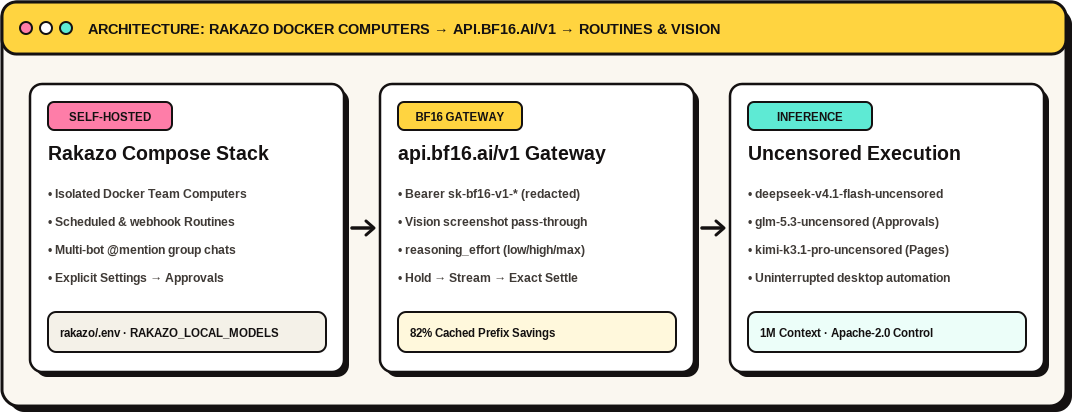
Rakazo (elie222/rakazo) is a full-stack Apache-2.0 self-hosted alternative to Grok Bot, OpenAI Dots, and OpenClaw. Every bot gets its own isolated Docker computer (complete with Chrome, terminal, and virtual screen you can watch or take over live), weekday/webhook routines, multi-bot @mention group chats, and configurable human-in-the-loop Approvals (Never ask, Auto, or Ask).
In unattended Rakazo routines — such as nightly staging QA checks, internal admin form automation, security log triage, or multi-language localization pipelines — mainstream hosted APIs frequently emit prose refusals instead of tool calls, halting the Graphile/Postgres run queue. Connecting Rakazo to bf16.ai gives your bots orthogonal weight-edited models that execute instructions reliably while Rakazo’s own Settings → Approvals rules and restricted Docker egress enforce hard operational boundaries.
Rakazo natively supports operator-managed OpenAI-compatible gateways via RAKAZO_LOCAL_MODELS_* in .env (exposing models to every bot across Web, Desktop, iOS, and Android) as well as per-user connections in Settings → Models.
Configuration
Se connecter pour insérer votre clé API →Les commandes affichent $BF16_API_KEY. Connectez-vous pour insérer automatiquement votre vraie clé.
One-Command Rakazo Docker Bootstrap & bf16 Injection
Downloads the official Rakazo Compose installer (--prepare-only), backs up .env if present, injects bf16.ai as the default 1M-context Vision + Reasoning provider across all bots, and launches the stack.
export BF16_API_KEY="sk-bf16-v1-..."
mkdir -p rakazo && cd rakazo
curl -fsSLO https://raw.githubusercontent.com/elie222/rakazo/main/infra/compose/install-images.sh
bash install-images.sh --prepare-only
cp .env .env.bak
python3 -c '
import os, pathlib
p = pathlib.Path(".env")
lines = [l for l in p.read_text().splitlines() if not l.startswith((
  "RAKAZO_LOCAL_MODELS=", "RAKAZO_LOCAL_MODELS_URL=", "RAKAZO_LOCAL_MODELS_API_KEY=",
  "RAKAZO_LOCAL_CONTEXT_WINDOW=", "RAKAZO_LOCAL_MAX_TOKENS=", "RAKAZO_LOCAL_VISION_MODELS=",
  "RAKAZO_LOCAL_REASONING_MODELS=", "PI_DEFAULT_PROVIDER=", "PI_DEFAULT_MODEL=", "PI_DEFAULT_CREDENTIALS="
))]
models = "deepseek/deepseek-v4.1-flash-uncensored,zai-org/glm-5.3-flash-uncensored,zai-org/glm-5.3-uncensored,moonshotai/kimi-k3.1-pro-uncensored"
vision = "deepseek/deepseek-v4.1-flash-uncensored,zai-org/glm-5.3-flash-uncensored,moonshotai/kimi-k3.1-pro-uncensored"
lines += [
  f"RAKAZO_LOCAL_MODELS={models}",
  "RAKAZO_LOCAL_MODELS_URL=https://api.bf16.ai/v1",
  f"RAKAZO_LOCAL_MODELS_API_KEY={os.environ["BF16_API_KEY"]}",
  "RAKAZO_LOCAL_CONTEXT_WINDOW=1048576",
  "RAKAZO_LOCAL_MAX_TOKENS=65536",
  f"RAKAZO_LOCAL_VISION_MODELS={vision}",
  f"RAKAZO_LOCAL_REASONING_MODELS={models}",
  "PI_DEFAULT_PROVIDER=local",
  "PI_DEFAULT_MODEL=deepseek/deepseek-v4.1-flash-uncensored",
  "PI_DEFAULT_CREDENTIALS=host",
]
p.write_text("\n".join(lines) + "\n")
' && bash install-images.sh- 1
Prepare the Rakazo Compose Stack
Run the official image installer with --prepare-only so it generates .env with random Postgres, Better Auth, and Sandbox Supervisor secrets before starting containers.
mkdir -p rakazo && cd rakazo curl -fsSLO https://raw.githubusercontent.com/elie222/rakazo/main/infra/compose/install-images.sh bash install-images.sh --prepare-only - 2
Configure bf16.ai in rakazo/.env
Declare all four uncensored models, enable Vision screenshot tools via RAKAZO_LOCAL_VISION_MODELS, and enable thinking effort controls via RAKAZO_LOCAL_REASONING_MODELS.
rakazo/.envRAKAZO_LOCAL_MODELS=deepseek/deepseek-v4.1-flash-uncensored,zai-org/glm-5.3-flash-uncensored,zai-org/glm-5.3-uncensored,moonshotai/kimi-k3.1-pro-uncensored RAKAZO_LOCAL_MODELS_URL=https://api.bf16.ai/v1 RAKAZO_LOCAL_MODELS_API_KEY=$BF16_API_KEY RAKAZO_LOCAL_CONTEXT_WINDOW=1048576 RAKAZO_LOCAL_MAX_TOKENS=65536 RAKAZO_LOCAL_VISION_MODELS=deepseek/deepseek-v4.1-flash-uncensored,zai-org/glm-5.3-flash-uncensored,moonshotai/kimi-k3.1-pro-uncensored RAKAZO_LOCAL_REASONING_MODELS=zai-org/glm-5.3-uncensored,deepseek/deepseek-v4.1-flash-uncensored,moonshotai/kimi-k3.1-pro-uncensored PI_DEFAULT_PROVIDER=local PI_DEFAULT_MODEL=deepseek/deepseek-v4.1-flash-uncensored PI_DEFAULT_CREDENTIALS=host - 3
Launch Rakazo & Connect Optional Per-User Keys in Web UI
Run bash install-images.sh to start Postgres, API, Worker, Web, and the Docker Computer Supervisor, then open http://127.0.0.1:5173. Individual users can also add personal keys under Settings → Models → OpenAI-Compatible (toggle "Supports images" ON).
bash install-images.sh
Référence Champ par Champ
https://api.bf16.ai/v1Reachable by both rakazo-api and rakazo-worker containers.
sk-bf16-v1-••••••••••••Sent as Authorization: Bearer; redacted automatically from bot run logs.
1048576Unlocks full 1M window; keep RAKAZO_LOCAL_MAX_TOKENS=65536 (< 1/4 window).
deepseek/deepseek-v4.1-flash-uncensored,zai-org/glm-5.3-flash-uncensored,moonshotai/kimi-k3.1-pro-uncensoredRequired so Rakazo enables screenshot Computer Use tools on those models.
zai-org/glm-5.3-uncensored,deepseek/deepseek-v4.1-flash-uncensored,moonshotai/kimi-k3.1-pro-uncensoredExposes Low / High / Max thinking effort selector in the Rakazo composer.
Auto / Ask (Purchases always require human approval)Let Rakazo policy gates — not model refusals — govern side effects.
Répartition Recommandée des Modèles
Confiez l’architecture aux modèles Flagship et les sous-agents ou captures d’écran aux modèles Flash.
| Rôle | ID du Modèle | Pourquoi ce choix | USD / 1M Tokens |
|---|---|---|---|
| Team Computer & Scheduled Routines (Default) | deepseek/deepseek-v4.1-flash-uncensored | Accepts desktop screenshots + structured browser/shell tool calls at high speed and $0.045/1M cached input across multi-bot group chats. | $0.26 in / $0.045 cached / $1.00 out |
| Auto-Review Approval & Engineering Bot | zai-org/glm-5.3-uncensored | Strong analytical judgment for Rakazo Settings → Models → Approval model verification and deep code/audit tasks. | $1.35 in / $0.25 cached / $4.20 out |
| Executive Dashboards & Multimodal Research | moonshotai/kimi-k3.1-pro-uncensored | 2.8T MoE flagship when Rakazo bots build shareable live Pages/dashboards from large documents and browser captures. | $1.95 in / $0.28 cached / $6.90 out |
Comment savoir si tout fonctionne
- Open http://127.0.0.1:5173, create a bot, and verify the composer lists deepseek/deepseek-v4.1-flash-uncensored with thinking effort controls.
- Ask the bot to open its Team Computer browser and summarize a page; confirm screenshot tool calls succeed and settle in bf16.ai/dashboard/logs.
- curl https://api.bf16.ai/v1/models -H "Authorization: Bearer $BF16_API_KEY"
Garde-fous de Production & Plafonds Budgétaires
- Keep SANDBOX_COMPUTER_EGRESS=auto (restricted internet-only egress) enabled on Linux hosts so Docker bot computers cannot probe private LAN or cloud metadata IPs.
- Set MAX_TOOL_CALLS_PER_TURN=40 in .env and assign a Daily Spend Cap on your sk-bf16-v1-* key to bound unattended cron routines.
- Leave RAKAZO_LOCAL_PROMPT_CACHE unset (default on) — bf16.ai automatically discounts cached prefix tokens up to 82% across multi-step Pi agent turns.
Erreurs courantes
Vous ne l’avez pas encore ?
mkdir -p rakazo && cd rakazo && curl -fsSLO https://raw.githubusercontent.com/elie222/rakazo/main/infra/compose/install-images.sh && bash install-images.sh