OpenClaw
Agente personale con onboarding non interattivo.
https://api.bf16.ai/v1openai-completionsPer chi è pensato
Chi vuole che siano i permessi dell’agente — non i rifiuti del modello — a decidere cosa eseguire.
Architettura e Integrazione con bf16.ai
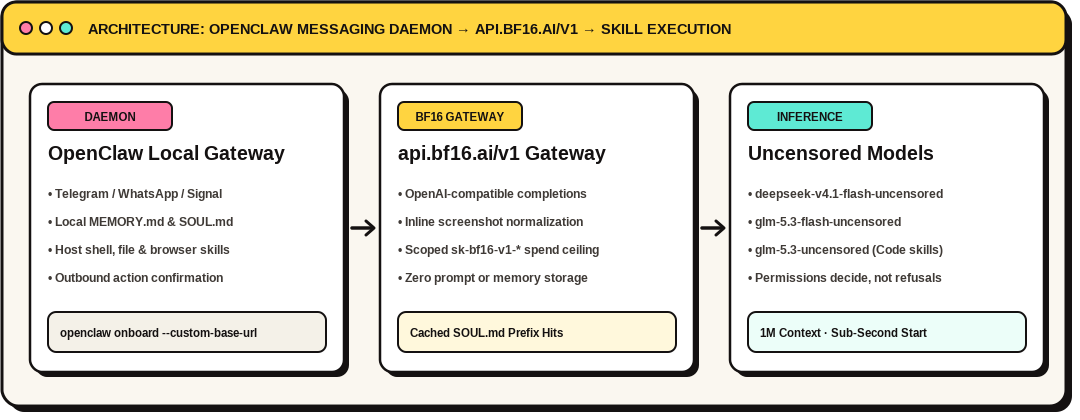
OpenClaw runs as a local-first personal AI daemon that connects your messaging channels (Telegram, WhatsApp, Discord, Slack, Signal) to local shell, calendar, file, and browser skills governed by your local SOUL.md and permission rules.
Standard cloud APIs frequently reject benign personal automation messages containing system logs, medical lab PDFs, security alerts, or raw legal contracts. Routing OpenClaw through bf16.ai ensures your daemon executes every authorized skill while your local OpenClaw approval policy stays in complete control of outgoing messages and side effects.
Configurazione
Accedi per inserire la tua chiave API →I comandi mostrano $BF16_API_KEY. Accedi per inserire automaticamente la tua chiave reale.
One-Command OpenClaw Non-Interactive Setup
Installs OpenClaw if missing, configures bf16.ai as the custom OpenAI-compatible provider with 1M-context DeepSeek V4.1 Flash Uncensored, and verifies gateway connectivity.
export BF16_API_KEY="sk-bf16-v1-..."
command -v openclaw >/dev/null 2>&1 || npm install -g openclaw
openclaw onboard --non-interactive --accept-risk \
  --auth-choice custom-api-key \
  --custom-provider-id bf16 \
  --custom-compatibility openai \
  --custom-base-url https://api.bf16.ai/v1 \
  --custom-api-key "$BF16_API_KEY" \
  --custom-model-id deepseek/deepseek-v4.1-flash-uncensored \
  --skip-health
curl -fsS "https://api.bf16.ai/v1/models" -H "Authorization: Bearer $BF16_API_KEY" >/dev/null && echo "bf16.ai connected to OpenClaw."- 1
Esporta la tua chiave
Effettuando l’accesso, la tua chiave reale viene inserita automaticamente qui.
export BF16_API_KEY=sk-bf16-v1-... - 2
Configura con bf16
openclaw onboard --non-interactive --accept-risk \
  --auth-choice custom-api-key \
  --custom-provider-id bf16 \
  --custom-compatibility openai \
  --custom-base-url https://api.bf16.ai/v1 \
  --custom-api-key "$BF16_API_KEY" \
  --custom-model-id deepseek/deepseek-v4.1-flash-uncensored \
  --skip-health
Riferimento Campo per Campo
custom-api-keyopenaihttps://api.bf16.ai/v1Must end with /v1.
deepseek/deepseek-v4.1-flash-uncensored1M context · Vision + fast skill execution.
Modelli Consigliati per Ruolo
Assegna la progettazione ai modelli Flagship e i subtask rapidi o screenshot ai modelli Flash.
| Ruolo | Model ID | Motivazione | USD / 1M Token |
|---|---|---|---|
| Messaging & Daily Skills (Default) | deepseek/deepseek-v4.1-flash-uncensored | Sub-second first-token feel in Telegram/WhatsApp with native image input and $0.045/1M prefix cache hits on SOUL.md + MEMORY.md. | $0.26 in / $0.045 cached / $1.00 out |
| Complex Code & System Administration | zai-org/glm-5.3-uncensored | Highest multi-step shell and file-editing accuracy when invoking engineering skills. | $1.35 in / $0.25 cached / $4.20 out |
Come capire se ha funzionato
- OpenClaw segnala il provider personalizzato come connesso.
- curl https://api.bf16.ai/v1/models -H "Authorization: Bearer $BF16_API_KEY"
Guardrail di Produzione e Limiti di Spesa
- Keep OpenClaw confirmation prompts turned ON for outgoing messages to third parties, destructive shell commands, and payment skills (Decision 2.7).
- Scope a dedicated OpenClaw key in /dashboard/keys with a daily USD ceiling.