OpenHands
Agente SWE autonomo open-source per sandbox Docker, terminale e GitHub.
https://api.bf16.ai/v1openai-completionsPer chi è pensato
Team che vogliono ridurre dell’80–90% i costi dei cicli di sviluppo autonomi.
Architettura e Integrazione con bf16.ai
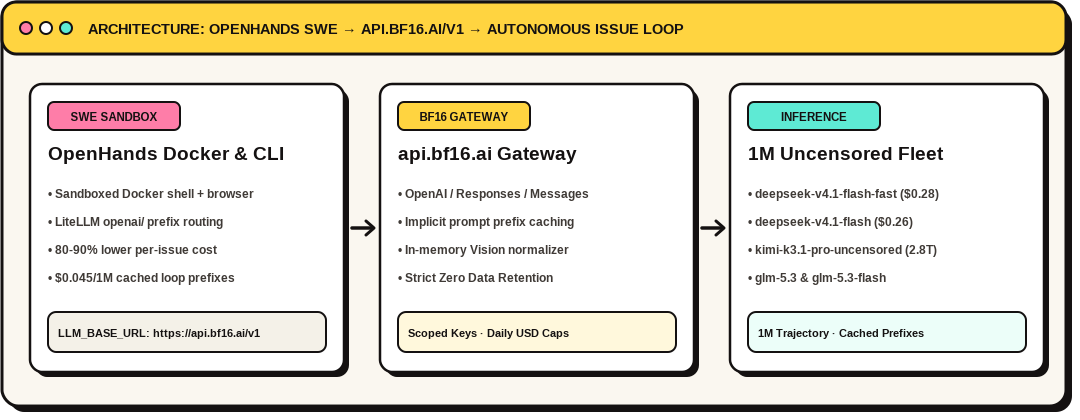
OpenHands executes dozens to hundreds of sandboxed shell commands, test suites, and browser inspections per GitHub issue. Because each step resends the full trajectory, token bills on commercial flagship APIs quickly exceed $5–$20 per task.
Pairing OpenHands with DeepSeek V4.1 Flash Uncensored ($0.26 in / $0.045 cached / $1.00 out) cuts autonomous SWE run costs by 80–90% while maintaining 1M-token context and zero refusal interruptions during security or low-level systems debugging.
Configurazione
Accedi per inserire la tua chiave API →I comandi mostrano $BF16_API_KEY. Accedi per inserire automaticamente la tua chiave reale.
One-Command OpenHands Headless Config
Exports the exact OpenHands LLM environment variables for headless CLI or Docker runs.
export BF16_API_KEY="sk-bf16-v1-..."
export LLM_API_KEY="$BF16_API_KEY"
export LLM_BASE_URL="https://api.bf16.ai/v1"
export LLM_MODEL="openai/deepseek/deepseek-v4.1-flash-uncensored-fast"
curl https://api.bf16.ai/v1/models -H "Authorization: Bearer $BF16_API_KEY"- 1
Configura la tua chiave API bf16.ai
Open OpenHands Settings → LLM → toggle Advanced, or pass environment variables into your Docker container.
- 2
Collega l’endpoint bf16.ai e i modelli da 1M
Inserisci la Base URL e la chiave API per attivare subito i modelli senza censura da 1M di contesto con zero data retention (ZDR).
LLM_MODEL=openai/deepseek/deepseek-v4.1-flash-uncensored-fast
LLM_BASE_URL=https://api.bf16.ai/v1
LLM_API_KEY=$BF16_API_KEY
Riferimento Campo per Campo
openai/deepseek/deepseek-v4.1-flash-uncensored-fastLeading openai/ tells OpenHands’ LiteLLM router to use OpenAI-compatible wire format
https://api.bf16.ai/v1sk-bf16-v1-••••••••••••Automatic ($0.045–$0.055/1M read)Modelli Consigliati per Ruolo
Assegna la progettazione ai modelli Flagship e i subtask rapidi o screenshot ai modelli Flash.
| Ruolo | Model ID | Motivazione | USD / 1M Token |
|---|---|---|---|
| Autonomous Issue Solving & CI Loops | deepseek/deepseek-v4.1-flash-uncensored | $0.045/1M cached input reads make 80-step OpenHands trajectories remarkably economical. | $0.26 in / $0.045 cached / $1.00 out |
| High-Speed Interactive Sandboxes | deepseek/deepseek-v4.1-flash-uncensored-fast | Cuts wall-clock latency across iterative build-test-fix loops. | $0.28 in / $0.055 cached / $1.12 out |
Come capire se ha funzionato
- Invia una richiesta di test e verifica la chiamata in tempo reale nei log di bf16.ai.
- curl https://api.bf16.ai/v1/models -H "Authorization: Bearer $BF16_API_KEY"
Guardrail di Produzione e Limiti di Spesa
- Always set max_iterations and a per-key daily USD cap in /dashboard/keys for unattended OpenHands batch jobs.