Codex
専用の bf16 プロファイルで OpenAI の Codex エージェントを実行します。
https://api.bf16.ai/v1openai-responses対象ユーザー
既存の Codex 設定を残したまま、別プロファイルで使い分けたいユーザー向け。
アーキテクチャと bf16.ai 連携の利点
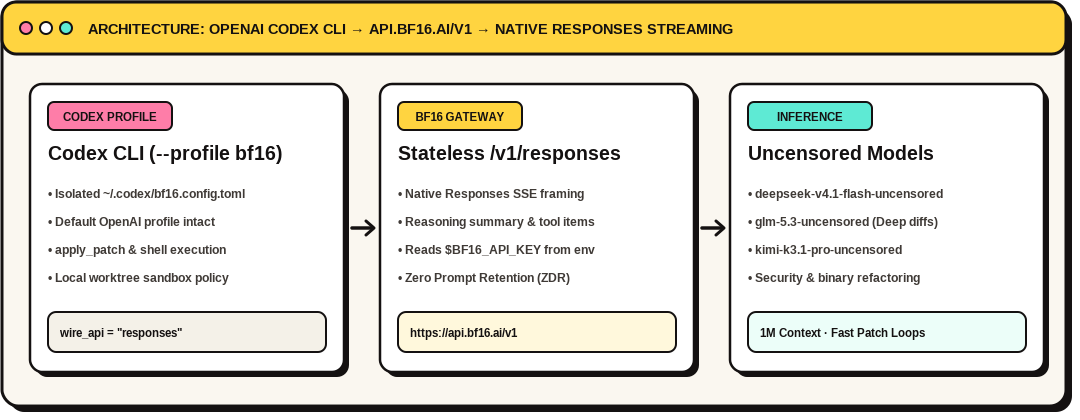
OpenAI’s terminal coding agent (`@openai/codex`) speaks the modern OpenAI `/v1/responses` wire format rather than legacy `/v1/chat/completions`. Many third-party OpenAI-compatible relays fail with HTTP 404 or 400 when Codex sends `input` items, `function_call_output`, and reasoning summaries.
bf16.ai implements a full stateless `/v1/responses` endpoint on https://api.bf16.ai/v1, allowing Codex CLI to stream reasoning items, shell tool calls, and `apply_patch` diffs cleanly on an isolated `--profile bf16` configuration.
セットアップ
サインインしてAPIキーを自動入力 →コマンドには $BF16_API_KEY と表示されています。サインインすると自分のキーが自動入力されます。
One-Command Codex `--profile bf16` Installer
Creates ~/.codex/bf16.config.toml, stores BF16_API_KEY in ~/.bf16.env (chmod 600), and verifies /v1/models so you can immediately run codex -c ~/.codex/bf16.config.toml --profile bf16.
export BF16_API_KEY="sk-bf16-v1-..."
mkdir -p ~/.codex && umask 077 && printf 'export BF16_API_KEY="%s"\n' "$BF16_API_KEY" > ~/.bf16.env
cat <<'EOF' > ~/.codex/bf16.config.toml
# ~/.codex/bf16.config.toml  (Codex 0.134+ profile file)
model = "deepseek/deepseek-v4.1-flash-uncensored"
model_provider = "bf16"
model_context_window = 1048576
model_auto_compact_token_limit = 900000

[model_providers.bf16]
name = "bf16.ai"
base_url = "https://api.bf16.ai/v1"
wire_api = "responses"
env_key = "BF16_API_KEY"
EOF
curl -fsS "https://api.bf16.ai/v1/models" -H "Authorization: Bearer $BF16_API_KEY" >/dev/null && echo "Ready! Run: codex -c ~/.codex/bf16.config.toml --profile bf16"- 1
APIキーをエクスポート
プロファイルは環境変数 BF16_API_KEY を参照します。
export BF16_API_KEY=sk-bf16-v1-... - 2
プロファイル設定ファイルを作成
~/.codex/bf16.config.toml# ~/.codex/bf16.config.toml (Codex 0.134+ profile file) model = "deepseek/deepseek-v4.1-flash-uncensored" model_provider = "bf16" model_context_window = 1048576 model_auto_compact_token_limit = 900000 [model_providers.bf16] name = "bf16.ai" base_url = "https://api.bf16.ai/v1" wire_api = "responses" env_key = "BF16_API_KEY" - 3
プロファイルを指定して Codex を起動
デフォルトの `codex` プロファイルはそのまま維持されます。
mkdir -p ~/.codex
cat > ~/.codex/bf16.config.toml <<'EOF'
model = "deepseek/deepseek-v4.1-flash-uncensored"
model_provider = "bf16"
model_context_window = 1048576
model_auto_compact_token_limit = 900000
[model_providers.bf16]
name = "bf16.ai"
base_url = "https://api.bf16.ai/v1"
wire_api = "responses"
env_key = "BF16_API_KEY"
EOF
codex --profile bf16
入力パラメータ早見表
https://api.bf16.ai/v1BF16_API_KEYCodex reads $BF16_API_KEY from your shell at launch.
"responses"Uses native /v1/responses streaming on api.bf16.ai.
codex -c ~/.codex/bf16.config.toml --profile bf16用途別おすすめモデル構成
設計・監査には Flagship モデル、並列サブタスクや画面認識には Flash モデルを組み合わせます。
| 役割 | モデル ID | 選定理由 | USD / 1M トークン |
|---|---|---|---|
| Fast Patch & Shell Execution (Default) | deepseek/deepseek-v4.1-flash-uncensored | Rapid tool cycles + Vision support for UI debugging inside Codex. | $0.26 in / $0.045 cached / $1.00 out |
| Deep Multi-File Refactoring | zai-org/glm-5.3-uncensored | Switch model = "zai-org/glm-5.3-uncensored" in [profiles.bf16] for complex architecture or security audit sessions. | $1.35 in / $0.25 cached / $4.20 out |
正しく動いているか確認する方法
- 起動時に bf16 プロバイダが表示されます。
- コンソールのリクエストログに呼び出しが記録されます。
- curl https://api.bf16.ai/v1/models -H "Authorization: Bearer $BF16_API_KEY"
本番運用の安全策と予算上限
- Keep Codex sandbox approvals enabled (`suggest` or `auto-edit` inside git worktrees) so file writes outside your project require confirmation.
- Export BF16_API_KEY before launching Codex — Codex reads env_key at process startup.