Dify
OpenAI 互換プロバイダと bf16.ai プラグインに対応するオープンソース LLM ワークフロー開発基盤。
https://api.bf16.ai/v1openai-completions対象ユーザー
Dify Cloud やセルフホスト Docker で本番 AI アプリ・RAG を構築する開発チーム。
アーキテクチャと bf16.ai 連携の利点
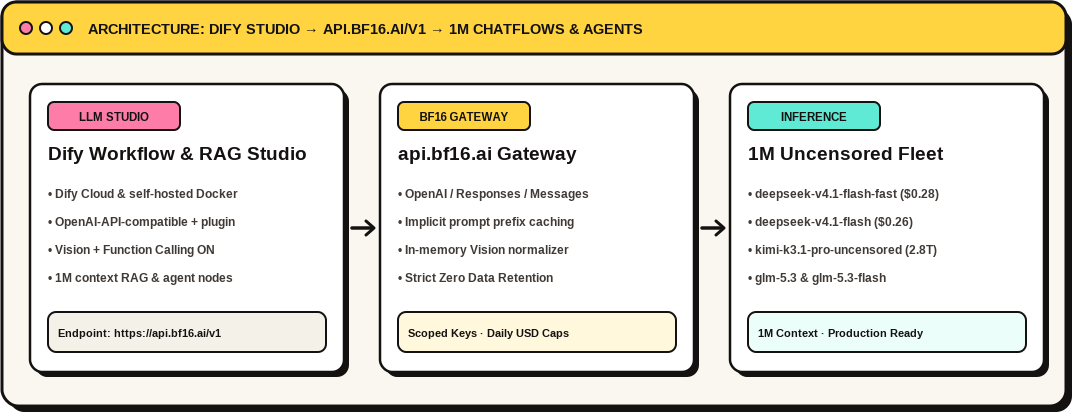
Dify powers production RAG pipelines, chatflows, and visual multi-step agent apps across both Dify Cloud and self-hosted Docker deployments.
Connecting bf16.ai inside Dify’s Model Providers gives every LLM, Question Classifier, and Agent node instant 1M-context uncensored models — with native Vision on DeepSeek V4.1 Flash, GLM-5.3 Flash, and 2.8T Kimi K3.1 Pro, plus zero prompt retention.
セットアップ
サインインしてAPIキーを自動入力 →コマンドには $BF16_API_KEY と表示されています。サインインすると自分のキーが自動入力されます。
Verify Your bf16.ai Key Before Adding to Dify
Tests authentication and prints all live model IDs you can register in Dify.
export BF16_API_KEY="sk-bf16-v1-..."
curl https://api.bf16.ai/v1/models -H "Authorization: Bearer $BF16_API_KEY"- 1
bf16.ai API キーを設定する
Open Dify Settings → Model Providers → locate OpenAI-API-compatible (or install the open-source bf16.ai plugin from https://github.com/BF16-AI/bf16-dify-plugin).
- 2
bf16.ai エンドポイントと 1M 無検閲モデルを接続する
ページ上部の Base URL と API キーを設定するだけで、1M コンテキスト・ゼロ保持(ZDR)の全モデルが利用できます。
API Endpoint URL: https://api.bf16.ai/v1
API Key:          $BF16_API_KEY
Model Name:       deepseek/deepseek-v4.1-flash-uncensored-fast
Context Size:     1048576
入力パラメータ早見表
LLM (Chat · Function Call + Vision)deepseek/deepseek-v4.1-flash-uncensored-fastsk-bf16-v1-••••••••••••https://api.bf16.ai/v1用途別おすすめモデル構成
設計・監査には Flagship モデル、並列サブタスクや画面認識には Flash モデルを組み合わせます。
| 役割 | モデル ID | 選定理由 | USD / 1M トークン |
|---|---|---|---|
| Fast Chatflows & Agent Routing | deepseek/deepseek-v4.1-flash-uncensored-fast | Snappy streaming, native vision, and low cost across high-traffic Dify apps. | $0.28 in / $0.055 cached / $1.12 out |
| 2.8T Flagship Research & Synthesis Nodes | moonshotai/kimi-k3.1-pro-uncensored | Ideal for final report generation, complex analysis, and long-context RAG nodes. | $1.95 in / $0.28 cached / $6.90 out |
正しく動いているか確認する方法
- テスト送信後、bf16.ai ダッシュボードのリクエストログにリアルタイムで記録されます。
- curl https://api.bf16.ai/v1/models -H "Authorization: Bearer $BF16_API_KEY"
本番運用の安全策と予算上限
- Isolate production vs staging Dify apps with separate scoped API keys and daily USD spend caps.