SillyTavern
ロアブック・完全プロンプト制御を備えたローカル対話フロントエンド(創作・インタラクティブ小説向け)。
https://api.bf16.ai/v1openai-completions対象ユーザー
1M トークンの世界観設定をキャッシュしつつ説教的拒否なしで創作したい作家・ゲーム開発者。
アーキテクチャと bf16.ai 連携の利点
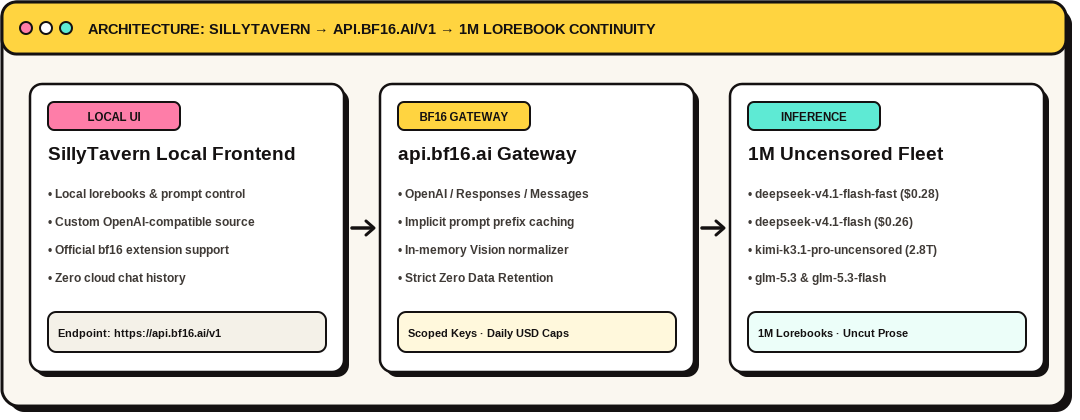
SillyTavern gives writers and game designers total control over system prompts, Lorebooks/World Info, sampler parameters, and local chat history. Stock commercial APIs routinely derail dramatic fiction, historical dialogue, or dark fantasy scenes with out-of-character refusal lectures.
bf16.ai delivers 1M-token context across every model — letting entire multi-book lorebooks stay cached at $0.045–$0.28/1M tokens — paired with strict zero prompt retention so your manuscripts and local sessions stay strictly on your own machine.
セットアップ
サインインしてAPIキーを自動入力 →コマンドには $BF16_API_KEY と表示されています。サインインすると自分のキーが自動入力されます。
Verify Your Key & Model List for SillyTavern
Confirms your API key and displays all active 1M-context model IDs ready to select in SillyTavern.
export BF16_API_KEY="sk-bf16-v1-..."
curl https://api.bf16.ai/v1/models -H "Authorization: Bearer $BF16_API_KEY"- 1
bf16.ai API キーを設定する
Click the plug icon in the top navigation bar, choose Chat Completion, and select Custom (OpenAI-compatible) as the Chat Completion Source.
- 2
bf16.ai エンドポイントと 1M 無検閲モデルを接続する
ページ上部の Base URL と API キーを設定するだけで、1M コンテキスト・ゼロ保持(ZDR)の全モデルが利用できます。
Custom Endpoint: https://api.bf16.ai/v1 Custom API Key: $BF16_API_KEY Model ID: moonshotai/kimi-k3.1-pro-uncensored - 3
Optional: Install the Official bf16.ai SillyTavern Extension
Open Extensions → Install Extension and paste https://github.com/BF16-AI/bf16-sillytavern-extension for one-click preset switching and live model catalog refresh.
入力パラメータ早見表
Custom (OpenAI-compatible)https://api.bf16.ai/v1sk-bf16-v1-••••••••••••moonshotai/kimi-k3.1-pro-uncensored (or deepseek/deepseek-v4.1-flash-uncensored-fast)Auto-populates when clicking Connect, or enter directly
用途別おすすめモデル構成
設計・監査には Flagship モデル、並列サブタスクや画面認識には Flash モデルを組み合わせます。
| 役割 | モデル ID | 選定理由 | USD / 1M トークン |
|---|---|---|---|
| Rich Literary Prose & 2.8T World-Building | moonshotai/kimi-k3.1-pro-uncensored | Nuanced long-horizon character consistency, rich literary voice, and 1M lorebook capacity. | $1.95 in / $0.28 cached / $6.90 out |
| Fast Multi-Turn Interactive Prototyping | deepseek/deepseek-v4.1-flash-uncensored-fast | Ultra-fast streaming and $0.055/1M cached lorebook reads for high-volume creative sessions. | $0.28 in / $0.055 cached / $1.12 out |
正しく動いているか確認する方法
- テスト送信後、bf16.ai ダッシュボードのリクエストログにリアルタイムで記録されます。
- curl https://api.bf16.ai/v1/models -H "Authorization: Bearer $BF16_API_KEY"
本番運用の安全策と予算上限
- SillyTavern keeps all character cards and lorebooks on local disk; combined with bf16.ai ZDR, zero prompt text is persisted remotely.