OpenClaw
비대화형 명령어로 간편하게 온보딩하는 개인용 에이전트.
https://api.bf16.ai/v1openai-completions대상 사용자
모델의 자체 검열이 아니라 에이전트 권한 설정으로 실행 여부를 통제하려는 사용자.
아키텍처 및 bf16.ai 연동 구조
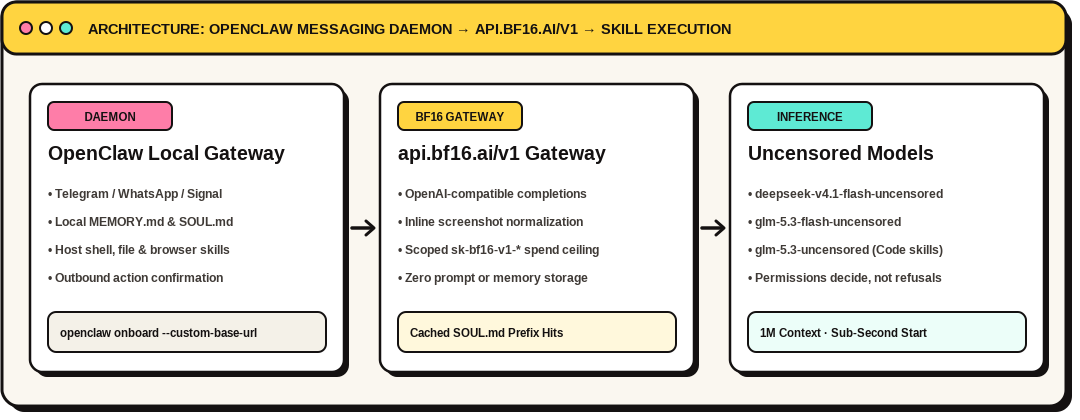
OpenClaw runs as a local-first personal AI daemon that connects your messaging channels (Telegram, WhatsApp, Discord, Slack, Signal) to local shell, calendar, file, and browser skills governed by your local SOUL.md and permission rules.
Standard cloud APIs frequently reject benign personal automation messages containing system logs, medical lab PDFs, security alerts, or raw legal contracts. Routing OpenClaw through bf16.ai ensures your daemon executes every authorized skill while your local OpenClaw approval policy stays in complete control of outgoing messages and side effects.
명령어에는 $BF16_API_KEY가 표시됩니다. 로그인하면 내 실제 키가 자동으로 채워집니다.
One-Command OpenClaw Non-Interactive Setup
Installs OpenClaw if missing, configures bf16.ai as the custom OpenAI-compatible provider with 1M-context DeepSeek V4.1 Flash Uncensored, and verifies gateway connectivity.
export BF16_API_KEY="sk-bf16-v1-..."
command -v openclaw >/dev/null 2>&1 || npm install -g openclaw
openclaw onboard --non-interactive --accept-risk \
  --auth-choice custom-api-key \
  --custom-provider-id bf16 \
  --custom-compatibility openai \
  --custom-base-url https://api.bf16.ai/v1 \
  --custom-api-key "$BF16_API_KEY" \
  --custom-model-id deepseek/deepseek-v4.1-flash-uncensored \
  --skip-health
curl -fsS "https://api.bf16.ai/v1/models" -H "Authorization: Bearer $BF16_API_KEY" >/dev/null && echo "bf16.ai connected to OpenClaw."- 1
API 키 환경변수 설정
로그인 상태에서는 내 실제 키가 자동으로 채워지며 바로 복사해 실행할 수 있습니다.
export BF16_API_KEY=sk-bf16-v1-... - 2
bf16으로 온보딩 실행
openclaw onboard --non-interactive --accept-risk \
  --auth-choice custom-api-key \
  --custom-provider-id bf16 \
  --custom-compatibility openai \
  --custom-base-url https://api.bf16.ai/v1 \
  --custom-api-key "$BF16_API_KEY" \
  --custom-model-id deepseek/deepseek-v4.1-flash-uncensored \
  --skip-health
핵심 설정값 대조표
custom-api-keyopenaihttps://api.bf16.ai/v1Must end with /v1.
deepseek/deepseek-v4.1-flash-uncensored1M context · Vision + fast skill execution.
역할별 권장 모델 구성
복잡한 설계는 플래그십 모델로, 병렬 서브에이전트와 스크린샷은 Flash 모델로 분리하세요.
| 역할 | 모델 ID | 권장 사유 | USD / 1M 토큰 |
|---|---|---|---|
| Messaging & Daily Skills (Default) | deepseek/deepseek-v4.1-flash-uncensored | Sub-second first-token feel in Telegram/WhatsApp with native image input and $0.045/1M prefix cache hits on SOUL.md + MEMORY.md. | $0.26 in / $0.045 cached / $1.00 out |
| Complex Code & System Administration | zai-org/glm-5.3-uncensored | Highest multi-step shell and file-editing accuracy when invoking engineering skills. | $1.35 in / $0.25 cached / $4.20 out |
제대로 작동하는지 확인하는 방법
- OpenClaw에서 커스텀 프로바이더 연결 완료가 표시됩니다.
- curl https://api.bf16.ai/v1/models -H "Authorization: Bearer $BF16_API_KEY"
운영 가드레일 및 예산 격리
- Keep OpenClaw confirmation prompts turned ON for outgoing messages to third parties, destructive shell commands, and payment skills (Decision 2.7).
- Scope a dedicated OpenClaw key in /dashboard/keys with a daily USD ceiling.