Chatbox
Lightweight native AI client for macOS, Windows, Linux, iOS, and Android connected directly via Custom OpenAI Provider.
https://api.bf16.ai/v1openai-completions適用對象
Users who want a clean, zero-Docker native desktop and mobile app with local SQLite history and direct BYOK connection to bf16.ai.
架構原理與接入優勢
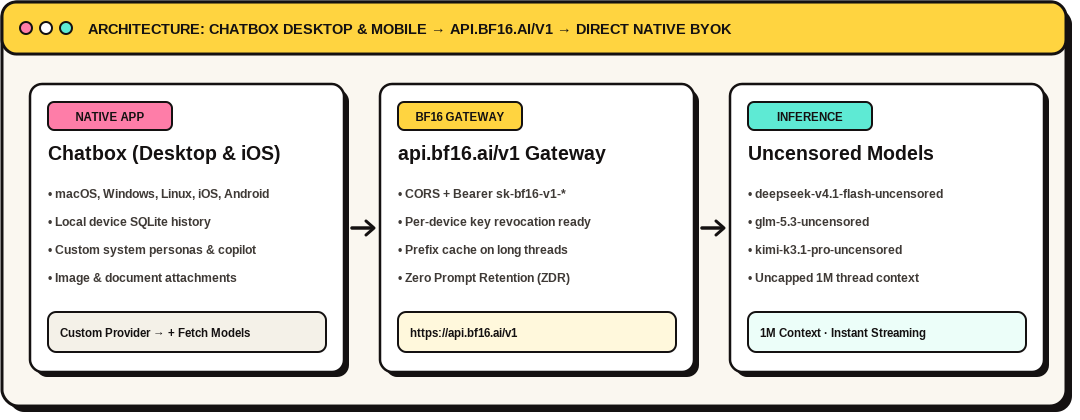
Chatbox (`chatboxai.app`) is a lightweight native client across macOS, Windows, Linux, iOS, and Android that stores conversation threads locally on your device and connects directly to any OpenAI-compatible API.
Adding bf16.ai as a Custom Provider in Chatbox takes under 30 seconds: click **Fetch** to pull all live uncensored models directly from `GET https://api.bf16.ai/v1/models`, including 1M context windows and Vision support.
指令預設顯示 $BF16_API_KEY。登入並建立金鑰後會自動填入你的真實金鑰。
One-Command API Key Verification Before Pasting into Chatbox
Tests your key against https://api.bf16.ai/v1/models so you know Fetch in Chatbox will succeed.
export BF16_API_KEY="sk-bf16-v1-..."
curl https://api.bf16.ai/v1/models -H "Authorization: Bearer $BF16_API_KEY"- 1
Add Custom Provider in Chatbox Settings
Open Chatbox → Settings → Model Provider → click "+ Add" at the bottom. Set API Mode to "OpenAI API Compatible", API Host to https://api.bf16.ai/v1, API Path to /chat/completions, and paste your API key.
API Host: https://api.bf16.ai/v1 API Path: /chat/completions API Key: $BF16_API_KEY - 2
Click Fetch & Enable Capabilities
Click "Fetch" under Models, add all active bf16.ai models, and enable Vision + Reasoning + Tool Use badges next to each model.
關鍵參數核對清單
bf16.aiOpenAI API Compatiblehttps://api.bf16.ai/v1Chatbox shows preview: https://api.bf16.ai/v1/chat/completions
sk-bf16-v1-••••••••••••Click "+ Fetch" to import GLM-5.3, DeepSeek V4.1 Flash, and Kimi K3.1 Pro推薦模型分層配置
架構規劃使用旗艦模型,高頻子任務與螢幕截圖使用 Flash 模型以節省開銷。
| 工作流角色 | 模型 ID | 選型說明 | USD / 1M Tokens |
|---|---|---|---|
| Fast Everyday Chat & Vision | deepseek/deepseek-v4.1-flash-uncensored | Instant mobile/desktop streaming + image attachment support. | $0.26 in / $0.045 cached / $1.00 out |
| Deep Coding & Technical Problem Solving | zai-org/glm-5.3-uncensored | High reasoning accuracy on long prompts. | $1.35 in / $0.25 cached / $4.20 out |
如何確認設定成功
- Fetch lists all active bf16.ai models immediately.
- Test message streams cleanly and logs in bf16.ai/dashboard/logs.
- curl https://api.bf16.ai/v1/models -H "Authorization: Bearer $BF16_API_KEY"
生產環境護欄與預算隔離
- When syncing Chatbox across desktop and mobile, create separate keys (`chatbox-mac`, `chatbox-iphone`) in /dashboard/keys so you can revoke a lost phone independently.