Cherry Studio
Cross-platform desktop AI studio with side-by-side multi-model comparison, local knowledge bases, Vision, and collapsible reasoning traces.
https://api.bf16.aiopenai-completions適用對象
Researchers, translators, and developers on macOS, Windows, and Linux who want a fast native desktop UI for 1M-context uncensored chat, document analysis, and side-by-side model testing.
架構原理與接入優勢
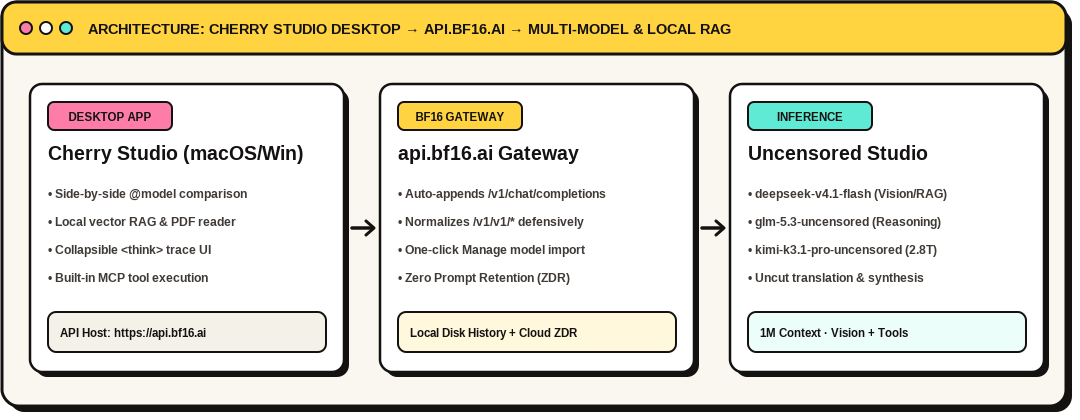
Cherry Studio is one of the fastest native desktop workspaces for macOS, Windows, and Linux, supporting simultaneous multi-model answers (`@` mention multiple models in one turn), local vector RAG knowledge bases, MCP tools, and collapsible `<think>` reasoning blocks.
Cherry Studio automatically appends `/v1/chat/completions` to any OpenAI-type API Host in its preview bar. Enter `https://api.bf16.ai` as the API Host (so Cherry Studio’s live preview reads `https://api.bf16.ai/v1/chat/completions`), click **Manage** to auto-import all active uncensored models, and enable Vision + Reasoning icons per model.
指令預設顯示 $BF16_API_KEY。登入並建立金鑰後會自動填入你的真實金鑰。
One-Command Key & Model Catalog Check for Cherry Studio
Confirms your API key is active and prints the live model IDs Cherry Studio’s Manage dialog will import.
export BF16_API_KEY="sk-bf16-v1-..."
curl https://api.bf16.ai/v1/models -H "Authorization: Bearer $BF16_API_KEY"- 1
Add a Custom OpenAI Provider in Cherry Studio
Click the gear icon (Settings) at the bottom-left of Cherry Studio → Model Provider → click "+ Add" at the bottom of the provider list. Name it "bf16.ai" and keep Provider Type set to "OpenAI".
- 2
Enter API Key & API Host, Then Click Check
Paste your API key and set API Host to https://api.bf16.ai (verify the grey preview text right below reads https://api.bf16.ai/v1/chat/completions). Toggle the provider switch ON in the top-right corner.
API Key: $BF16_API_KEY API Host: https://api.bf16.ai - 3
Click "Manage" to Auto-Add All Uncensored Models
Click the green "Manage" button at the bottom, click "+" next to deepseek/deepseek-v4.1-flash-uncensored, zai-org/glm-5.3-uncensored, zai-org/glm-5.3-flash-uncensored, and moonshotai/kimi-k3.1-pro-uncensored, and click Check to verify.
關鍵參數核對清單
bf16.ai · OpenAIsk-bf16-v1-••••••••••••https://api.bf16.aiPreview underneath will confirm: https://api.bf16.ai/v1/chat/completions
Click "Manage" to auto-pull GLM-5.3, DeepSeek V4.1 Flash, and Kimi K3.1 Pro推薦模型分層配置
架構規劃使用旗艦模型,高頻子任務與螢幕截圖使用 Flash 模型以節省開銷。
| 工作流角色 | 模型 ID | 選型說明 | USD / 1M Tokens |
|---|---|---|---|
| Daily Research, Translation & Vision | deepseek/deepseek-v4.1-flash-uncensored | Snappy streaming, native image/screenshot input, and low cost on 1M-token PDF/book contexts. | $0.26 in / $0.045 cached / $1.00 out |
| Deep Analytical & Code Reasoning | zai-org/glm-5.3-uncensored | Rich collapsible reasoning traces and structured technical writing. | $1.35 in / $0.25 cached / $4.20 out |
| 2.8T Side-by-Side Flagship Synthesis | moonshotai/kimi-k3.1-pro-uncensored | Pair side-by-side with GLM-5.3 in Cherry Studio multi-model mode for nuanced literary or architectural reviews. | $1.95 in / $0.28 cached / $6.90 out |
如何確認設定成功
- Clicking "Check" next to API Key turns green ("Connection successful").
- Reasoning blocks render inside a collapsible Thought panel and Vision uploads work on Flash and Kimi K3.1 Pro.
- curl https://api.bf16.ai/v1/models -H "Authorization: Bearer $BF16_API_KEY"
生產環境護欄與預算隔離
- Cherry Studio stores chat history strictly on your local disk; combined with bf16.ai zero prompt retention, sensitive research never persists in the cloud.