Codex
以獨立的 bf16 設定檔執行 OpenAI Codex 編碼代理。
https://api.bf16.ai/v1openai-responses適用對象
想保留預設 Codex 設定、按需切換第二組設定檔的使用者。
架構原理與接入優勢
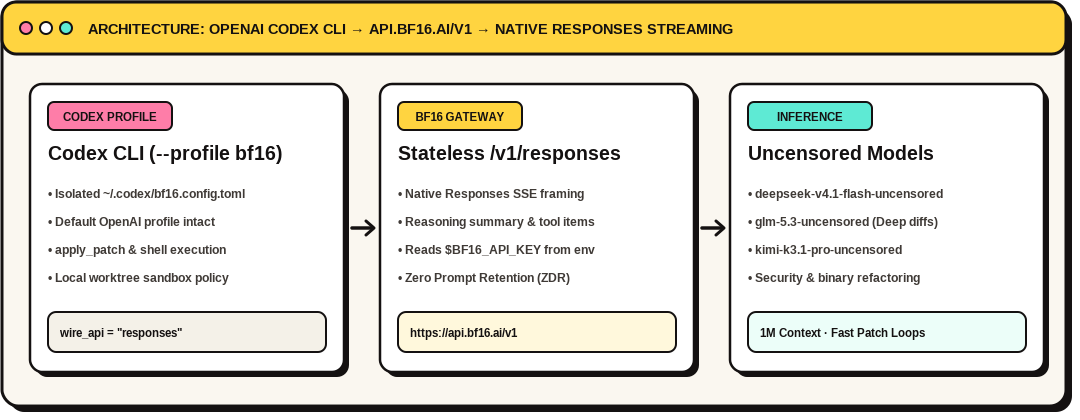
OpenAI’s terminal coding agent (`@openai/codex`) speaks the modern OpenAI `/v1/responses` wire format rather than legacy `/v1/chat/completions`. Many third-party OpenAI-compatible relays fail with HTTP 404 or 400 when Codex sends `input` items, `function_call_output`, and reasoning summaries.
bf16.ai implements a full stateless `/v1/responses` endpoint on https://api.bf16.ai/v1, allowing Codex CLI to stream reasoning items, shell tool calls, and `apply_patch` diffs cleanly on an isolated `--profile bf16` configuration.
指令預設顯示 $BF16_API_KEY。登入並建立金鑰後會自動填入你的真實金鑰。
One-Command Codex `--profile bf16` Installer
Creates ~/.codex/bf16.config.toml, stores BF16_API_KEY in ~/.bf16.env (chmod 600), and verifies /v1/models so you can immediately run codex -c ~/.codex/bf16.config.toml --profile bf16.
export BF16_API_KEY="sk-bf16-v1-..."
mkdir -p ~/.codex && umask 077 && printf 'export BF16_API_KEY="%s"\n' "$BF16_API_KEY" > ~/.bf16.env
cat <<'EOF' > ~/.codex/bf16.config.toml
# ~/.codex/bf16.config.toml  (Codex 0.134+ profile file)
model = "deepseek/deepseek-v4.1-flash-uncensored"
model_provider = "bf16"
model_context_window = 1048576
model_auto_compact_token_limit = 900000

[model_providers.bf16]
name = "bf16.ai"
base_url = "https://api.bf16.ai/v1"
wire_api = "responses"
env_key = "BF16_API_KEY"
EOF
curl -fsS "https://api.bf16.ai/v1/models" -H "Authorization: Bearer $BF16_API_KEY" >/dev/null && echo "Ready! Run: codex -c ~/.codex/bf16.config.toml --profile bf16"- 1
匯出你的 API 金鑰
設定檔會從環境變數 BF16_API_KEY 讀取金鑰。
export BF16_API_KEY=sk-bf16-v1-... - 2
寫入設定檔
~/.codex/bf16.config.toml# ~/.codex/bf16.config.toml (Codex 0.134+ profile file) model = "deepseek/deepseek-v4.1-flash-uncensored" model_provider = "bf16" model_context_window = 1048576 model_auto_compact_token_limit = 900000 [model_providers.bf16] name = "bf16.ai" base_url = "https://api.bf16.ai/v1" wire_api = "responses" env_key = "BF16_API_KEY" - 3
指定設定檔啟動 Codex
你原有的預設 `codex` 設定檔完全不受影響。
mkdir -p ~/.codex
cat > ~/.codex/bf16.config.toml <<'EOF'
model = "deepseek/deepseek-v4.1-flash-uncensored"
model_provider = "bf16"
model_context_window = 1048576
model_auto_compact_token_limit = 900000
[model_providers.bf16]
name = "bf16.ai"
base_url = "https://api.bf16.ai/v1"
wire_api = "responses"
env_key = "BF16_API_KEY"
EOF
codex --profile bf16
關鍵參數核對清單
https://api.bf16.ai/v1BF16_API_KEYCodex reads $BF16_API_KEY from your shell at launch.
"responses"Uses native /v1/responses streaming on api.bf16.ai.
codex -c ~/.codex/bf16.config.toml --profile bf16推薦模型分層配置
架構規劃使用旗艦模型,高頻子任務與螢幕截圖使用 Flash 模型以節省開銷。
| 工作流角色 | 模型 ID | 選型說明 | USD / 1M Tokens |
|---|---|---|---|
| Fast Patch & Shell Execution (Default) | deepseek/deepseek-v4.1-flash-uncensored | Rapid tool cycles + Vision support for UI debugging inside Codex. | $0.26 in / $0.045 cached / $1.00 out |
| Deep Multi-File Refactoring | zai-org/glm-5.3-uncensored | Switch model = "zai-org/glm-5.3-uncensored" in [profiles.bf16] for complex architecture or security audit sessions. | $1.35 in / $0.25 cached / $4.20 out |
如何確認設定成功
- Codex 啟動時會顯示正在使用 bf16 供應商。
- 請求紀錄會即時顯示於控制台日誌。
- curl https://api.bf16.ai/v1/models -H "Authorization: Bearer $BF16_API_KEY"
生產環境護欄與預算隔離
- Keep Codex sandbox approvals enabled (`suggest` or `auto-edit` inside git worktrees) so file writes outside your project require confirmation.
- Export BF16_API_KEY before launching Codex — Codex reads env_key at process startup.