Pi
支援 Anthropic Messages 格式的終端代理。
https://api.bf16.aianthropic-messages適用對象
希望在 Pi 背後掛載 1M 長上下文模型的開發者。
架構原理與接入優勢
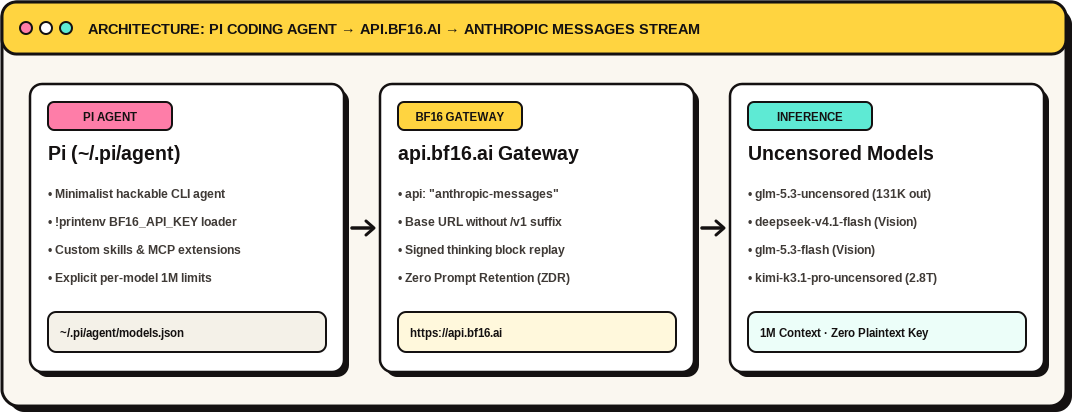
Pi is a hackable, minimalist terminal coding agent used standalone and as the embedded agent runtime inside platforms like Rakazo and OpenBot. Pi supports custom providers via `~/.pi/agent/models.json` with `!printenv BF16_API_KEY` command evaluation.
Pointing Pi at `https://api.bf16.ai` (no `/v1`) with `api: "anthropic-messages"` preserves streaming thinking blocks, signed tool-continuation turns, and full `1,048,576`-token context windows.
指令預設顯示 $BF16_API_KEY。登入並建立金鑰後會自動填入你的真實金鑰。
One-Command Pi `~/.pi/agent/models.json` Setup
Backs up ~/.pi/agent/models.json if present, merges `providers.bf16` with 1M-context uncensored models, and verifies connectivity.
export BF16_API_KEY="sk-bf16-v1-..."
mkdir -p ~/.pi/agent
node -e '
const fs = require("fs"), os = require("os"), path = require("path");
const file = path.join(os.homedir(), ".pi/agent/models.json");
const incoming = JSON.parse("{\n  \"providers\": {\n    \"bf16\": {\n      \"name\": \"bf16.ai\",\n      \"baseUrl\": \"https://api.bf16.ai\",\n      \"api\": \"anthropic-messages\",\n      \"apiKey\": \"!printenv BF16_API_KEY\",\n      \"models\": [\n        { \"id\": \"zai-org/glm-5.3-uncensored\", \"name\": \"Uncensored GLM-5.3\", \"reasoning\": true, \"contextWindow\": 1048576 },\n        { \"id\": \"zai-org/glm-5.3-flash-uncensored\", \"name\": \"Uncensored GLM-5.3 Flash Vision\", \"reasoning\": true, \"input\": [\"text\", \"image\"], \"contextWindow\": 1048576 },\n        { \"id\": \"deepseek/deepseek-v4.1-flash-uncensored\", \"name\": \"Uncensored DeepSeek V4.1 Flash\", \"reasoning\": true, \"input\": [\"text\", \"image\"], \"contextWindow\": 1048576 },\n        { \"id\": \"deepseek/deepseek-v4.1-flash-uncensored-fast\", \"name\": \"Uncensored DeepSeek V4.1 Flash Fast\", \"reasoning\": true, \"input\": [\"text\", \"image\"], \"contextWindow\": 1048576 },\n        { \"id\": \"bf16/deepseek-v4.1-flash-1017-exl3-2.5bpw\", \"name\": \"DeepSeek V4.1 Flash 1017 EXL3 2.5bpw (bf16)\", \"reasoning\": true, \"input\": [\"text\", \"image\"], \"contextWindow\": 524288 },\n        { \"id\": \"moonshotai/kimi-k3.1-pro-uncensored\", \"name\": \"Uncensored Kimi K3.1 Pro\", \"reasoning\": true, \"input\": [\"text\", \"image\"], \"contextWindow\": 1048576 }\n      ]\n    }\n  }\n}");
let current = { providers: {} };
if (fs.existsSync(file)) {
  fs.copyFileSync(file, file + ".bak");
  try { current = JSON.parse(fs.readFileSync(file, "utf8")); } catch {}
}
current.providers = Object.assign({}, current.providers || {}, incoming.providers);
fs.writeFileSync(file, JSON.stringify(current, null, 2) + "\n");
console.log("Updated " + file);
' && curl -fsS "https://api.bf16.ai/v1/models" -H "Authorization: Bearer $BF16_API_KEY" >/dev/null && echo "Ready! Run: pi --model bf16/zai-org/glm-5.3-uncensored"- 1
匯出你的 API 金鑰
Pi 會在執行時讀取環境變數 BF16_API_KEY。
export BF16_API_KEY=sk-bf16-v1-... - 2
新增供應商設定
~/.pi/agent/models.json{ "providers": { "bf16": { "name": "bf16.ai", "baseUrl": "https://api.bf16.ai", "api": "anthropic-messages", "apiKey": "!printenv BF16_API_KEY", "models": [ { "id": "zai-org/glm-5.3-uncensored", "name": "Uncensored GLM-5.3", "reasoning": true, "contextWindow": 1048576 }, { "id": "zai-org/glm-5.3-flash-uncensored", "name": "Uncensored GLM-5.3 Flash Vision", "reasoning": true, "input": ["text", "image"], "contextWindow": 1048576 }, { "id": "deepseek/deepseek-v4.1-flash-uncensored", "name": "Uncensored DeepSeek V4.1 Flash", "reasoning": true, "input": ["text", "image"], "contextWindow": 1048576 }, { "id": "deepseek/deepseek-v4.1-flash-uncensored-fast", "name": "Uncensored DeepSeek V4.1 Flash Fast", "reasoning": true, "input": ["text", "image"], "contextWindow": 1048576 }, { "id": "bf16/deepseek-v4.1-flash-1017-exl3-2.5bpw", "name": "DeepSeek V4.1 Flash 1017 EXL3 2.5bpw (bf16)", "reasoning": true, "input": ["text", "image"], "contextWindow": 524288 }, { "id": "moonshotai/kimi-k3.1-pro-uncensored", "name": "Uncensored Kimi K3.1 Pro", "reasoning": true, "input": ["text", "image"], "contextWindow": 1048576 } ] } } } - 3
啟動執行
pi --model bf16/zai-org/glm-5.3-uncensored
關鍵參數核對清單
https://api.bf16.aiNo /v1 suffix for anthropic-messages.
!printenv BF16_API_KEYEvaluates your shell environment variable dynamically.
1048576推薦模型分層配置
架構規劃使用旗艦模型,高頻子任務與螢幕截圖使用 Flash 模型以節省開銷。
| 工作流角色 | 模型 ID | 選型說明 | USD / 1M Tokens |
|---|---|---|---|
| Deep Coding & Refactoring | zai-org/glm-5.3-uncensored | Cleanest Anthropic-protocol tool assembly and multi-file code editing. | $1.35 in / $0.25 cached / $4.20 out |
| Fast Multimodal & Vision Turns | deepseek/deepseek-v4.1-flash-uncensored | Accepts `input: ["text", "image"]` screenshots with rapid streaming. | $0.26 in / $0.045 cached / $1.00 out |
如何確認設定成功
- Pi 啟動時會列出 bf16 供應商。
- 請求紀錄會出現在控制台日誌中。
- curl https://api.bf16.ai/v1/models -H "Authorization: Bearer $BF16_API_KEY"
生產環境護欄與預算隔離
- Use `!printenv BF16_API_KEY` in models.json so dotfile backups never contain raw API secrets.