Magpie
開源本地多 Agent 統一閘道(yetone/magpie),一鍵彙整訂閱與 API 金鑰並原生三協議直連 bf16.ai。
https://api.bf16.ai/v1openai-completions適用對象
透過 Magpie 為 Claude Code、Codex、OpenCode 與 Cursor 統一分配 1M 免審查模型與故障切換池的開發者。
架構原理與接入優勢
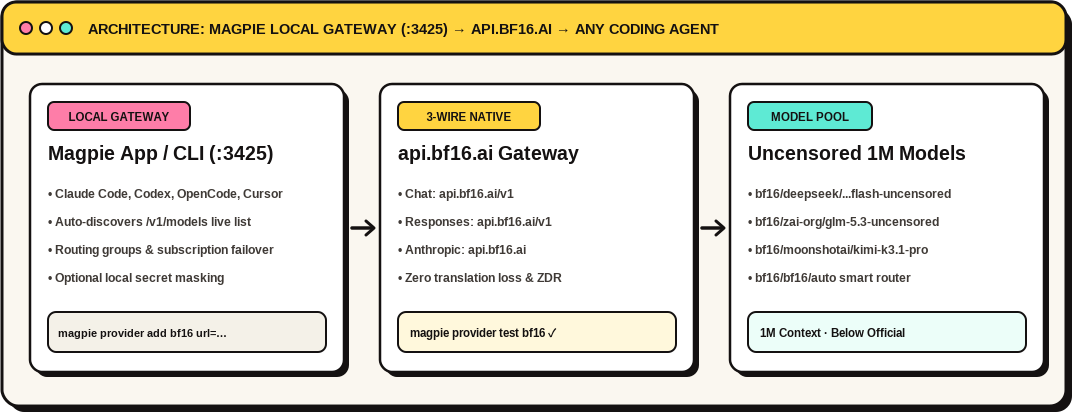
Magpie (yetone/magpie, 42k+ ★) unifies all of your coding subscriptions and pay-as-you-go API keys behind a single local app and localhost gateway (:3425), letting you assign any model to Claude Code, Codex, OpenCode, Cursor, or Hermes from one list — with routing groups and automatic failover when a subscription quota runs dry.
Because api.bf16.ai speaks all three wire protocols natively (OpenAI Chat Completions, OpenAI Responses, and Anthropic Messages) and publishes structured `/v1/models` capability metadata, adding bf16.ai as a custom provider in Magpie immediately discovers all live 1M-context uncensored models and passes `magpie provider test bf16` across every endpoint.
指令預設顯示 $BF16_API_KEY。登入並建立金鑰後會自動填入你的真實金鑰。
One-Command Magpie 3-Protocol Provider Setup & Verification
Registers bf16 in Magpie with native Chat, Responses, and Anthropic endpoints, auto-fetches all live models from api.bf16.ai/v1/models, and runs Magpie’s built-in 3-protocol health check.
export BF16_API_KEY="sk-bf16-v1-..."
magpie provider add bf16 \
  url=https://api.bf16.ai/v1 \
  responses=https://api.bf16.ai/v1 \
  anthropic=https://api.bf16.ai \
  key="$BF16_API_KEY"
magpie provider test bf16- 1
設定你的 bf16.ai API 金鑰
Register bf16 once with https://api.bf16.ai/v1 for Chat/Responses and https://api.bf16.ai for Anthropic Messages. Magpie automatically queries https://api.bf16.ai/v1/models and exposes all active 1M-context models.
magpie provider add bf16 \ url=https://api.bf16.ai/v1 \ responses=https://api.bf16.ai/v1 \ anthropic=https://api.bf16.ai \ key="$BF16_API_KEY" - 2
填入 bf16.ai 端點與 1M 免審查模型
使用頁面提供的 Base URL 與 API 金鑰,即可立即存取全系 1M 上下文免審查模型(含零留存政策)。
magpie provider test bf16
magpie claude bf16/zai-org/glm-5.3-uncensored
magpie codex bf16/deepseek/deepseek-v4.1-flash-uncensored
關鍵參數核對清單
bf16https://api.bf16.ai/v1https://api.bf16.ai/v1Optional — lets Codex hit bf16 /v1/responses natively.
https://api.bf16.aiOptional — lets Claude Code hit bf16 /v1/messages natively without translation.
sk-bf16-v1-••••••••••••推薦模型分層配置
架構規劃使用旗艦模型,高頻子任務與螢幕截圖使用 Flash 模型以節省開銷。
| 工作流角色 | 模型 ID | 選型說明 | USD / 1M Tokens |
|---|---|---|---|
| Fast Coding, Claude Code Subagents & Vision | bf16/deepseek/deepseek-v4.1-flash-uncensored | High-speed 1M-context coding and screenshot analysis — great as a pay-as-you-go fallback behind subscription pools. | $0.26 in / $0.045 cached / $1.00 out |
| Flagship Engineering & Deep Debugging | bf16/zai-org/glm-5.3-uncensored | Native Anthropic Messages + OpenAI Responses support for complex Claude Code and Codex refactoring sessions. | $1.35 in / $0.25 cached / $4.20 out |
| Zero-Markup Smart Router Fallback | bf16/bf16/auto | Automatically routes to the healthiest uncensored endpoint inside Magpie failover groups. | Model rate · $0 router fee |
如何確認設定成功
- 發送測試訊息後,可在 bf16.ai 控制台請求紀錄中即時查看計費與狀態。
- curl https://api.bf16.ai/v1/models -H "Authorization: Bearer $BF16_API_KEY"
生產環境護欄與預算隔離
- Bind all three URLs (`url`, `responses`, `anthropic`) so Claude Code and Codex use bf16.ai natively instead of translating through Chat Completions.
- Create a dedicated bf16.ai API key with a daily USD cap specifically for your Magpie failover pool so runaway agent loops cannot exhaust your balance.