OpenBot
Local-first desktop workspace and Linux daemon for persistent multi-agent teammates, embedded browser control, and Computer Use.
https://api.bf16.ai/v1openai-completions適用對象
Developers running always-on OpenBot teammates, channel queues, and browser workflows who want local OS permissions — not model refusals — to govern execution.
架構原理與接入優勢
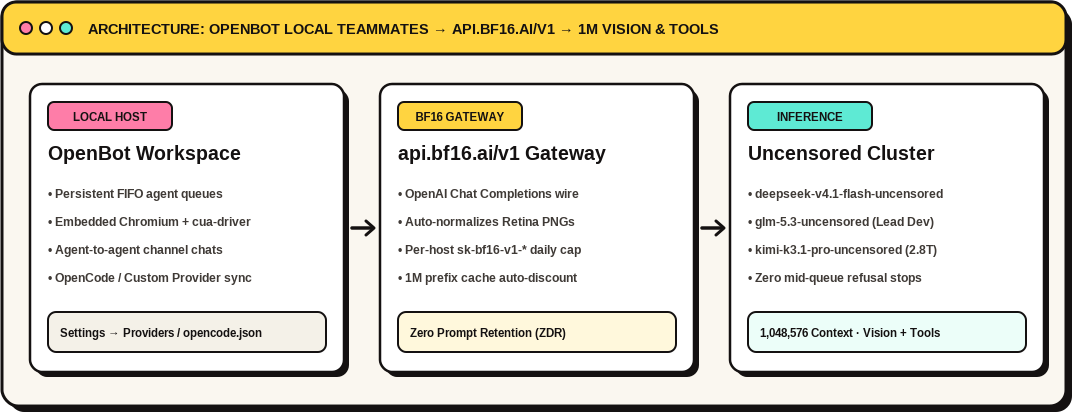
OpenBot (nightly-labs/openbot) gives each AI teammate a persistent workspace, FIFO message queue, agent-to-agent delegation channel, embedded Chromium browser, and optional cua-driver Computer Use on macOS, Windows, and Linux. Because OpenBot agents execute multi-step shell and browser tasks autonomously after your explicit workspace consent, a single false-positive safety refusal on step 15 of a staging QA audit, log triage run, or legacy binary inspection stalls the entire teammate queue.
Pointing OpenBot at bf16.ai separates local host security from model censorship. You can connect bf16.ai directly as a custom OpenAI-compatible endpoint inside OpenBot Settings → Providers, or bridge it through your local OpenCode / Hermes CLI configuration so every teammate in OpenBot inherits 1M-token context windows, structured tool calling, and native screenshot vision.
When an OpenBot teammate captures a Retina desktop or browser screenshot via cua-driver, bf16.ai automatically normalizes oversized inline PNG payloads in memory so multi-turn visual sessions never hit payload-size errors and keep prefix-cache hits intact.
指令預設顯示 $BF16_API_KEY。登入並建立金鑰後會自動填入你的真實金鑰。
One-Command OpenBot + OpenCode Bridge Setup
Backs up any existing ~/.config/opencode/opencode.json, merges the bf16 provider with all five 1M-context uncensored models (including Vision metadata for OpenBot screenshots), writes BF16_API_KEY to ~/.bf16.env (chmod 600), and verifies live connectivity.
export BF16_API_KEY="sk-bf16-v1-..."
mkdir -p ~/.config/opencode && umask 077 && printf 'BF16_API_KEY=%s\n' "$BF16_API_KEY" > ~/.bf16.env
node -e '
const fs = require("fs"), os = require("os"), path = require("path");
const file = path.join(os.homedir(), ".config/opencode/opencode.json");
let cfg = { "$schema": "https://opencode.ai/config.json", provider: {} };
if (fs.existsSync(file)) {
  fs.copyFileSync(file, file + ".bak");
  try { cfg = JSON.parse(fs.readFileSync(file, "utf8")); } catch {}
}
cfg.provider = cfg.provider || {};
cfg.provider.bf16 = {
  npm: "@ai-sdk/openai-compatible",
  name: "bf16.ai",
  options: { baseURL: "https://api.bf16.ai/v1", apiKey: "{env:BF16_API_KEY}" },
  models: {
    "deepseek/deepseek-v4.1-flash-uncensored": { name: "DeepSeek V4.1 Flash (Uncensored)", attachment: true, reasoning: true, tool_call: true, modalities: { input: ["text", "image"], output: ["text"] }, limit: { context: 1048576, output: 65536 } },
    "zai-org/glm-5.3-flash-uncensored": { name: "GLM-5.3 Flash (Uncensored)", attachment: true, reasoning: true, tool_call: true, modalities: { input: ["text", "image"], output: ["text"] }, limit: { context: 1048576, output: 65536 } },
    "zai-org/glm-5.3-uncensored": { name: "GLM-5.3 Flagship (Uncensored)", reasoning: true, tool_call: true, modalities: { input: ["text"], output: ["text"] }, limit: { context: 1048576, output: 131072 } },
    "moonshotai/kimi-k3.1-pro-uncensored": { name: "Kimi K3.1 Pro 2.8T (Uncensored)", attachment: true, reasoning: true, tool_call: true, modalities: { input: ["text", "image"], output: ["text"] }, limit: { context: 1048576, output: 131072 } }
  }
};
fs.writeFileSync(file, JSON.stringify(cfg, null, 2) + "\n");
console.log("Updated " + file);
' && curl -fsS "https://api.bf16.ai/v1/models" -H "Authorization: Bearer $BF16_API_KEY" | head -c 240 && echo ""- 1
Add bf16.ai as a Custom OpenAI-Compatible Provider in OpenBot
Open OpenBot Desktop (or openbot.run/app connected to your self-hosted server), go to Settings → Providers, add a Custom OpenAI-Compatible endpoint, set Base URL to https://api.bf16.ai/v1, and paste your key below.
Base URL: https://api.bf16.ai/v1 API Key: $BF16_API_KEY - 2
Assign Per-Teammate Models & Context Compaction
Edit your OpenBot agent card and select deepseek/deepseek-v4.1-flash-uncensored for browser/routine workers or zai-org/glm-5.3-uncensored for engineering leads. OpenBot reads the 1,048,576-token window directly from GET /v1/models so context compaction triggers only near 1M tokens.
- 3
Optional: Run OpenBot Headless in Docker with bf16 Environment
When running OpenBot on a home server or VPS with Docker, keep the default seccomp sandbox enabled and pass BF16_API_KEY into the container environment.
curl -fsSLO https://raw.githubusercontent.com/nightly-labs/openbot/main/docker/seccomp.json
docker run -d --name openbot --restart unless-stopped \
  --security-opt seccomp=seccomp.json --security-opt no-new-privileges:true \
  --shm-size 1g --stop-timeout 60 -v openbot-data:/data \
  -e BF16_API_KEY="$BF16_API_KEY" \
  ghcr.io/nightly-labs/openbot:latest
關鍵參數核對清單
OpenAI-Compatible (Custom Endpoint)bf16.ai Uncensored Clusterhttps://api.bf16.ai/v1Include /v1 suffix so /chat/completions and /models auto-discovery resolve.
sk-bf16-v1-••••••••••••Use a dedicated per-host key with a daily USD spend cap.
deepseek/deepseek-v4.1-flash-uncensored1M context · Vision + Tools · $0.26 / $1.00 per 1M tokens.
zai-org/glm-5.3-uncensored1M context · Flagship multi-file code & security analysis.
推薦模型分層配置
架構規劃使用旗艦模型,高頻子任務與螢幕截圖使用 Flash 模型以節省開銷。
| 工作流角色 | 模型 ID | 選型說明 | USD / 1M Tokens |
|---|---|---|---|
| Browser & Computer-Use Loop (Default) | deepseek/deepseek-v4.1-flash-uncensored | Fast tool dispatch + native image input for embedded browser and cua-driver desktop screenshots across 30+ step queues. | $0.26 in / $0.045 cached / $1.00 out |
| Lead Teammate / Codebase Refactoring | zai-org/glm-5.3-uncensored | High tool-schema discipline for multi-file edits, security code reviews, and delegating tasks across channel chats. | $1.35 in / $0.25 cached / $4.20 out |
| 2.8T Visual Architecture & Long Research | moonshotai/kimi-k3.1-pro-uncensored | Flagship multimodal reasoning when teammates synthesize 1M-token repositories alongside complex UI mockups or diagrams. | $1.95 in / $0.28 cached / $6.90 out |
如何確認設定成功
- Open the model picker on any OpenBot teammate and confirm deepseek/deepseek-v4.1-flash-uncensored and zai-org/glm-5.3-uncensored appear with 1M context.
- Send a test task in an OpenBot channel; confirm the settled call appears in bf16.ai/dashboard/logs within seconds.
- curl https://api.bf16.ai/v1/models -H "Authorization: Bearer $BF16_API_KEY"
生產環境護欄與預算隔離
- OpenBot teammates run with full workspace access after initial consent — always run untrusted targets inside the Docker container or a dedicated VM user.
- Mint a dedicated sk-bf16-v1-* key for OpenBot in /dashboard/keys with a Daily Spend Cap (for example $5.00/day) so a stuck FIFO queue or browser retry loop cannot drain your balance.
- Keep human approval gates enabled for external emails, git pushes to production remotes, and any financial actions.
常見錯誤
還沒安裝?
curl -fsSL https://raw.githubusercontent.com/nightly-labs/openbot/main/scripts/install-server.sh | sudo bash