OpenClaw
提供非互動式快速導引流程的個人代理。
https://api.bf16.ai/v1openai-completions適用對象
希望由代理權限規則(而非模型本身拒答)決定可執行動作的使用者。
架構原理與接入優勢
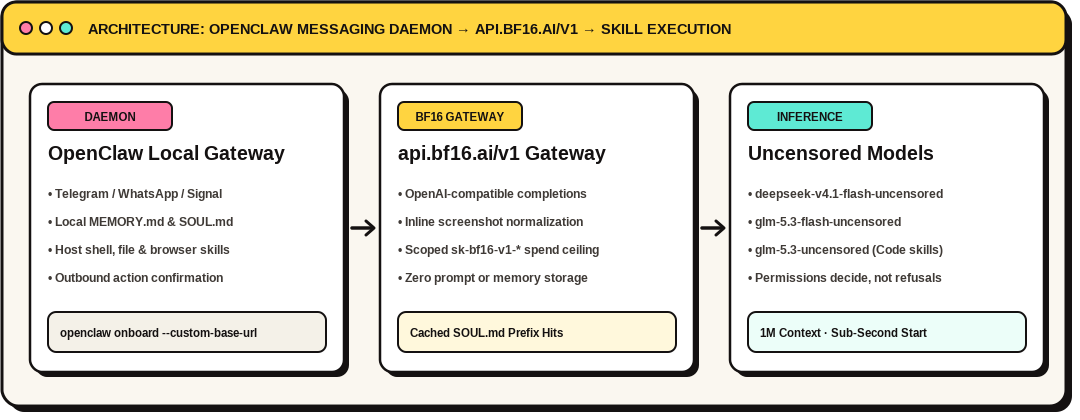
OpenClaw runs as a local-first personal AI daemon that connects your messaging channels (Telegram, WhatsApp, Discord, Slack, Signal) to local shell, calendar, file, and browser skills governed by your local SOUL.md and permission rules.
Standard cloud APIs frequently reject benign personal automation messages containing system logs, medical lab PDFs, security alerts, or raw legal contracts. Routing OpenClaw through bf16.ai ensures your daemon executes every authorized skill while your local OpenClaw approval policy stays in complete control of outgoing messages and side effects.
指令預設顯示 $BF16_API_KEY。登入並建立金鑰後會自動填入你的真實金鑰。
One-Command OpenClaw Non-Interactive Setup
Installs OpenClaw if missing, configures bf16.ai as the custom OpenAI-compatible provider with 1M-context DeepSeek V4.1 Flash Uncensored, and verifies gateway connectivity.
export BF16_API_KEY="sk-bf16-v1-..."
command -v openclaw >/dev/null 2>&1 || npm install -g openclaw
openclaw onboard --non-interactive --accept-risk \
  --auth-choice custom-api-key \
  --custom-provider-id bf16 \
  --custom-compatibility openai \
  --custom-base-url https://api.bf16.ai/v1 \
  --custom-api-key "$BF16_API_KEY" \
  --custom-model-id deepseek/deepseek-v4.1-flash-uncensored \
  --skip-health
curl -fsS "https://api.bf16.ai/v1/models" -H "Authorization: Bearer $BF16_API_KEY" >/dev/null && echo "bf16.ai connected to OpenClaw."- 1
匯出你的 API 金鑰
登入後頁面會自動填入你的真實金鑰;點擊複製即可貼上執行。
export BF16_API_KEY=sk-bf16-v1-... - 2
一行指令完成 bf16 串接
openclaw onboard --non-interactive --accept-risk \
  --auth-choice custom-api-key \
  --custom-provider-id bf16 \
  --custom-compatibility openai \
  --custom-base-url https://api.bf16.ai/v1 \
  --custom-api-key "$BF16_API_KEY" \
  --custom-model-id deepseek/deepseek-v4.1-flash-uncensored \
  --skip-health
關鍵參數核對清單
custom-api-keyopenaihttps://api.bf16.ai/v1Must end with /v1.
deepseek/deepseek-v4.1-flash-uncensored1M context · Vision + fast skill execution.
推薦模型分層配置
架構規劃使用旗艦模型,高頻子任務與螢幕截圖使用 Flash 模型以節省開銷。
| 工作流角色 | 模型 ID | 選型說明 | USD / 1M Tokens |
|---|---|---|---|
| Messaging & Daily Skills (Default) | deepseek/deepseek-v4.1-flash-uncensored | Sub-second first-token feel in Telegram/WhatsApp with native image input and $0.045/1M prefix cache hits on SOUL.md + MEMORY.md. | $0.26 in / $0.045 cached / $1.00 out |
| Complex Code & System Administration | zai-org/glm-5.3-uncensored | Highest multi-step shell and file-editing accuracy when invoking engineering skills. | $1.35 in / $0.25 cached / $4.20 out |
如何確認設定成功
- OpenClaw 顯示自訂供應商已成功連線。
- curl https://api.bf16.ai/v1/models -H "Authorization: Bearer $BF16_API_KEY"
生產環境護欄與預算隔離
- Keep OpenClaw confirmation prompts turned ON for outgoing messages to third parties, destructive shell commands, and payment skills (Decision 2.7).
- Scope a dedicated OpenClaw key in /dashboard/keys with a daily USD ceiling.