Crush (Charm)
Charms LSP-fähiger Terminal-Coding-Agent (charmbracelet/crush) — in wenigen Zeilen crushrc oder über Catwalk direkt mit 1M-Modellen auf bf16.ai verbinden.
https://api.bf16.ai/v1openai-completionsFür wen gedacht
Terminal-Entwickler auf macOS, Linux und Windows, die 1M-Kontext ohne Fehlablehnungen und mit strenger ZDR benötigen.
Architektur & Zusammenspiel mit bf16.ai
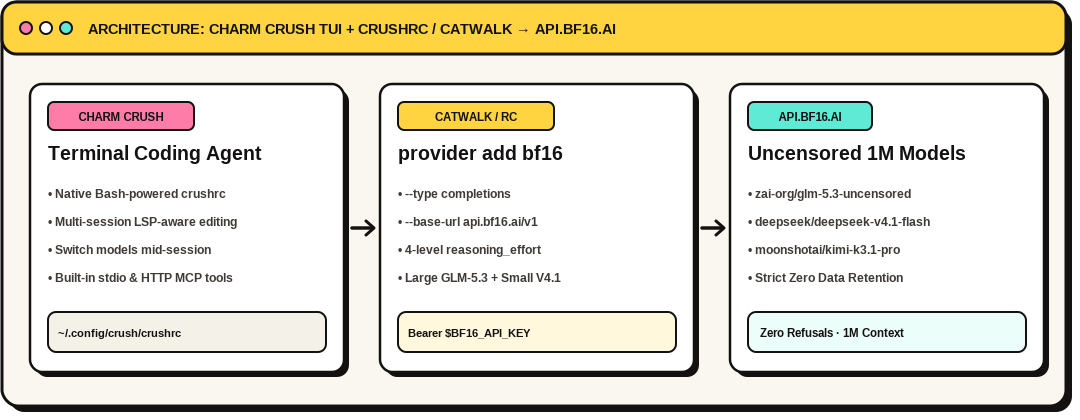
Crush (charmbracelet/crush, 29k+ ★) is Charm’s cross-platform terminal coding agent with built-in LSP diagnostics, multi-session project contexts, mid-session model switching, and MCP tool support.
Modern Crush uses a built-in Bash interpreter (`~/.config/crush/crushrc` or per-project `./.crushrc`) so you can register `bf16` with a single `provider add bf16 --type completions` block and pull your key cleanly from `$BF16_API_KEY` or a password manager.
We have also submitted a native `bf16` provider with automated catalog sync to Charm’s Catwalk database (`charmbracelet/catwalk#790`) — pairing GLM-5.3 Flagship as large model and DeepSeek V4.1 Flash as small model with 1M context and `low`/`medium`/`high`/`max` reasoning effort.
In den Befehlen steht $BF16_API_KEY. Melden Sie sich an, um Ihren eigenen Schlüssel automatisch einzusetzen.
Append bf16.ai Provider & 1M Models to ~/.config/crush/crushrc
Creates ~/.config/crush/crushrc (preserving existing lines), registers bf16 with GLM-5.3 Flagship and DeepSeek V4.1 Flash, and verifies your API key.
export BF16_API_KEY="sk-bf16-v1-..."
mkdir -p "$HOME/.config/crush"
cat <<'EOF' >> "$HOME/.config/crush/crushrc"

# bf16.ai — Uncensored 1M-context models (Strict ZDR)
provider add bf16 --type completions --base-url "https://api.bf16.ai/v1" --api-key "$BF16_API_KEY"
model add bf16/zai-org/glm-5.3-uncensored --name "GLM-5.3 Flagship (Uncensored)" --context-window 1048576
model add bf16/deepseek/deepseek-v4.1-flash-uncensored --name "DeepSeek V4.1 Flash (Uncensored)" --context-window 1048576
EOF
curl https://api.bf16.ai/v1/models -H "Authorization: Bearer $BF16_API_KEY"- 1
bf16.ai API-Schlüssel konfigurieren
Create an API key at bf16.ai/dashboard/keys and export `BF16_API_KEY` in `~/.zshrc` or `~/.bashrc` so Crush’s `crushrc` reads it securely at startup.
export BF16_API_KEY="sk-bf16-v1-..." - 2
bf16.ai Endpunkt & 1M unzensierte Modelle verbinden
Trage die angezeigte Base URL und deinen API-Schlüssel ein, um sofort 1M-Kontext-Modelle mit Zero Data Retention (ZDR) zu nutzen.
~/.config/crush/crushrcprovider add bf16 \ --type completions \ --base-url "https://api.bf16.ai/v1" \ --api-key "$BF16_API_KEY" model add bf16/zai-org/glm-5.3-uncensored \ --name "GLM-5.3 Flagship (Uncensored)" \ --context-window 1048576 model add bf16/deepseek/deepseek-v4.1-flash-uncensored \ --name "DeepSeek V4.1 Flash (Uncensored)" \ --context-window 1048576 - 3
Launch Crush & Switch to bf16.ai
Start `crush` in any Git repository, open the model picker, and select GLM-5.3 Flagship or DeepSeek V4.1 Flash under `bf16`.
crush
Feld-für-Feld-Referenz
provider add bf16 --type completionshttps://api.bf16.ai/v1$BF16_API_KEYzai-org/glm-5.3-uncensored (Large) · deepseek/deepseek-v4.1-flash-uncensored (Small)1,048,576 context window · toggleable reasoning_effort
Empfohlene Modell-Aufteilung
Planung über Flagship-Modelle, schnelle Subtasks und Screenshots über Flash-Modelle.
| Rolle | Modell-ID | Einsatzgrund | USD / 1M Tokens |
|---|---|---|---|
| Crush Large Model (Primary Reasoning & Refactoring) | zai-org/glm-5.3-uncensored | 1M context, 131K max output, deterministic LSP-assisted edits, and zero refusals on security or low-level systems code. | $1.35 in / $0.25 cached / $4.20 out |
| Crush Small Model (Fast Search, Summaries & Vision) | deepseek/deepseek-v4.1-flash-uncensored | 1M context at ~155 tok/s with image support and $0.045/1M cached prompt reads. | $0.26 in / $0.045 cached / $1.00 out |
| Long-Context Multimodal Analysis | moonshotai/kimi-k3.1-pro-uncensored | Frontier 1M multimodal model for cross-file architectural audits and screenshot debugging. | $1.95 in / $0.28 cached / $6.90 out |
So prüfen Sie, ob es funktioniert
- Nach dem ersten Test erscheint der Aufruf sofort im bf16.ai Request-Log.
- curl https://api.bf16.ai/v1/models -H "Authorization: Bearer $BF16_API_KEY"
Produktions-Guardrails & Budget-Limits
- Avoid hardcoding raw `sk-bf16-...` keys inside project-local `./.crushrc` files; always reference `$BF16_API_KEY` or a secret manager CLI.
- Use DeepSeek V4.1 Flash as your Crush small model for fast title generation and file summarization while reserving GLM-5.3 Flagship for complex edits.