Kilo Code
Open-source VS Code and JetBrains AI coding orchestrator wired directly to bf16.ai 1M-context uncensored models.
https://api.bf16.ai/v1openai-completionsFür wen gedacht
Engineers using Kilo Code in VS Code or JetBrains IDEs who want transparent USD per-token billing and uncensored security/systems coding.
Architektur & Zusammenspiel mit bf16.ai
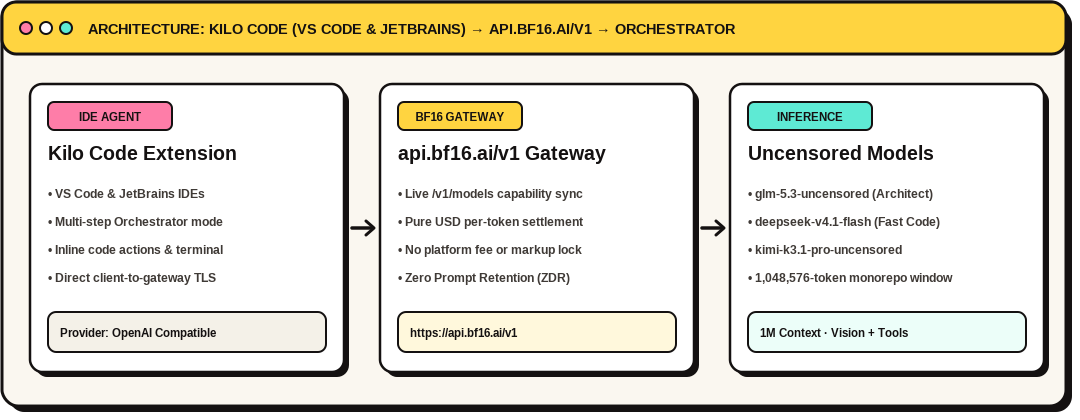
Kilo Code combines Cline and Roo Code capabilities into a polished VS Code and JetBrains agent extension with Orchestrator workflows, inline code actions, and per-profile provider routing.
Connecting Kilo Code to `https://api.bf16.ai/v1` bypasses platform markup and moderation bottlenecks, giving Orchestrator subtasks direct access to 1M-context `zai-org/glm-5.3-uncensored`, `moonshotai/kimi-k3.1-pro-uncensored`, and `deepseek/deepseek-v4.1-flash-uncensored`.
In den Befehlen steht $BF16_API_KEY. Melden Sie sich an, um Ihren eigenen Schlüssel automatisch einzusetzen.
One-Command Kilo Code Endpoint Smoke Test
Verifies your bf16.ai API key and lists live model IDs ready to select in Kilo Code’s OpenAI Compatible dropdown.
export BF16_API_KEY="sk-bf16-v1-..."
curl https://api.bf16.ai/v1/models -H "Authorization: Bearer $BF16_API_KEY"- 1
Configure OpenAI Compatible Provider in Kilo Code
Open Kilo Code Settings → Providers, switch API Provider to "OpenAI Compatible", enter Base URL https://api.bf16.ai/v1, paste your API key, and select zai-org/glm-5.3-uncensored from the fetched model list.
API Provider: OpenAI Compatible Base URL: https://api.bf16.ai/v1 API Key: $BF16_API_KEY Model: zai-org/glm-5.3-uncensored - 2
Confirm 1M Context Window & Prompt Caching
Verify Context Window reads 1048576 under Model Configuration so large monorepo files are never truncated early.
Feld-für-Feld-Referenz
OpenAI Compatiblehttps://api.bf16.ai/v1sk-bf16-v1-••••••••••••zai-org/glm-5.3-uncensoredContext Window: 1,048,576 · Enable R1/Reasoning format if prompted.
Empfohlene Modell-Aufteilung
Planung über Flagship-Modelle, schnelle Subtasks und Screenshots über Flash-Modelle.
| Rolle | Modell-ID | Einsatzgrund | USD / 1M Tokens |
|---|---|---|---|
| Orchestrator & Architect | zai-org/glm-5.3-uncensored | Accurate task decomposition and multi-file edits. | $1.35 in / $0.25 cached / $4.20 out |
| Fast Code & Screenshot Tasks | deepseek/deepseek-v4.1-flash-uncensored | Low-latency execution + native image input. | $0.26 in / $0.045 cached / $1.00 out |
So prüfen Sie, ob es funktioniert
- Model dropdown in Kilo Code populates automatically from GET /v1/models.
- First task streams reasoning + tool calls and logs in bf16.ai/dashboard/logs.
- curl https://api.bf16.ai/v1/models -H "Authorization: Bearer $BF16_API_KEY"
Produktions-Guardrails & Budget-Limits
- Pin auto-execution terminal whitelists to test runners (`pnpm test`, `pytest`, `cargo check`) rather than wildcard shell commands.