Paseo
Multi-Host-Agent-Daemon & Desktop/Mobile-Workspace (getpaseo/paseo) — mit unserem offiziellen bf16-paseo-plugin für Live-Guthaben, Tier und Nebenläufigkeit.
https://api.bf16.ai/v1openai-completionsFür wen gedacht
Entwickler, die Claude Code, Codex und OpenCode auf Paseo-Daemons mit Live-/v1/me-Monitoring betreiben.
Architektur & Zusammenspiel mit bf16.ai
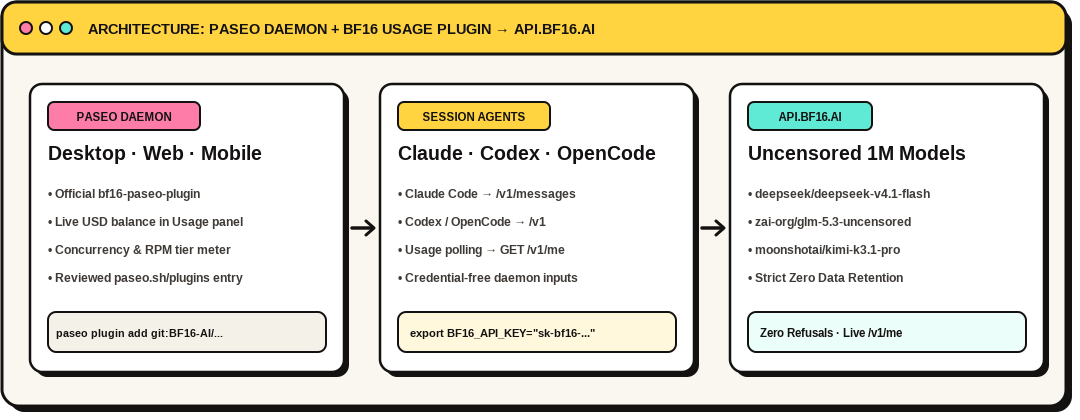
Paseo (getpaseo/paseo, 25k+ ★) runs a persistent agent daemon across your workstation and remote servers, letting you drive coding agents from desktop, web, and mobile clients with a unified Usage panel and reviewed plugin ecosystem (paseo.sh/plugins).
Our official open-source plugin (`BF16-AI/bf16-paseo-plugin`, submitted to the reviewed Paseo registry) registers `bf16` as a native Usage Source querying `GET https://api.bf16.ai/v1/me` — surfacing available prepaid USD balance, rate-limit tier, live concurrency bar (`in_use / limit`), RPM limit, and next-tier unlock progress with zero credentials stored on disk.
Export `BF16_API_KEY` in the Paseo daemon environment and point your Claude Code (`ANTHROPIC_BASE_URL=https://api.bf16.ai`), Codex, or OpenCode sessions at bf16.ai so long unattended mobile-approved runs finish with 1M context and strict ZDR.
In den Befehlen steht $BF16_API_KEY. Melden Sie sich an, um Ihren eigenen Schlüssel automatisch einzusetzen.
Install the Official bf16.ai Paseo Plugin & Verify API Key
Exports your bf16.ai key, installs BF16-AI/bf16-paseo-plugin on your active Paseo daemon, and verifies live /v1/models and /v1/me access.
export BF16_API_KEY="sk-bf16-v1-..."
paseo plugin add git:BF16-AI/bf16-paseo-plugin
curl https://api.bf16.ai/v1/models -H "Authorization: Bearer $BF16_API_KEY"- 1
bf16.ai API-Schlüssel konfigurieren
Run `paseo plugin add git:BF16-AI/bf16-paseo-plugin` (or paste `git:BF16-AI/bf16-paseo-plugin` in Settings → Plugins → Plugin source). Once approved on paseo.sh/plugins, you can also install via `paseo plugin add bf16-ai/bf16-usage`.
paseo plugin add git:BF16-AI/bf16-paseo-plugin - 2
bf16.ai Endpunkt & 1M unzensierte Modelle verbinden
Trage die angezeigte Base URL und deinen API-Schlüssel ein, um sofort 1M-Kontext-Modelle mit Zero Data Retention (ZDR) zu nutzen.
export BF16_API_KEY="sk-bf16-v1-..." # Verify /v1/me responds with your live balance & tier curl -sS https://api.bf16.ai/v1/me -H "Authorization: Bearer $BF16_API_KEY" - 3
Point Paseo Sessions (Claude Code / Codex / OpenCode) at bf16.ai
Configure your agent environment overrides on the Paseo daemon to route inference through api.bf16.ai using the same key.
# Claude Code sessions on Paseo
export ANTHROPIC_BASE_URL="https://api.bf16.ai"
export ANTHROPIC_AUTH_TOKEN="$BF16_API_KEY"
export ANTHROPIC_MODEL="zai-org/glm-5.3-uncensored"

# Codex / OpenCode sessions on Paseo
export OPENAI_BASE_URL="https://api.bf16.ai/v1"
export OPENAI_API_KEY="$BF16_API_KEY"
Feld-für-Feld-Referenz
git:BF16-AI/bf16-paseo-pluginBF16_API_KEY=sk-bf16-v1-...https://api.bf16.ai/v1/me (USD balance, tier, concurrency, RPM)https://api.bf16.ai (Anthropic) · https://api.bf16.ai/v1 (OpenAI)Single key shared across Usage panel and all Paseo sessions
Empfohlene Modell-Aufteilung
Planung über Flagship-Modelle, schnelle Subtasks und Screenshots über Flash-Modelle.
| Rolle | Modell-ID | Einsatzgrund | USD / 1M Tokens |
|---|---|---|---|
| Fast Remote Daemon Sessions & Mobile Approvals | deepseek/deepseek-v4.1-flash-uncensored | 1M context, ~155 tok/s streaming, multimodal vision, and $0.045/1M cached input keep long Paseo sessions responsive over mobile connections. | $0.26 in / $0.045 cached / $1.00 out |
| Deep Architecture & Security Refactors | zai-org/glm-5.3-uncensored | Flagship 1M reasoning and deterministic tool calling on both native Anthropic /v1/messages and OpenAI /v1/chat/completions. | $1.35 in / $0.25 cached / $4.20 out |
| Zero-Markup Coding Smart Router | bf16/auto:coding | Routes automatically to the highest code-adherence uncensored model without extra router fees. | Model rate · $0 router fee |
So prüfen Sie, ob es funktioniert
- Nach dem ersten Test erscheint der Aufruf sofort im bf16.ai Request-Log.
- curl https://api.bf16.ai/v1/models -H "Authorization: Bearer $BF16_API_KEY"
Produktions-Guardrails & Budget-Limits
- Paseo’s usage plugin inspects `BF16_API_KEY` from the daemon host environment only; never commit API keys into repository files.
- Set a daily spend limit on a dedicated key at /dashboard/keys when running multiple remote Paseo daemons concurrently.