SillyTavern
Lokales Frontend für interaktive Fiktion, World-Building, Lorebooks und volle Prompt-Kontrolle.
https://api.bf16.ai/v1openai-completionsFür wen gedacht
Autoren und Game-Designer, die 1M-Kontext-Lorebooks ohne moralisierende Abbrüche benötigen.
Architektur & Zusammenspiel mit bf16.ai
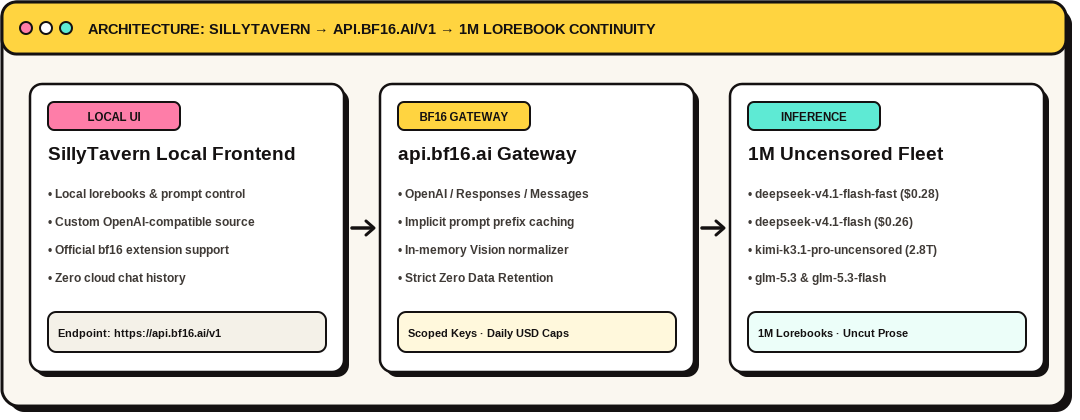
SillyTavern gives writers and game designers total control over system prompts, Lorebooks/World Info, sampler parameters, and local chat history. Stock commercial APIs routinely derail dramatic fiction, historical dialogue, or dark fantasy scenes with out-of-character refusal lectures.
bf16.ai delivers 1M-token context across every model — letting entire multi-book lorebooks stay cached at $0.045–$0.28/1M tokens — paired with strict zero prompt retention so your manuscripts and local sessions stay strictly on your own machine.
In den Befehlen steht $BF16_API_KEY. Melden Sie sich an, um Ihren eigenen Schlüssel automatisch einzusetzen.
Verify Your Key & Model List for SillyTavern
Confirms your API key and displays all active 1M-context model IDs ready to select in SillyTavern.
export BF16_API_KEY="sk-bf16-v1-..."
curl https://api.bf16.ai/v1/models -H "Authorization: Bearer $BF16_API_KEY"- 1
bf16.ai API-Schlüssel konfigurieren
Click the plug icon in the top navigation bar, choose Chat Completion, and select Custom (OpenAI-compatible) as the Chat Completion Source.
- 2
bf16.ai Endpunkt & 1M unzensierte Modelle verbinden
Trage die angezeigte Base URL und deinen API-Schlüssel ein, um sofort 1M-Kontext-Modelle mit Zero Data Retention (ZDR) zu nutzen.
Custom Endpoint: https://api.bf16.ai/v1 Custom API Key: $BF16_API_KEY Model ID: moonshotai/kimi-k3.1-pro-uncensored - 3
Optional: Install the Official bf16.ai SillyTavern Extension
Open Extensions → Install Extension and paste https://github.com/BF16-AI/bf16-sillytavern-extension for one-click preset switching and live model catalog refresh.
Feld-für-Feld-Referenz
Custom (OpenAI-compatible)https://api.bf16.ai/v1sk-bf16-v1-••••••••••••moonshotai/kimi-k3.1-pro-uncensored (or deepseek/deepseek-v4.1-flash-uncensored-fast)Auto-populates when clicking Connect, or enter directly
Empfohlene Modell-Aufteilung
Planung über Flagship-Modelle, schnelle Subtasks und Screenshots über Flash-Modelle.
| Rolle | Modell-ID | Einsatzgrund | USD / 1M Tokens |
|---|---|---|---|
| Rich Literary Prose & 2.8T World-Building | moonshotai/kimi-k3.1-pro-uncensored | Nuanced long-horizon character consistency, rich literary voice, and 1M lorebook capacity. | $1.95 in / $0.28 cached / $6.90 out |
| Fast Multi-Turn Interactive Prototyping | deepseek/deepseek-v4.1-flash-uncensored-fast | Ultra-fast streaming and $0.055/1M cached lorebook reads for high-volume creative sessions. | $0.28 in / $0.055 cached / $1.12 out |
So prüfen Sie, ob es funktioniert
- Nach dem ersten Test erscheint der Aufruf sofort im bf16.ai Request-Log.
- curl https://api.bf16.ai/v1/models -H "Authorization: Bearer $BF16_API_KEY"
Produktions-Guardrails & Budget-Limits
- SillyTavern keeps all character cards and lorebooks on local disk; combined with bf16.ai ZDR, zero prompt text is persisted remotely.