T3 Code
Open-Source-Control-Plane für Coding-Agents auf Desktop, Web & Mobile (pingdotgg/t3code) — isolierte bf16.ai-Instanzen per CLAUDE_CONFIG_DIR und Env-Variablen.
https://api.bf16.aianthropic-messagesFür wen gedacht
Entwickler, die Worktree-Threads in T3 Code mit nativem /v1/messages und 1M-Kontext steuern.
Architektur & Zusammenspiel mit bf16.ai
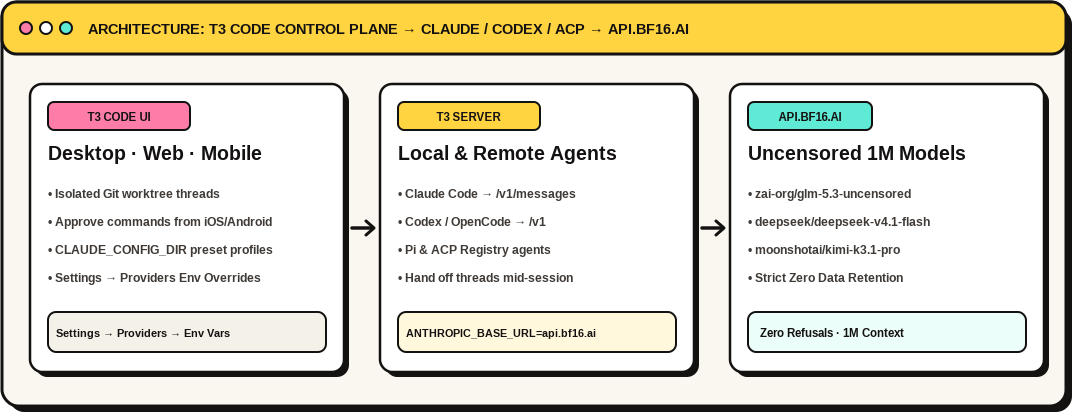
T3 Code (pingdotgg/t3code, 81k+ ★) is an MIT-licensed control plane that drives the coding agents installed on your machine (Claude Code, Codex, OpenCode, Pi, Cursor, and any ACP Registry agent) across desktop, web, and native iOS/Android apps with per-thread Git worktrees.
Because T3 Code natively supports multiple isolated provider instances (`CLAUDE_CONFIG_DIR` for Claude Code and per-instance **Environment variables** in Settings → Providers), you can add a dedicated **bf16.ai** Claude or Codex profile right alongside your existing subscriptions and switch or hand off threads at any time.
Pointing a T3 Code Claude instance at `ANTHROPIC_BASE_URL=https://api.bf16.ai` gives you native Anthropic Messages (`/v1/messages` + `/v1/messages/count_tokens`) with adaptive thinking, parallel tool calls, 1M context, strict ZDR, and zero false-positive refusals — even when approving runs remotely from your phone.
In den Befehlen steht $BF16_API_KEY. Melden Sie sich an, um Ihren eigenen Schlüssel automatisch einzusetzen.
Initialize an Isolated ~/.claude_bf16 Profile & Verify Endpoint
Creates a clean CLAUDE_CONFIG_DIR directory for your bf16.ai T3 Code Claude instance and runs a live API check against api.bf16.ai.
export BF16_API_KEY="sk-bf16-v1-..."
mkdir -p "$HOME/.claude_bf16"
curl https://api.bf16.ai/v1/models -H "Authorization: Bearer $BF16_API_KEY"- 1
bf16.ai API-Schlüssel konfigurieren
Keep your bf16.ai provider instance cleanly separated from any personal Claude or Codex subscription by creating a dedicated directory (e.g. `~/.claude_bf16`).
mkdir -p ~/.claude_bf16 - 2
bf16.ai Endpunkt & 1M unzensierte Modelle verbinden
Trage die angezeigte Base URL und deinen API-Schlüssel ein, um sofort 1M-Kontext-Modelle mit Zero Data Retention (ZDR) zu nutzen.
ANTHROPIC_BASE_URL=https://api.bf16.ai ANTHROPIC_AUTH_TOKEN=sk-bf16-v1-... ANTHROPIC_MODEL=zai-org/glm-5.3-uncensored ANTHROPIC_SMALL_FAST_MODEL=deepseek/deepseek-v4.1-flash-uncensored - 3
Optional: Wire Codex or OpenCode Instances in T3 Code
For Codex or OpenCode instances on the same T3 Code server, set OpenAI-compatible environment variables pointing to `https://api.bf16.ai/v1`.
OPENAI_BASE_URL=https://api.bf16.ai/v1
OPENAI_API_KEY=sk-bf16-v1-...
Feld-für-Feld-Referenz
~/.claude_bf16Keeps your bf16.ai preset isolated from your default Claude login
https://api.bf16.aiNo /v1 suffix — Claude Code appends /v1/messages automatically
sk-bf16-v1-...zai-org/glm-5.3-uncensoredEmpfohlene Modell-Aufteilung
Planung über Flagship-Modelle, schnelle Subtasks und Screenshots über Flash-Modelle.
| Rolle | Modell-ID | Einsatzgrund | USD / 1M Tokens |
|---|---|---|---|
| Primary T3 Code Claude Threads (Native /v1/messages) | zai-org/glm-5.3-uncensored | Full Anthropic Messages adaptive thinking + 1M context window for multi-file Git worktree diffs and code reviews. | $1.35 in / $0.25 cached / $4.20 out |
| High-Speed Parallel Threads & Mobile Approvals | deepseek/deepseek-v4.1-flash-uncensored | 1M context at ~155 tok/s with vision support and $0.045/1M cached prompt reads. | $0.26 in / $0.045 cached / $1.00 out |
| Zero-Markup Coding Router | bf16/auto:coding | Auto-routes threads to the highest code-adherence uncensored endpoint. | Model rate · $0 router fee |
So prüfen Sie, ob es funktioniert
- Nach dem ersten Test erscheint der Aufruf sofort im bf16.ai Request-Log.
- curl https://api.bf16.ai/v1/models -H "Authorization: Bearer $BF16_API_KEY"
Produktions-Guardrails & Budget-Limits
- Follow T3 Code’s security guidance: put `ANTHROPIC_AUTH_TOKEN` in **Environment variables**, never in Launch arguments.
- If running T3 Code on a remote host via T3 Connect, configure the environment variables on the target environment first.