ZeroClaw
Ultra-lightweight Rust multi-channel personal agent with OS-level sandboxing, cryptographic tool receipts, and event-driven SOPs.
https://api.bf16.ai/v1openai-completionsFür wen gedacht
Security-conscious engineers running ZeroClaw (zeroclaw-labs/zeroclaw) across Telegram, Matrix, Discord, or edge Linux hosts who want deterministic OS sandboxes instead of model refusals.
Architektur & Zusammenspiel mit bf16.ai
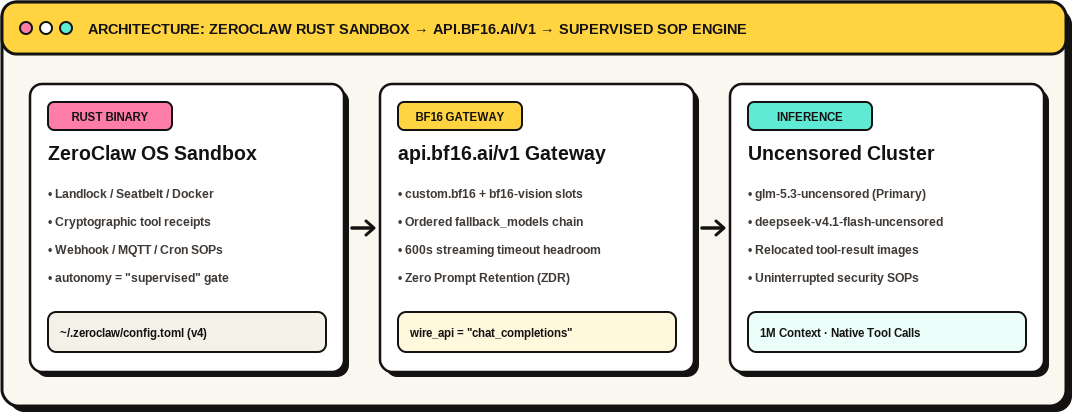
ZeroClaw (zeroclaw-labs/zeroclaw) replaces heavy Node.js agent stacks with a single Rust binary featuring OS-level sandboxes (Landlock, Bubblewrap, macOS Seatbelt, Docker), cryptographic tool receipts, and an event-triggered Standard Operating Procedure (SOP) engine driven by webhooks, MQTT, or cron.
Because ZeroClaw already enforces a strict local risk profile (supervised by default: medium-risk actions prompt for approval, high-risk actions blocked), model-side safety lectures only break automated SOP runs and security triage pipelines. ZeroClaw’s V4 TOML config can connect to bf16.ai either through its native [providers.models.anthropic.bf16] slot (preserving signed bf16sig_v1 thinking blocks) or [providers.models.custom.bf16] over Chat Completions with fallback_models.
In den Befehlen steht $BF16_API_KEY. Melden Sie sich an, um Ihren eigenen Schlüssel automatisch einzusetzen.
One-Command ZeroClaw ~/.zeroclaw/config.toml Setup
Backs up any existing ~/.zeroclaw/config.toml, writes a clean Schema v4 configuration with bf16 primary + Flash vision fallback and supervised autonomy, sets 0600 permissions, and verifies api.bf16.ai.
export BF16_API_KEY="sk-bf16-v1-..."
mkdir -p ~/.zeroclaw && [ -f ~/.zeroclaw/config.toml ] && cp ~/.zeroclaw/config.toml ~/.zeroclaw/config.toml.bak
umask 077 && cat <<EOF > ~/.zeroclaw/config.toml
schema_version = 4

[providers.models.custom.bf16]
uri = "https://api.bf16.ai/v1"
api_key = "$BF16_API_KEY"
model = "zai-org/glm-5.3-uncensored"
wire_api = "chat_completions"
timeout_secs = 600
max_tokens = 32768
fallback_models = ["deepseek/deepseek-v4.1-flash-uncensored"]

[providers.models.custom.bf16-vision]
uri = "https://api.bf16.ai/v1"
api_key = "$BF16_API_KEY"
model = "deepseek/deepseek-v4.1-flash-uncensored"
wire_api = "chat_completions"
vision = true
timeout_secs = 600

[multimodal]
vision_model_provider = "custom.bf16-vision"

[risk_profiles.default]
autonomy = "supervised"

[agents.main]
model_provider = "custom.bf16"
risk_profile = "default"
EOF
curl -fsS "https://api.bf16.ai/v1/models" -H "Authorization: Bearer $BF16_API_KEY" >/dev/null && echo "ZeroClaw config written to ~/.zeroclaw/config.toml"- 1
Write Schema v4 Provider & Agent Blocks
Ensure schema_version = 4 is the first line, configure custom.bf16 for primary reasoning and custom.bf16-vision for multimodal turns, and bind agents.main to supervised autonomy.
~/.zeroclaw/config.tomlschema_version = 4 [providers.models.custom.bf16] uri = "https://api.bf16.ai/v1" api_key = "$BF16_API_KEY" model = "zai-org/glm-5.3-uncensored" wire_api = "chat_completions" timeout_secs = 600 fallback_models = ["deepseek/deepseek-v4.1-flash-uncensored"] [providers.models.custom.bf16-vision] uri = "https://api.bf16.ai/v1" api_key = "$BF16_API_KEY" model = "deepseek/deepseek-v4.1-flash-uncensored" wire_api = "chat_completions" vision = true [multimodal] vision_model_provider = "custom.bf16-vision" [risk_profiles.default] autonomy = "supervised" [agents.main] model_provider = "custom.bf16" risk_profile = "default" - 2
Launch Interactive Chat or Install Background Service
Test the agent interactively first, then register ZeroClaw with launchctl / systemd if you run multi-channel webhooks.
zeroclaw agent -a main
# Optional background daemon:
# zeroclaw service install && zeroclaw service start
Feld-für-Feld-Referenz
4Must be line 1 of ~/.zeroclaw/config.toml to avoid legacy migration warnings.
[providers.models.custom.bf16]https://api.bf16.ai/v1sk-bf16-v1-••••••••••••zai-org/glm-5.3-uncensored → ["deepseek/deepseek-v4.1-flash-uncensored"]600Raises both HTTP header timeout and streaming idle bound above 300s.
Empfohlene Modell-Aufteilung
Planung über Flagship-Modelle, schnelle Subtasks und Screenshots über Flash-Modelle.
| Rolle | Modell-ID | Einsatzgrund | USD / 1M Tokens |
|---|---|---|---|
| Primary Supervised Agent (custom.bf16) | zai-org/glm-5.3-uncensored | Deterministic tool-call formatting for ZeroClaw SOP steps, shell execution, and security log analysis. | $1.35 in / $0.25 cached / $4.20 out |
| Multimodal & Fast Channel Replies (custom.bf16-vision) | deepseek/deepseek-v4.1-flash-uncensored | Handles [multimodal] vision_model_provider routing and rapid Telegram/Matrix turns. | $0.26 in / $0.045 cached / $1.00 out |
So prüfen Sie, ob es funktioniert
- Run zeroclaw agent -a main and send a one-line prompt; verify cryptographic tool receipts execute without config migration warnings.
- Confirm the settled turn appears in bf16.ai/dashboard/logs.
- curl https://api.bf16.ai/v1/models -H "Authorization: Bearer $BF16_API_KEY"
Produktions-Guardrails & Budget-Limits
- Keep autonomy = "supervised" in [risk_profiles.default]; reserve YOLO mode strictly for disposable container VMs.
- Do not enable thinking_passthrough = true on chat_completions entries — DeepSeek and GLM reasoning flows natively via reasoning_content without Anthropic parameter injection.
Häufige Fehler
Noch nicht installiert?
curl -fsSL https://raw.githubusercontent.com/zeroclaw-labs/zeroclaw/master/install.sh | bash