curl e gli SDK
La verifica più rapida della chiave e le due configurazioni SDK.
https://api.bf16.ai/v1openai-completionsPer chi è pensato
Chiunque integri bf16 direttamente nel proprio codice.
Architettura e Integrazione con bf16.ai
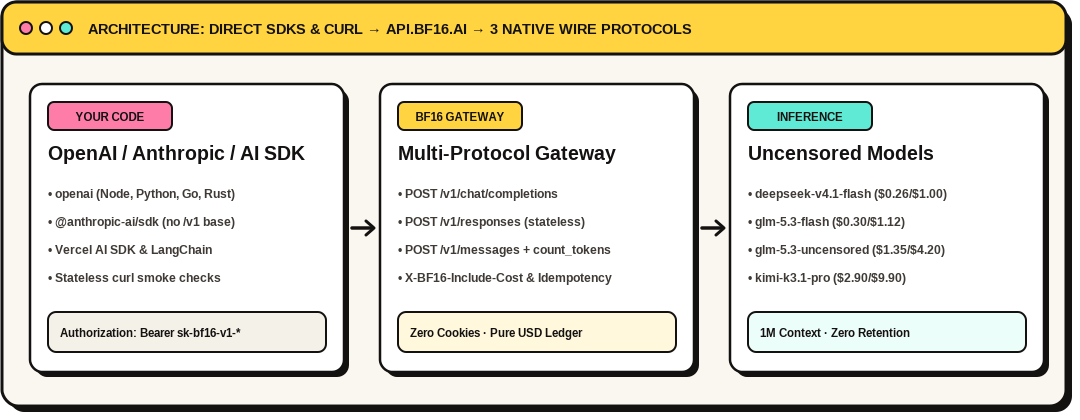
bf16.ai exposes three native wire surfaces on a single prepaid USD balance: OpenAI Chat Completions (`POST https://api.bf16.ai/v1/chat/completions`), stateless OpenAI Responses (`POST https://api.bf16.ai/v1/responses`), and Anthropic Messages (`POST https://api.bf16.ai/v1/messages`).
Every response includes `x-request-id`, `x-bf16-model`, rate-limit headers, and optional `x-bf16-cost-usd` when `X-BF16-Include-Cost: true` is sent — plus 24-hour transactional `Idempotency-Key` protection so network retries never double-bill.
Configurazione
Accedi per inserire la tua chiave API →I comandi mostrano $BF16_API_KEY. Accedi per inserire automaticamente la tua chiave reale.
One-Command End-to-End Streaming & Cost Header Probe
Sends a live Chat Completions request with `X-BF16-Include-Cost: true` and prints both the response headers (`x-bf16-cost-usd`) and JSON body.
export BF16_API_KEY="sk-bf16-v1-..."
curl -fsSi "https://api.bf16.ai/v1/chat/completions" \
  -H "Authorization: Bearer $BF16_API_KEY" \
  -H "Content-Type: application/json" \
  -H "X-BF16-Include-Cost: true" \
-d '{"model":"deepseek/deepseek-v4.1-flash-uncensored","messages":[{"role":"user","content":"Say ok."}],"max_tokens":16}'- 1
Una richiesta
curl https://api.bf16.ai/v1/models -H "Authorization: Bearer $BF16_API_KEY" - 2
OpenAI SDK
Imposta base_url su https://api.bf16.ai/v1 e api_key sulla tua chiave bf16. Non serve altro.
import OpenAI from 'openai'; const client = new OpenAI({ baseURL: 'https://api.bf16.ai/v1', apiKey: process.env.BF16_API_KEY, // sk-bf16-v1-... }); const res = await client.chat.completions.create({ model: 'zai-org/glm-5.3-uncensored', messages: [{ role: 'user', content: 'Say ok.' }], }); - 3
Anthropic SDK
Imposta base_url su https://api.bf16.ai — senza /v1 — e passa la chiave come x-api-key o Bearer token.
import Anthropic from '@anthropic-ai/sdk';

const anthropic = new Anthropic({
  baseURL: 'https://api.bf16.ai', // no /v1
  apiKey: process.env.BF16_API_KEY, // sk-bf16-v1-...
});

const msg = await anthropic.messages.create({
  model: 'zai-org/glm-5.3-uncensored',
  max_tokens: 1024,
  messages: [{ role: 'user', content: 'Say ok.' }],
});
Riferimento Campo per Campo
https://api.bf16.ai/v1https://api.bf16.aiNo /v1 — @anthropic-ai/sdk appends /v1/messages.
X-BF16-Include-Cost: true · X-BF16-Max-Price-Per-M-Output · Idempotency-KeyModelli Consigliati per Ruolo
Assegna la progettazione ai modelli Flagship e i subtask rapidi o screenshot ai modelli Flash.
| Ruolo | Model ID | Motivazione | USD / 1M Token |
|---|---|---|---|
| High-Throughput API, Vision & JSON Extraction | deepseek/deepseek-v4.1-flash-uncensored | Fastest TTFT and lowest per-token rate with full 1M context + Vision + JSON Schema. | $0.26 in / $0.045 cached / $1.00 out |
| Complex Code, Reasoning & Tool Loops | zai-org/glm-5.3-uncensored | Flagship multi-turn tool calling across both OpenAI and Anthropic SDKs. | $1.35 in / $0.25 cached / $4.20 out |
| 2.8T Multimodal Flagship | moonshotai/kimi-k3.1-pro-uncensored | Maximum creative, multilingual, and visual depth across 1M tokens. | $1.95 in / $0.28 cached / $6.90 out |
Come capire se ha funzionato
- La risposta contiene un ID modello presente in /models.
Guardrail di Produzione e Limiti di Spesa
- Attach an `Idempotency-Key` header (8–128 visible ASCII chars) on non-idempotent background jobs so network timeouts never trigger duplicate inference.
- Keep `sk-bf16-v1-*` keys strictly server-side in production apps.