n8n
Piattaforma open-source di automazione con nodi AI Agent e output JSON strutturato.
https://api.bf16.ai/v1openai-completionsPer chi è pensato
Builder di workflow 24/7 che richiedono JSON affidabili senza blocchi imprevisti.
Architettura e Integrazione con bf16.ai
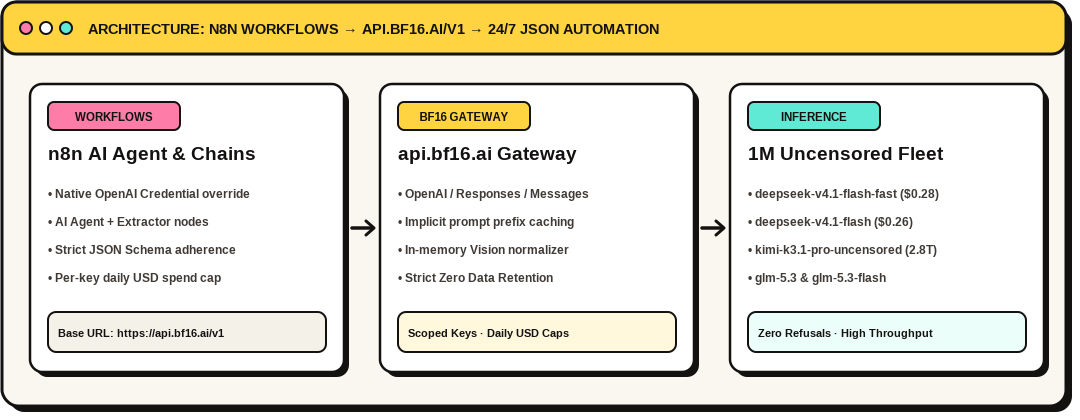
n8n workflows run unattended across thousands of webhook executions per day — summarizing tickets, parsing scraped pages, moderating user content, and triggering downstream APIs. A single false-positive safety refusal returns prose instead of JSON and crashes the entire workflow branch.
Pointing n8n’s native OpenAI Chat Model credential to https://api.bf16.ai/v1 gives every AI Agent and Basic LLM Chain node strict JSON Schema adherence, 1M context, zero false refusals, and $0.26/$1.00 Flash economics.
Configurazione
Accedi per inserire la tua chiave API →I comandi mostrano $BF16_API_KEY. Accedi per inserire automaticamente la tua chiave reale.
Smoke-Test Your n8n Key & Structured Output Endpoint
Verifies API key authentication and model discovery from your n8n host before activating workflows.
export BF16_API_KEY="sk-bf16-v1-..."
curl https://api.bf16.ai/v1/models -H "Authorization: Bearer $BF16_API_KEY"- 1
Configura la tua chiave API bf16.ai
In n8n, open Credentials → Add Credential → OpenAI. Paste your API key and set Base URL to https://api.bf16.ai/v1.
API Key: $BF16_API_KEY Base URL: https://api.bf16.ai/v1 - 2
Collega l’endpoint bf16.ai e i modelli da 1M
Inserisci la Base URL e la chiave API per attivare subito i modelli senza censura da 1M di contesto con zero data retention (ZDR).
Riferimento Campo per Campo
sk-bf16-v1-••••••••••••https://api.bf16.ai/v1deepseek/deepseek-v4.1-flash-uncensoredAlso supports zai-org/glm-5.3-flash-uncensored for strict JSON extraction
Zero Prompt Retention · 1M ContextModelli Consigliati per Ruolo
Assegna la progettazione ai modelli Flagship e i subtask rapidi o screenshot ai modelli Flash.
| Ruolo | Model ID | Motivazione | USD / 1M Token |
|---|---|---|---|
| 24/7 Webhook & Batch Automation | deepseek/deepseek-v4.1-flash-uncensored | High throughput (~155 tok/s) and $0.045/1M cached prompt reads keep 10,000-run workflows affordable. | $0.26 in / $0.045 cached / $1.00 out |
| Strict JSON Schema Extraction | zai-org/glm-5.3-flash-uncensored | Rock-solid structured JSON outputs + vision for invoice, UI, and document pipelines. | $0.30 in / $0.065 cached / $1.12 out |
Come capire se ha funzionato
- Invia una richiesta di test e verifica la chiamata in tempo reale nei log di bf16.ai.
- curl https://api.bf16.ai/v1/models -H "Authorization: Bearer $BF16_API_KEY"
Guardrail di Produzione e Limiti di Spesa
- Create a dedicated API key with a daily USD spend cap in /dashboard/keys for every production n8n instance to guard against infinite webhook loops.