AstrBot
All-in-one open-source IM agent platform for Telegram, Slack, Discord, Feishu, DingTalk, and WeChat Work with isolated Docker code sandboxes.
https://api.bf16.ai/v1openai-completions対象ユーザー
Developers and teams running AstrBot across instant-messaging workflows who need uncensored multimodal reasoning, RAG, and isolated shell/Python sandboxes.
アーキテクチャと bf16.ai 連携の利点
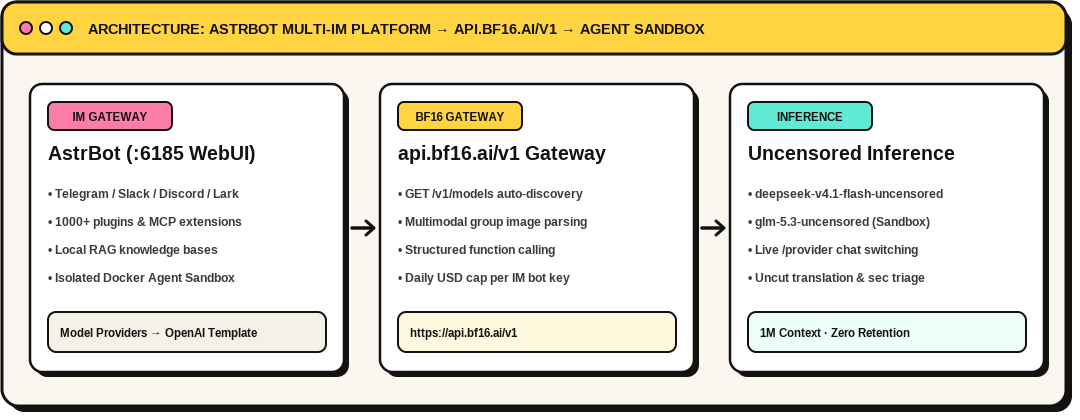
AstrBot (AstrBotDevs/AstrBot) is one of the most widely deployed open-source IM agent platforms, connecting Telegram, Slack, Discord, Feishu/Lark, DingTalk, WeChat Work, and a built-in Web ChatUI to MCP servers, local knowledge bases, and a Docker-isolated Agent Sandbox.
When AstrBot runs technical group bots, security alert responders, or uncut multi-language translation plugins, standard commercial APIs frequently block entire group threads over benign security payloads or colloquial text. Connecting AstrBot’s OpenAI provider slot to bf16.ai gives your IM bots 1M-context uncensored reasoning and vision with automatic prefix-cache discounts.
セットアップ
サインインしてAPIキーを自動入力 →コマンドには $BF16_API_KEY と表示されています。サインインすると自分のキーが自動入力されます。
One-Command AstrBot Docker Launch + Endpoint Verification
Verifies your bf16.ai API key against GET /v1/models and launches AstrBot in Docker on port 6185 with persistent data mounted at ./astrbot-data.
export BF16_API_KEY="sk-bf16-v1-..."
curl -fsS "https://api.bf16.ai/v1/models" -H "Authorization: Bearer $BF16_API_KEY" >/dev/null && \
mkdir -p ./astrbot-data && \
docker run -d --name astrbot --restart unless-stopped \
  -p 6185:6185 \
  -v "$(pwd)/astrbot-data:/AstrBot/data" \
  soulter/astrbot:latest && \
echo "AstrBot running at http://127.0.0.1:6185 — paste Base URL https://api.bf16.ai/v1 in Model Providers."- 1
Start AstrBot via uv or Docker
Launch AstrBot locally with uv (Python 3.12) or Docker, then open the WebUI console on port 6185.
uv tool install astrbot --python 3.12 astrbot init astrbot run - 2
Add bf16.ai in WebUI → Model Providers
In http://127.0.0.1:6185, navigate to Model Providers → + Add Provider → OpenAI. Set API Base URL to https://api.bf16.ai/v1, add your key below, and set Model to deepseek/deepseek-v4.1-flash-uncensored (or click Fetch Models).
API Base URL: https://api.bf16.ai/v1 API Key: $BF16_API_KEY Model: deepseek/deepseek-v4.1-flash-uncensored - 3
Enable Vision & Tool Calling Modalities
On the provider card in AstrBot, ensure Tool Calling (Function Calling) and Image Understanding (Vision) toggles are enabled so AstrBot forwards group screenshots and MCP/plugin schemas.
入力パラメータ早見表
OpenAI (OpenAI-Compatible Chat Completions)bf16-uncensoredhttps://api.bf16.ai/v1Must include /v1.
sk-bf16-v1-••••••••••••deepseek/deepseek-v4.1-flash-uncensoredSupports Vision + Function Calling + 1M context compression.
用途別おすすめモデル構成
設計・監査には Flagship モデル、並列サブタスクや画面認識には Flash モデルを組み合わせます。
| 役割 | モデル ID | 選定理由 | USD / 1M トークン |
|---|---|---|---|
| High-Concurrency IM Bot & Image Recognition | deepseek/deepseek-v4.1-flash-uncensored | Handles group-chat images, plugin tool calls, and long chat histories quickly at low token cost. | $0.26 in / $0.045 cached / $1.00 out |
| Agent Sandbox Coding & Deep RAG Synthesis | zai-org/glm-5.3-uncensored | Reliable multi-step Python/Shell code generation inside AstrBot’s isolated Agent Sandbox. | $1.35 in / $0.25 cached / $4.20 out |
正しく動いているか確認する方法
- Open AstrBot Web ChatUI and send "/provider" or a test prompt; verify a streaming reply arrives.
- Check bf16.ai/dashboard/logs to confirm HTTP 200 settlement.
- curl https://api.bf16.ai/v1/models -H "Authorization: Bearer $BF16_API_KEY"
本番運用の安全策と予算上限
- Configure AstrBot session whitelists and rate limits before adding the bot to large public Telegram or Discord servers.
- Pass a hashed per-sender identifier in custom wrappers or cap daily spend on the AstrBot API key in /dashboard/keys.