OpenClaw
非対話型コマンドでセットアップできるパーソナルエージェント。
https://api.bf16.ai/v1openai-completions対象ユーザー
モデルの拒否ではなく、エージェント側の権限設定で動作を制御したいユーザー向け。
アーキテクチャと bf16.ai 連携の利点
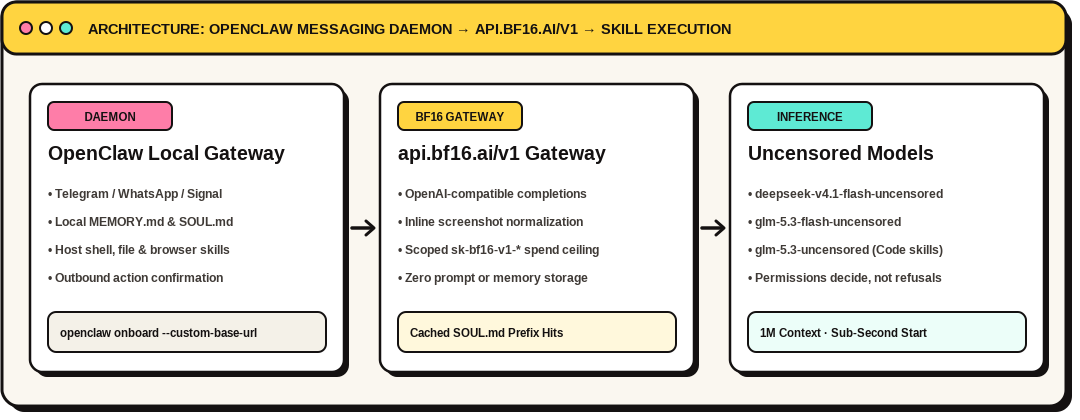
OpenClaw runs as a local-first personal AI daemon that connects your messaging channels (Telegram, WhatsApp, Discord, Slack, Signal) to local shell, calendar, file, and browser skills governed by your local SOUL.md and permission rules.
Standard cloud APIs frequently reject benign personal automation messages containing system logs, medical lab PDFs, security alerts, or raw legal contracts. Routing OpenClaw through bf16.ai ensures your daemon executes every authorized skill while your local OpenClaw approval policy stays in complete control of outgoing messages and side effects.
セットアップ
サインインしてAPIキーを自動入力 →コマンドには $BF16_API_KEY と表示されています。サインインすると自分のキーが自動入力されます。
One-Command OpenClaw Non-Interactive Setup
Installs OpenClaw if missing, configures bf16.ai as the custom OpenAI-compatible provider with 1M-context DeepSeek V4.1 Flash Uncensored, and verifies gateway connectivity.
export BF16_API_KEY="sk-bf16-v1-..."
command -v openclaw >/dev/null 2>&1 || npm install -g openclaw
openclaw onboard --non-interactive --accept-risk \
  --auth-choice custom-api-key \
  --custom-provider-id bf16 \
  --custom-compatibility openai \
  --custom-base-url https://api.bf16.ai/v1 \
  --custom-api-key "$BF16_API_KEY" \
  --custom-model-id deepseek/deepseek-v4.1-flash-uncensored \
  --skip-health
curl -fsS "https://api.bf16.ai/v1/models" -H "Authorization: Bearer $BF16_API_KEY" >/dev/null && echo "bf16.ai connected to OpenClaw."- 1
APIキーを環境変数に設定
サインイン中は自分のキーが自動入力されます。そのままコピーして実行できます。
export BF16_API_KEY=sk-bf16-v1-... - 2
bf16 を指定してオンボーディングを実行
openclaw onboard --non-interactive --accept-risk \
  --auth-choice custom-api-key \
  --custom-provider-id bf16 \
  --custom-compatibility openai \
  --custom-base-url https://api.bf16.ai/v1 \
  --custom-api-key "$BF16_API_KEY" \
  --custom-model-id deepseek/deepseek-v4.1-flash-uncensored \
  --skip-health
入力パラメータ早見表
custom-api-keyopenaihttps://api.bf16.ai/v1Must end with /v1.
deepseek/deepseek-v4.1-flash-uncensored1M context · Vision + fast skill execution.
用途別おすすめモデル構成
設計・監査には Flagship モデル、並列サブタスクや画面認識には Flash モデルを組み合わせます。
| 役割 | モデル ID | 選定理由 | USD / 1M トークン |
|---|---|---|---|
| Messaging & Daily Skills (Default) | deepseek/deepseek-v4.1-flash-uncensored | Sub-second first-token feel in Telegram/WhatsApp with native image input and $0.045/1M prefix cache hits on SOUL.md + MEMORY.md. | $0.26 in / $0.045 cached / $1.00 out |
| Complex Code & System Administration | zai-org/glm-5.3-uncensored | Highest multi-step shell and file-editing accuracy when invoking engineering skills. | $1.35 in / $0.25 cached / $4.20 out |
正しく動いているか確認する方法
- カスタムプロバイダが接続済みとして表示されます。
- curl https://api.bf16.ai/v1/models -H "Authorization: Bearer $BF16_API_KEY"
本番運用の安全策と予算上限
- Keep OpenClaw confirmation prompts turned ON for outgoing messages to third parties, destructive shell commands, and payment skills (Decision 2.7).
- Scope a dedicated OpenClaw key in /dashboard/keys with a daily USD ceiling.