Hermes
コマンドラインから完結して設定できるパーソナルエージェント。
https://api.bf16.ai/v1openai-completions対象ユーザー
Hermes で 1M トークンのフルコンテキストを使いたいユーザー向け。
アーキテクチャと bf16.ai 連携の利点
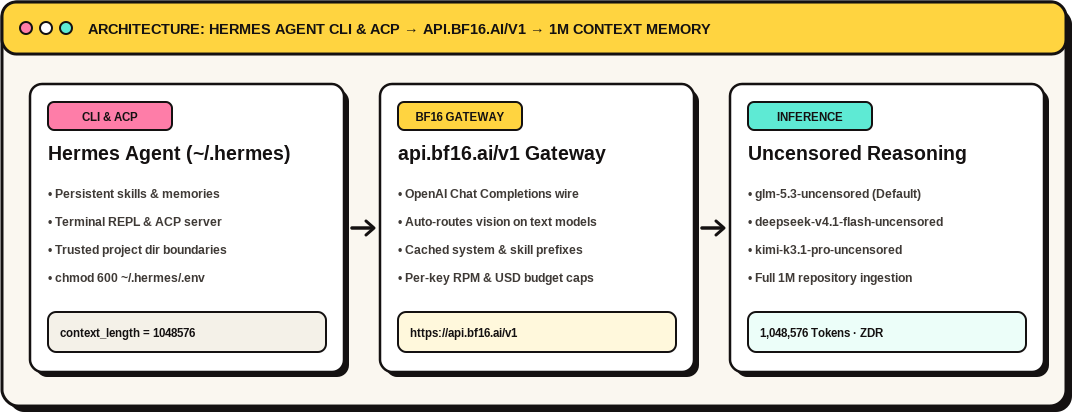
Hermes Agent (by Nous Research) combines persistent local skills, long-term memory, and Agent Client Protocol (ACP) integration so the same agent works in your terminal and inside desktop hosts like OpenBot.
By default, Hermes caps custom OpenAI-compatible endpoints at a conservative context window unless model.context_length is explicitly raised. Setting model.context_length to 1048576 unlocks the full 1M-token window across bf16.ai’s uncensored GLM, DeepSeek, and Kimi models.
セットアップ
サインインしてAPIキーを自動入力 →コマンドには $BF16_API_KEY と表示されています。サインインすると自分のキーが自動入力されます。
One-Command Hermes Agent Configuration
Installs Hermes if absent, writes BF16_API_KEY into ~/.hermes/.env (chmod 600), sets provider/base_url/model/1M context_length via hermes config set, and prints the active config.
export BF16_API_KEY="sk-bf16-v1-..."
command -v hermes >/dev/null 2>&1 || (curl -fsSL https://hermes-agent.nousresearch.com/install.sh | bash)
mkdir -p ~/.hermes && umask 077 && touch ~/.hermes/.env
grep -v '^OPENAI_API_KEY=' ~/.hermes/.env > ~/.hermes/.env.tmp && mv ~/.hermes/.env.tmp ~/.hermes/.env
printf 'OPENAI_API_KEY=%s\n' "$BF16_API_KEY" >> ~/.hermes/.env
hermes config set model.provider custom
hermes config set model.base_url https://api.bf16.ai/v1
hermes config set model.default zai-org/glm-5.3-uncensored
hermes config set model.context_length 1048576
hermes config show- 1
APIキーをエクスポート
Hermes は環境変数 BF16_API_KEY を参照します。
export BF16_API_KEY=sk-bf16-v1-... - 2
接続先を bf16 に設定
hermes config set model.provider custom
hermes config set model.base_url https://api.bf16.ai/v1
hermes config set model.key_env BF16_API_KEY
hermes config set model.default zai-org/glm-5.3-uncensored
hermes config set model.context_length 1048576
入力パラメータ早見表
customhttps://api.bf16.ai/v1zai-org/glm-5.3-uncensored1048576Required to prevent early truncation below 1M tokens.
用途別おすすめモデル構成
設計・監査には Flagship モデル、並列サブタスクや画面認識には Flash モデルを組み合わせます。
| 役割 | モデル ID | 選定理由 | USD / 1M トークン |
|---|---|---|---|
| Primary Reasoning & Engineering Agent | zai-org/glm-5.3-uncensored | Deep tool execution and multi-file reasoning across 1M-token workspaces. | $1.35 in / $0.25 cached / $4.20 out |
| Fast Multimodal & Sub-Tasks | deepseek/deepseek-v4.1-flash-uncensored | Native vision + high-speed tool loops for web research and screenshot tasks. | $0.26 in / $0.045 cached / $1.00 out |
正しく動いているか確認する方法
- hermes config show で bf16 のベースURLが表示されます。
- curl https://api.bf16.ai/v1/models -H "Authorization: Bearer $BF16_API_KEY"
本番運用の安全策と予算上限
- Restrict skills.trusted_project_dirs in ~/.hermes/config.yaml to repositories you own.
- Keep ~/.hermes/.env mode 0600 so local keys stay readable only by your OS user.