Continue
Open-source AI assistant for VS Code and IntelliJ/JetBrains configured via ~/.continue/config.yaml.
https://api.bf16.ai/v1openai-completions対象ユーザー
VS Code, PyCharm, GoLand, and IntelliJ developers who want an open-source sidebar Agent, Edit, and Chat workflow backed by bf16.ai.
アーキテクチャと bf16.ai 連携の利点
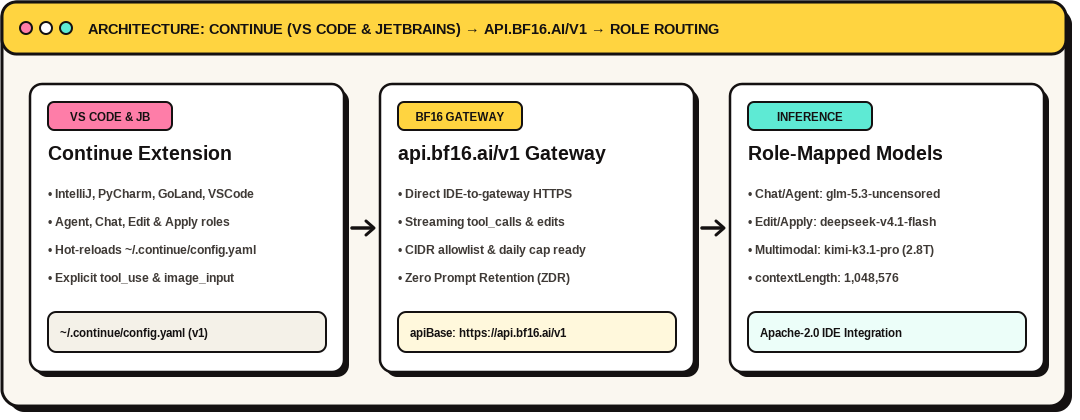
Continue (`continue.dev`) is the leading Apache-2.0 AI coding assistant supporting both **VS Code** and **all JetBrains IDEs** (IntelliJ IDEA, PyCharm, GoLand, RustRover, WebStorm, CLion).
Continue’s modern `~/.continue/config.yaml` lets you assign explicit `roles: [chat, edit, apply]` and `capabilities: [tool_use, image_input]` per model — pairing `zai-org/glm-5.3-uncensored` for Agent/Chat with `deepseek/deepseek-v4.1-flash-uncensored` for instant `Cmd+I` Edit and Apply.
セットアップ
サインインしてAPIキーを自動入力 →コマンドには $BF16_API_KEY と表示されています。サインインすると自分のキーが自動入力されます。
One-Command `~/.continue/config.yaml` Writer
Backs up ~/.continue/config.yaml if present, writes a clean Continue v1 YAML config with GLM-5.3, DeepSeek V4.1 Flash (Vision + Apply), and Kimi K3.1 Pro, and verifies api.bf16.ai.
export BF16_API_KEY="sk-bf16-v1-..."
mkdir -p ~/.continue && [ -f ~/.continue/config.yaml ] && cp ~/.continue/config.yaml ~/.continue/config.yaml.bak
umask 077 && cat <<EOF > ~/.continue/config.yaml
name: bf16-uncensored
version: 1.0.0
schema: v1
models:
  - name: GLM-5.3 Flagship (bf16)
    provider: openai
    model: zai-org/glm-5.3-uncensored
    apiBase: https://api.bf16.ai/v1
    apiKey: $BF16_API_KEY
    roles: [chat, edit]
    capabilities: [tool_use]
    defaultCompletionOptions:
      contextLength: 1048576
      maxTokens: 65536
  - name: DeepSeek V4.1 Flash Vision (bf16)
    provider: openai
    model: deepseek/deepseek-v4.1-flash-uncensored
    apiBase: https://api.bf16.ai/v1
    apiKey: $BF16_API_KEY
    roles: [chat, edit, apply]
    capabilities: [tool_use, image_input]
    defaultCompletionOptions:
      contextLength: 1048576
      maxTokens: 32768
  - name: Kimi K3.1 Pro 2.8T Vision (bf16)
    provider: openai
    model: moonshotai/kimi-k3.1-pro-uncensored
    apiBase: https://api.bf16.ai/v1
    apiKey: $BF16_API_KEY
    roles: [chat, edit]
    capabilities: [tool_use, image_input]
    defaultCompletionOptions:
      contextLength: 1048576
      maxTokens: 65536
EOF
curl -fsS "https://api.bf16.ai/v1/models" -H "Authorization: Bearer $BF16_API_KEY" >/dev/null && echo "Saved ~/.continue/config.yaml"- 1
Save ~/.continue/config.yaml
Open Continue → click the model dropdown → click the gear icon to open ~/.continue/config.yaml (Windows: %USERPROFILE%\.continue\config.yaml), and paste the YAML below.
~/.continue/config.yamlname: bf16-uncensored version: 1.0.0 schema: v1 models: - name: GLM-5.3 Flagship (bf16) provider: openai model: zai-org/glm-5.3-uncensored apiBase: https://api.bf16.ai/v1 apiKey: $BF16_API_KEY roles: [chat, edit] capabilities: [tool_use] defaultCompletionOptions: contextLength: 1048576 maxTokens: 65536 - name: DeepSeek V4.1 Flash Vision (bf16) provider: openai model: deepseek/deepseek-v4.1-flash-uncensored apiBase: https://api.bf16.ai/v1 apiKey: $BF16_API_KEY roles: [chat, edit, apply] capabilities: [tool_use, image_input] defaultCompletionOptions: contextLength: 1048576 maxTokens: 32768 - 2
Select GLM-5.3 or DeepSeek V4.1 Flash in Continue Sidebar
Switch Continue mode to Agent or Chat, pick GLM-5.3 Flagship (bf16), and set DeepSeek V4.1 Flash Vision (bf16) as your Apply model under Model Roles.
入力パラメータ早見表
openaihttps://api.bf16.ai/v1sk-bf16-v1-••••••••••••zai-org/glm-5.3-uncensored (contextLength: 1048576)deepseek/deepseek-v4.1-flash-uncensored用途別おすすめモデル構成
設計・監査には Flagship モデル、並列サブタスクや画面認識には Flash モデルを組み合わせます。
| 役割 | モデル ID | 選定理由 | USD / 1M トークン |
|---|---|---|---|
| Agent & Chat (`roles: [chat, edit]`) | zai-org/glm-5.3-uncensored | High tool-use reliability in Continue Agent mode across VS Code and JetBrains. | $1.35 in / $0.25 cached / $4.20 out |
| Fast Apply & Multimodal (`roles: [chat, edit, apply]`) | deepseek/deepseek-v4.1-flash-uncensored | Applies code blocks rapidly into files and accepts pasted UI screenshots. | $0.26 in / $0.045 cached / $1.00 out |
正しく動いているか確認する方法
- Both models appear immediately in Continue’s model selector with Tool Use icons enabled.
- Agent tool calls stream cleanly and log in bf16.ai/dashboard/logs.
- curl https://api.bf16.ai/v1/models -H "Authorization: Bearer $BF16_API_KEY"
本番運用の安全策と予算上限
- Do not assign LLM chat models to the `autocomplete` role unless you tolerate chat-model latency on every keystroke — keep `roles: [chat, edit, apply]`.