Orca
オープンソースのマルチエージェント IDE&Bot 実行環境(stablyai/orca)。公式プラグイン bf16-ai.bf16 でライブ 1M モデル一覧・ワンクリック起動・bf16 MCP を自動統合。
https://api.bf16.ai/v1openai-completions対象ユーザー
Orca 上で Claude Code・Codex・Hermes・無人 Orca Bots を並列実行し、誤拒否ゼロの 1M 推論を求める開発者。
アーキテクチャと bf16.ai 連携の利点
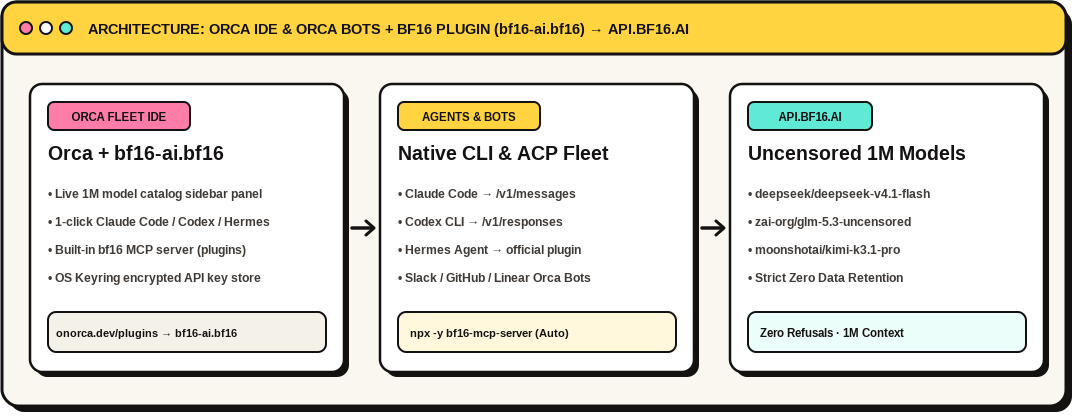
Orca (stablyai/orca, 142k+ ★) is an open-source Agent Development Environment for running fleets of coding agents (Claude Code, Codex, Hermes Agent, OpenCode, Cline, Pi, Goose) in parallel Git worktrees — plus unattended Orca Bots triggered from Slack, Linear, and GitHub.
Install our official open-source Orca plugin (`bf16-ai.bf16`, repo `BF16-AI/bf16-orca-plugin`) directly from Settings → Plugins to get a native bf16.ai sidebar panel with live 1M-context pricing, OS-keyring key checks, 1-click workspace launchers, and the official `bf16` MCP server (`npx -y bf16-mcp-server`) automatically available to every agent Orca spawns.
For unattended Orca Bots and native Orca Chat, pair Orca with our merged Nous Research Hermes Agent plugin (`hermes plugins install bf16-provider --enable`) or point Claude Code (`ANTHROPIC_BASE_URL=https://api.bf16.ai`) and Codex (`OPENAI_BASE_URL=https://api.bf16.ai/v1`) at bf16.ai so parallel agent runs never stall on false-positive safety refusals.
セットアップ
サインインしてAPIキーを自動入力 →コマンドには $BF16_API_KEY と表示されています。サインインすると自分のキーが自動入力されます。
Wire Hermes Agent + Orca Bots & Verify Your Key
Installs the official Hermes bf16-provider plugin (recognized automatically by Orca Chat and Orca Bots) and verifies your bf16.ai API key against live 1M-context endpoints.
export BF16_API_KEY="sk-bf16-v1-..."
hermes plugins install bf16-provider --enable
hermes config set model.default "deepseek/deepseek-v4.1-flash-uncensored"
curl https://api.bf16.ai/v1/models -H "Authorization: Bearer $BF16_API_KEY"- 1
bf16.ai API キーを設定する
Open Orca → Settings → Plugins, search for bf16.ai in the community directory (onorca.dev/plugins) or click Install from Git URL and paste https://github.com/BF16-AI/bf16-orca-plugin. This adds the live bf16.ai sidebar panel, Command Palette actions, status bar indicator, and built-in bf16 MCP server.
https://github.com/BF16-AI/bf16-orca-plugin - 2
bf16.ai エンドポイントと 1M 無検閲モデルを接続する
ページ上部の Base URL と API キーを設定するだけで、1M コンテキスト・ゼロ保持(ZDR)の全モデルが利用できます。
- 3
Launch Claude Code, Codex, or Hermes Agent on bf16.ai
Use the Setup tab (or Command Palette ⌘K → bf16.ai: Launch ...) to spin up Claude Code or Codex in the focused workspace, or install the official Hermes plugin so Orca Chat and unattended Orca Bots run directly on bf16.ai.
# Claude Code in any Orca workspace
export ANTHROPIC_BASE_URL="https://api.bf16.ai"
export ANTHROPIC_AUTH_TOKEN="$BF16_API_KEY"
export ANTHROPIC_MODEL="deepseek/deepseek-v4.1-flash-uncensored"
claude

# Hermes Agent (native Orca Chat & Orca Bots)
hermes plugins install bf16-provider --enable
入力パラメータ早見表
https://github.com/BF16-AI/bf16-orca-plugin (bf16-ai.bf16)bf16 → npx -y bf16-mcp-server (Settings → MCP → From plugins)https://api.bf16.ai (Anthropic) · https://api.bf16.ai/v1 (OpenAI)hermes plugins install bf16-provider --enableAuto-discovered by Orca native Chat and Orca Bots
用途別おすすめモデル構成
設計・監査には Flagship モデル、並列サブタスクや画面認識には Flash モデルを組み合わせます。
| 役割 | モデル ID | 選定理由 | USD / 1M トークン |
|---|---|---|---|
| Parallel Worktree Workers & Orca Bots (Fast + Vision) | deepseek/deepseek-v4.1-flash-uncensored | 1M context, ~155 tok/s throughput, multimodal screenshots, and $0.045/1M cached prompt reads keep multi-worker Orca fleets fast and affordable. | $0.26 in / $0.045 cached / $1.00 out |
| Coordinator Agent, Security Audits & Complex PR Reviews | zai-org/glm-5.3-uncensored | Native Anthropic Messages + OpenAI Responses tool calling with zero false-positive refusals on auth, crypto, and security diffs. | $1.35 in / $0.25 cached / $4.20 out |
| Zero-Markup Fleet Router | bf16/auto:coding | Automatically picks the highest tool-and-code adherence uncensored endpoint across your Orca workspaces. | Model rate · $0 router fee |
正しく動いているか確認する方法
- テスト送信後、bf16.ai ダッシュボードのリクエストログにリアルタイムで記録されます。
- curl https://api.bf16.ai/v1/models -H "Authorization: Bearer $BF16_API_KEY"
本番運用の安全策と予算上限
- Create a dedicated API key with a daily USD spend cap in /dashboard/keys before assigning unattended Orca Bots to high-volume GitHub or Slack triggers.
- Orca runs each worker in an isolated Git worktree — pairing Orca’s workspace isolation with bf16.ai weight-level uncensored models keeps security boundaries inside Orca rather than upstream safety filters.