Roo Code
Configure named Configuration Profiles in Roo Code so Architect, Code, Debug, and Boomerang subtasks each run on the optimal uncensored model.
https://api.bf16.ai/v1openai-completions対象ユーザー
VS Code developers using Roo Code’s Architect, Code, Ask, Debug, and Orchestrator modes who want uninterrupted 1M-context execution.
アーキテクチャと bf16.ai 連携の利点
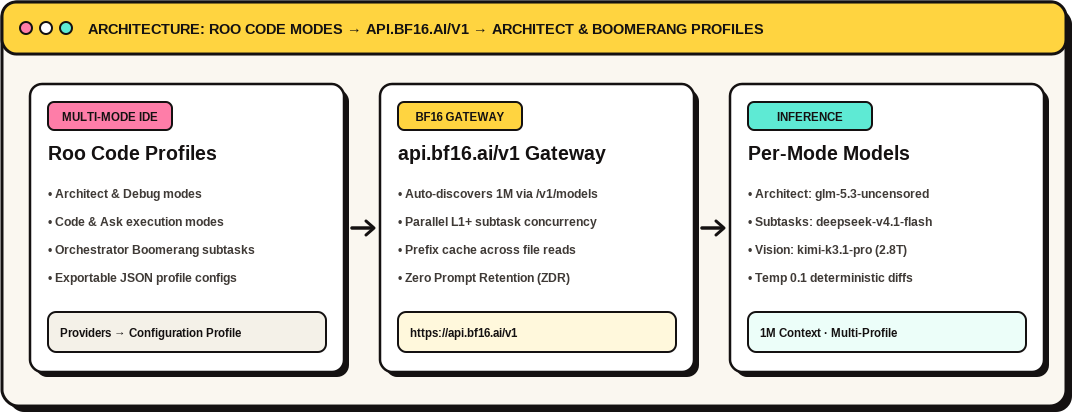
Roo Code extends VS Code autonomous coding with dedicated **Architect**, **Code**, **Ask**, **Debug**, and **Orchestrator (Boomerang)** modes, each bindable to its own Configuration Profile.
Because bf16.ai publishes OpenRouter-style capability metadata (`context_length: 1048576`, `architecture.input_modalities`, `supported_parameters`) directly on `GET /v1/models`, Roo Code’s model picker automatically detects 1M context, native tool calling, and Vision support.
セットアップ
サインインしてAPIキーを自動入力 →コマンドには $BF16_API_KEY と表示されています。サインインすると自分のキーが自動入力されます。
One-Command Roo Code Importable Profile Generator
Generates a ready-to-import `bf16-roo-profiles.json` file in your current folder (chmod 600) and verifies your bf16.ai key.
export BF16_API_KEY="sk-bf16-v1-..."
umask 077 && cat <<EOF > ./bf16-roo-profiles.json
{
  "providerProfiles": {
    "currentApiConfigName": "bf16-glm-flagship",
    "apiConfigs": {
      "bf16-glm-flagship": {
        "apiProvider": "openai",
        "openAiBaseUrl": "https://api.bf16.ai/v1",
        "openAiApiKey": "$BF16_API_KEY",
        "openAiModelId": "zai-org/glm-5.3-uncensored",
        "openAiCustomModelInfo": { "contextWindow": 1048576, "maxTokens": 65536, "supportsImages": false, "supportsPromptCache": true }
      },
      "bf16-deepseek-flash": {
        "apiProvider": "openai",
        "openAiBaseUrl": "https://api.bf16.ai/v1",
        "openAiApiKey": "$BF16_API_KEY",
        "openAiModelId": "deepseek/deepseek-v4.1-flash-uncensored",
        "openAiCustomModelInfo": { "contextWindow": 1048576, "maxTokens": 65536, "supportsImages": true, "supportsPromptCache": true }
      }
    }
  }
}
EOF
curl -fsS "https://api.bf16.ai/v1/models" -H "Authorization: Bearer $BF16_API_KEY" >/dev/null && echo "Wrote ./bf16-roo-profiles.json"- 1
Create Two Profiles in Roo Code → Settings → Providers
Add Profile "bf16-flagship" (zai-org/glm-5.3-uncensored) and Profile "bf16-flash" (deepseek/deepseek-v4.1-flash-uncensored) using API Provider "OpenAI Compatible" and Base URL https://api.bf16.ai/v1.
OpenAI Base URL: https://api.bf16.ai/v1 API Key: $BF16_API_KEY Architect Model: zai-org/glm-5.3-uncensored Code Model: deepseek/deepseek-v4.1-flash-uncensored - 2
Bind Profiles to Modes in Roo Code → Prompts / Modes
Assign bf16-flagship to Architect & Debug, and assign bf16-flash to Code & Ask so Orchestrator tasks automatically switch models per phase.
入力パラメータ早見表
OpenAI Compatiblehttps://api.bf16.ai/v1sk-bf16-v1-••••••••••••zai-org/glm-5.3-uncensored (or moonshotai/kimi-k3.1-pro-uncensored)deepseek/deepseek-v4.1-flash-uncensored用途別おすすめモデル構成
設計・監査には Flagship モデル、並列サブタスクや画面認識には Flash モデルを組み合わせます。
| 役割 | モデル ID | 選定理由 | USD / 1M トークン |
|---|---|---|---|
| Architect & Debug Modes | zai-org/glm-5.3-uncensored | Deep root-cause diagnosis and cross-module design without false refusals. | $1.35 in / $0.25 cached / $4.20 out |
| Code & Boomerang Subtasks | deepseek/deepseek-v4.1-flash-uncensored | Fast diff application, Vision browser checks, and low-cost subtask fan-out. | $0.26 in / $0.045 cached / $1.00 out |
正しく動いているか確認する方法
- Model picker auto-populates all active bf16.ai models from GET /v1/models.
- Run an Orchestrator task and verify sub-dollar cached prefix hits in bf16.ai/dashboard/logs.
- curl https://api.bf16.ai/v1/models -H "Authorization: Bearer $BF16_API_KEY"
本番運用の安全策と予算上限
- When using Orchestrator mode with parallel subtasks, ensure your account is on Tier L1 ($10+ lifetime top-up, 10 concurrent) so parallel subtask turns never queue on 429.