Zed
GPU 高速化 Rust エディタ。プラグイン不要のネイティブ OpenAI 互換 Agent パネルを搭載。
https://api.bf16.ai/v1openai-completions対象ユーザー
Zed 内でサブスクリプション縛りなく 1M コンテキスト高速無検閲モデルを使いたい開発者。
アーキテクチャと bf16.ai 連携の利点
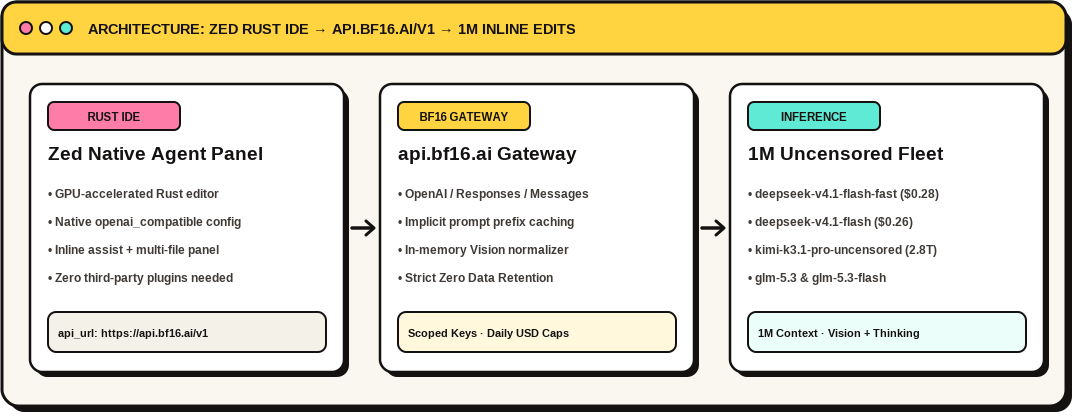
Zed’s native Agent Panel supports custom OpenAI-compatible providers directly in settings.json with zero plugins required.
Pairing Zed with DeepSeek V4.1 Flash Uncensored Fast ($0.28/$1.12) gives sub-second inline code completions, while Kimi K3.1 Pro Uncensored ($1.95/$6.90) handles complex multi-file architecture threads across a full 1M token window.
セットアップ
サインインしてAPIキーを自動入力 →コマンドには $BF16_API_KEY と表示されています。サインインすると自分のキーが自動入力されます。
Verify Your Key & Print Zed Provider JSON
Tests your API key and outputs the exact openai_compatible block to paste into ~/.config/zed/settings.json.
export BF16_API_KEY="sk-bf16-v1-..."
curl https://api.bf16.ai/v1/models -H "Authorization: Bearer $BF16_API_KEY"- 1
bf16.ai API キーを設定する
Open Zed settings (⌘,) and add the openai_compatible block below.
~/.config/zed/settings.json{ "language_models": { "openai_compatible": { "bf16": { "api_url": "https://api.bf16.ai/v1", "available_models": [ { "name": "deepseek/deepseek-v4.1-flash-uncensored-fast", "display_name": "DeepSeek V4.1 Flash Fast (bf16)", "max_tokens": 1048576, "max_output_tokens": 130000, "capabilities": { "tools": true, "images": true, "thinking": true } }, { "name": "moonshotai/kimi-k3.1-pro-uncensored", "display_name": "Kimi K3.1 Pro 2.8T (bf16)", "max_tokens": 1048576, "max_output_tokens": 131072, "capabilities": { "tools": true, "images": true, "thinking": true } } ] } } } } - 2
bf16.ai エンドポイントと 1M 無検閲モデルを接続する
ページ上部の Base URL と API キーを設定するだけで、1M コンテキスト・ゼロ保持(ZDR)の全モデルが利用できます。
入力パラメータ早見表
https://api.bf16.ai/v1BF16_API_KEY (or Zed keychain)1048576deepseek/deepseek-v4.1-flash-uncensored-fast, moonshotai/kimi-k3.1-pro-uncensored用途別おすすめモデル構成
設計・監査には Flagship モデル、並列サブタスクや画面認識には Flash モデルを組み合わせます。
| 役割 | モデル ID | 選定理由 | USD / 1M トークン |
|---|---|---|---|
| Interactive Inline Edits & Agent Turns | deepseek/deepseek-v4.1-flash-uncensored-fast | Matches Zed’s low-latency editing feel with 1M context and $0.055 cached reads. | $0.28 in / $0.055 cached / $1.12 out |
| Heavy Refactoring & Design Reviews | moonshotai/kimi-k3.1-pro-uncensored | 2.8T MoE reasoning with native vision for UI screenshot debugging inside Zed. | $1.95 in / $0.28 cached / $6.90 out |
正しく動いているか確認する方法
- テスト送信後、bf16.ai ダッシュボードのリクエストログにリアルタイムで記録されます。
- curl https://api.bf16.ai/v1/models -H "Authorization: Bearer $BF16_API_KEY"
本番運用の安全策と予算上限
- Keep max_tokens set to 1048576 so Zed never truncates large file trees prematurely.