Chatbox
Lightweight native AI client for macOS, Windows, Linux, iOS, and Android connected directly via Custom OpenAI Provider.
https://api.bf16.ai/v1openai-completions대상 사용자
Users who want a clean, zero-Docker native desktop and mobile app with local SQLite history and direct BYOK connection to bf16.ai.
아키텍처 및 bf16.ai 연동 구조
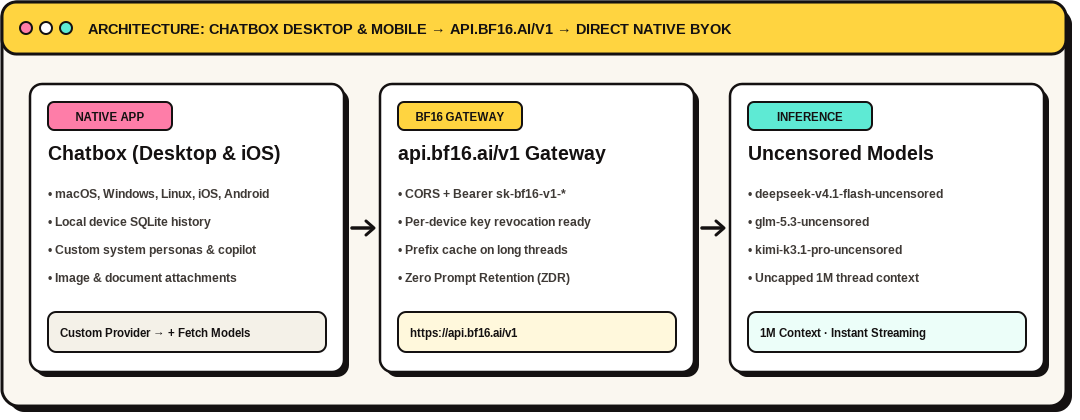
Chatbox (`chatboxai.app`) is a lightweight native client across macOS, Windows, Linux, iOS, and Android that stores conversation threads locally on your device and connects directly to any OpenAI-compatible API.
Adding bf16.ai as a Custom Provider in Chatbox takes under 30 seconds: click **Fetch** to pull all live uncensored models directly from `GET https://api.bf16.ai/v1/models`, including 1M context windows and Vision support.
명령어에는 $BF16_API_KEY가 표시됩니다. 로그인하면 내 실제 키가 자동으로 채워집니다.
One-Command API Key Verification Before Pasting into Chatbox
Tests your key against https://api.bf16.ai/v1/models so you know Fetch in Chatbox will succeed.
export BF16_API_KEY="sk-bf16-v1-..."
curl https://api.bf16.ai/v1/models -H "Authorization: Bearer $BF16_API_KEY"- 1
Add Custom Provider in Chatbox Settings
Open Chatbox → Settings → Model Provider → click "+ Add" at the bottom. Set API Mode to "OpenAI API Compatible", API Host to https://api.bf16.ai/v1, API Path to /chat/completions, and paste your API key.
API Host: https://api.bf16.ai/v1 API Path: /chat/completions API Key: $BF16_API_KEY - 2
Click Fetch & Enable Capabilities
Click "Fetch" under Models, add all active bf16.ai models, and enable Vision + Reasoning + Tool Use badges next to each model.
핵심 설정값 대조표
bf16.aiOpenAI API Compatiblehttps://api.bf16.ai/v1Chatbox shows preview: https://api.bf16.ai/v1/chat/completions
sk-bf16-v1-••••••••••••Click "+ Fetch" to import GLM-5.3, DeepSeek V4.1 Flash, and Kimi K3.1 Pro역할별 권장 모델 구성
복잡한 설계는 플래그십 모델로, 병렬 서브에이전트와 스크린샷은 Flash 모델로 분리하세요.
| 역할 | 모델 ID | 권장 사유 | USD / 1M 토큰 |
|---|---|---|---|
| Fast Everyday Chat & Vision | deepseek/deepseek-v4.1-flash-uncensored | Instant mobile/desktop streaming + image attachment support. | $0.26 in / $0.045 cached / $1.00 out |
| Deep Coding & Technical Problem Solving | zai-org/glm-5.3-uncensored | High reasoning accuracy on long prompts. | $1.35 in / $0.25 cached / $4.20 out |
제대로 작동하는지 확인하는 방법
- Fetch lists all active bf16.ai models immediately.
- Test message streams cleanly and logs in bf16.ai/dashboard/logs.
- curl https://api.bf16.ai/v1/models -H "Authorization: Bearer $BF16_API_KEY"
운영 가드레일 및 예산 격리
- When syncing Chatbox across desktop and mobile, create separate keys (`chatbox-mac`, `chatbox-iphone`) in /dashboard/keys so you can revoke a lost phone independently.