Open WebUI
Self-hosted multi-user web workspace with automatic /v1/models discovery, local RAG pipelines, and full mobile/PWA support.
https://api.bf16.ai/v1openai-completions대상 사용자
Self-hosters and engineering teams running Open WebUI in Docker who want a private ChatGPT-class web interface backed by bf16.ai.
아키텍처 및 bf16.ai 연동 구조
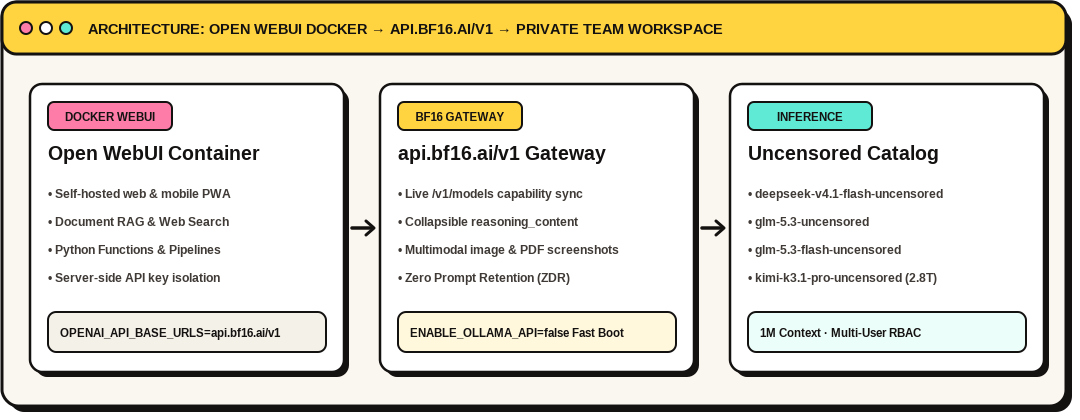
Open WebUI (`open-webui/open-webui`) is the leading self-hosted web workspace for LLMs, offering local document RAG, web search integration, Python tool/function pipelines, collapsible `<think>` reasoning panels, and fine-grained user/group model permissions.
Connecting Open WebUI to `https://api.bf16.ai/v1` via `OPENAI_API_BASE_URLS` (or Admin Panel → Settings → Connections) automatically imports every active uncensored model on bf16.ai while keeping your API key strictly server-side inside your Docker container.
명령어에는 $BF16_API_KEY가 표시됩니다. 로그인하면 내 실제 키가 자동으로 채워집니다.
One-Command Open WebUI Docker Launch Pre-Wired to bf16.ai
Verifies your bf16.ai key and starts Open WebUI on http://127.0.0.1:3080 with OPENAI_API_BASE_URLS pre-configured and Ollama probing disabled for instant model loading.
export BF16_API_KEY="sk-bf16-v1-..."
curl -fsS "https://api.bf16.ai/v1/models" -H "Authorization: Bearer $BF16_API_KEY" >/dev/null && \
docker run -d --name open-webui --restart unless-stopped \
  -p 3080:8080 \
  -e ENABLE_OLLAMA_API=false \
  -e OPENAI_API_BASE_URLS="https://api.bf16.ai/v1" \
  -e OPENAI_API_KEYS="$BF16_API_KEY" \
  -v open-webui-data:/app/backend/data \
  ghcr.io/open-webui/open-webui:main && \
echo "Open WebUI live at http://127.0.0.1:3080"- 1
Open Admin Panel → Settings → Connections
Under OpenAI API, click "+" (or edit the default row), enter URL https://api.bf16.ai/v1, paste your API key, and click the Verify (refresh) icon.
URL: https://api.bf16.ai/v1 Key: $BF16_API_KEY - 2
Optional: Set Default Models & Vision Capabilities in Workspace → Models
In Admin Panel → Settings → Models, pin deepseek/deepseek-v4.1-flash-uncensored as the default workspace model and ensure Vision capability is enabled on Flash and Kimi K3.1 Pro.
핵심 설정값 대조표
https://api.bf16.ai/v1Must end with /v1 (no trailing slash).
sk-bf16-v1-••••••••••••bf16Namespaces models cleanly if you also connect local Ollama.
역할별 권장 모델 구성
복잡한 설계는 플래그십 모델로, 병렬 서브에이전트와 스크린샷은 Flash 모델로 분리하세요.
| 역할 | 모델 ID | 권장 사유 | USD / 1M 토큰 |
|---|---|---|---|
| Default Workspace & Multimodal Chat | deepseek/deepseek-v4.1-flash-uncensored | Fast responses, Vision attachments, and low-cost RAG synthesis across long documents. | $0.26 in / $0.045 cached / $1.00 out |
| Deep Coding, Security & Technical Analysis | zai-org/glm-5.3-uncensored | Flagship reasoning with clean Thought-panel streaming. | $1.35 in / $0.25 cached / $4.20 out |
| 2.8T Multimodal Research & Long-Form Writing | moonshotai/kimi-k3.1-pro-uncensored | Top-tier nuance for uncut literary translation, policy analysis, and visual documents. | $1.95 in / $0.28 cached / $6.90 out |
제대로 작동하는지 확인하는 방법
- Verify Connection button in Admin → Connections reports "Server connection verified".
- All active bf16.ai models appear in the Open WebUI model selector and stream cleanly.
- curl https://api.bf16.ai/v1/models -H "Authorization: Bearer $BF16_API_KEY"
운영 가드레일 및 예산 격리
- On multi-user Open WebUI deployments, set `ENABLE_SIGNUP=false` after creating your admin account so strangers on the internet cannot use your shared key.