Codex
별도의 bf16 프로필로 OpenAI Codex 코딩 에이전트를 실행합니다.
https://api.bf16.ai/v1openai-responses대상 사용자
기본 Codex 설정을 바꾸지 않고 두 번째 프로필로 병행 사용하려는 개발자.
아키텍처 및 bf16.ai 연동 구조
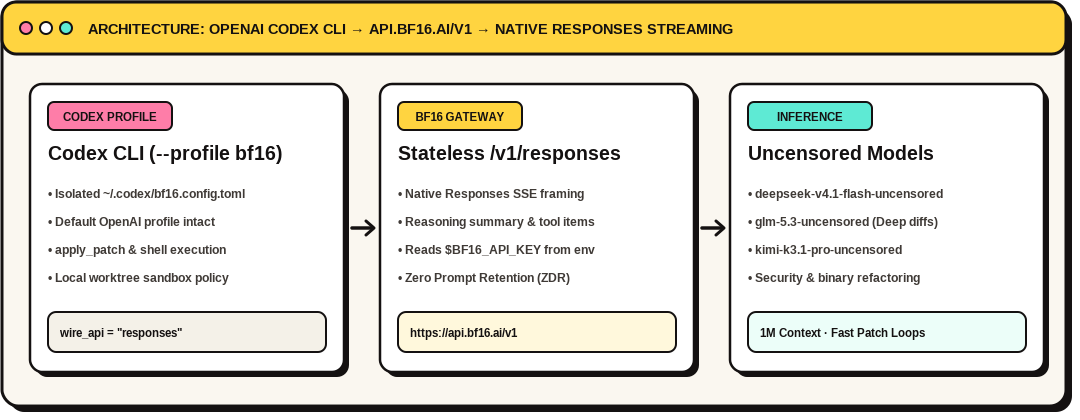
OpenAI’s terminal coding agent (`@openai/codex`) speaks the modern OpenAI `/v1/responses` wire format rather than legacy `/v1/chat/completions`. Many third-party OpenAI-compatible relays fail with HTTP 404 or 400 when Codex sends `input` items, `function_call_output`, and reasoning summaries.
bf16.ai implements a full stateless `/v1/responses` endpoint on https://api.bf16.ai/v1, allowing Codex CLI to stream reasoning items, shell tool calls, and `apply_patch` diffs cleanly on an isolated `--profile bf16` configuration.
명령어에는 $BF16_API_KEY가 표시됩니다. 로그인하면 내 실제 키가 자동으로 채워집니다.
One-Command Codex `--profile bf16` Installer
Creates ~/.codex/bf16.config.toml, stores BF16_API_KEY in ~/.bf16.env (chmod 600), and verifies /v1/models so you can immediately run codex -c ~/.codex/bf16.config.toml --profile bf16.
export BF16_API_KEY="sk-bf16-v1-..."
mkdir -p ~/.codex && umask 077 && printf 'export BF16_API_KEY="%s"\n' "$BF16_API_KEY" > ~/.bf16.env
cat <<'EOF' > ~/.codex/bf16.config.toml
# ~/.codex/bf16.config.toml  (Codex 0.134+ profile file)
model = "deepseek/deepseek-v4.1-flash-uncensored"
model_provider = "bf16"
model_context_window = 1048576
model_auto_compact_token_limit = 900000

[model_providers.bf16]
name = "bf16.ai"
base_url = "https://api.bf16.ai/v1"
wire_api = "responses"
env_key = "BF16_API_KEY"
EOF
curl -fsS "https://api.bf16.ai/v1/models" -H "Authorization: Bearer $BF16_API_KEY" >/dev/null && echo "Ready! Run: codex -c ~/.codex/bf16.config.toml --profile bf16"- 1
API 키 내보내기
프로필 설정에서 BF16_API_KEY 환경변수를 읽습니다.
export BF16_API_KEY=sk-bf16-v1-... - 2
프로필 파일 작성
~/.codex/bf16.config.toml# ~/.codex/bf16.config.toml (Codex 0.134+ profile file) model = "deepseek/deepseek-v4.1-flash-uncensored" model_provider = "bf16" model_context_window = 1048576 model_auto_compact_token_limit = 900000 [model_providers.bf16] name = "bf16.ai" base_url = "https://api.bf16.ai/v1" wire_api = "responses" env_key = "BF16_API_KEY" - 3
프로필로 Codex 시작
기존 기본 `codex` 프로필은 그대로 유지됩니다.
mkdir -p ~/.codex
cat > ~/.codex/bf16.config.toml <<'EOF'
model = "deepseek/deepseek-v4.1-flash-uncensored"
model_provider = "bf16"
model_context_window = 1048576
model_auto_compact_token_limit = 900000
[model_providers.bf16]
name = "bf16.ai"
base_url = "https://api.bf16.ai/v1"
wire_api = "responses"
env_key = "BF16_API_KEY"
EOF
codex --profile bf16
핵심 설정값 대조표
https://api.bf16.ai/v1BF16_API_KEYCodex reads $BF16_API_KEY from your shell at launch.
"responses"Uses native /v1/responses streaming on api.bf16.ai.
codex -c ~/.codex/bf16.config.toml --profile bf16역할별 권장 모델 구성
복잡한 설계는 플래그십 모델로, 병렬 서브에이전트와 스크린샷은 Flash 모델로 분리하세요.
| 역할 | 모델 ID | 권장 사유 | USD / 1M 토큰 |
|---|---|---|---|
| Fast Patch & Shell Execution (Default) | deepseek/deepseek-v4.1-flash-uncensored | Rapid tool cycles + Vision support for UI debugging inside Codex. | $0.26 in / $0.045 cached / $1.00 out |
| Deep Multi-File Refactoring | zai-org/glm-5.3-uncensored | Switch model = "zai-org/glm-5.3-uncensored" in [profiles.bf16] for complex architecture or security audit sessions. | $1.35 in / $0.25 cached / $4.20 out |
제대로 작동하는지 확인하는 방법
- 시작 시 Codex에 bf16 프로바이더가 표시됩니다.
- 콘솔 로그에서 요청 내역을 확인할 수 있습니다.
- curl https://api.bf16.ai/v1/models -H "Authorization: Bearer $BF16_API_KEY"
운영 가드레일 및 예산 격리
- Keep Codex sandbox approvals enabled (`suggest` or `auto-edit` inside git worktrees) so file writes outside your project require confirmation.
- Export BF16_API_KEY before launching Codex — Codex reads env_key at process startup.