OpenCode
멀티 프로바이더 레지스트리를 갖춘 오픈소스 터미널 에이전트.
https://api.bf16.ai/v1openai-completions대상 사용자
여러 모델 공급자를 동시에 등록해 두고 골라 쓰는 사용자.
아키텍처 및 bf16.ai 연동 구조
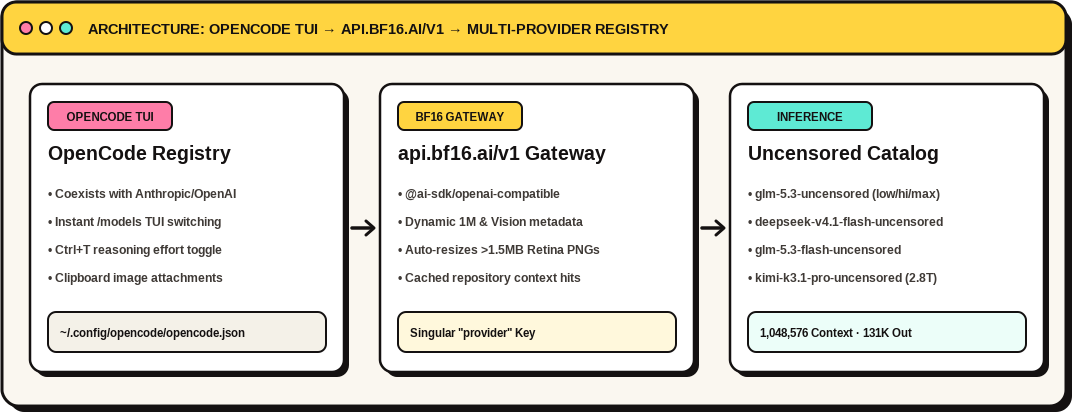
OpenCode is a fast open-source terminal coding agent built around a declarative provider registry (`~/.config/opencode/opencode.json`). Developers love OpenCode because you can keep Anthropic, OpenAI, and bf16 configured side-by-side and switch to an uncensored 1M-context model mid-project with `/models` whenever a stock provider refuses a security audit or binary reverse-engineering task.
When signed in on this page, the JSON snippet below dynamically includes every active model on your bf16.ai account — complete with `attachment: true`, `modalities`, `limit: { context: 1048576 }`, and `ctrl+t` reasoning effort variants.
명령어에는 $BF16_API_KEY가 표시됩니다. 로그인하면 내 실제 키가 자동으로 채워집니다.
One-Command Non-Destructive OpenCode Config Merge
Backs up ~/.config/opencode/opencode.json if it exists, merges the complete `provider.bf16` block without touching your other providers, and tests `/v1/models`.
export BF16_API_KEY="sk-bf16-v1-..."
mkdir -p ~/.config/opencode
node -e '
const fs = require("fs"), os = require("os"), path = require("path");
const file = path.join(os.homedir(), ".config/opencode/opencode.json");
const snippet = "{\n  \"$schema\": \"https://opencode.ai/config.json\",\n  \"provider\": {\n    \"bf16\": {\n      \"npm\": \"@ai-sdk/openai-compatible\",\n      \"name\": \"bf16.ai\",\n      \"options\": {\n        \"baseURL\": \"https://api.bf16.ai/v1\",\n        \"apiKey\": \"{env:BF16_API_KEY}\"\n      },\n      \"models\": {\n        \"zai-org/glm-5.3-uncensored\": {\n          \"name\": \"Uncensored GLM-5.3\",\n          \"reasoning\": true,\n          \"temperature\": true,\n          \"tool_call\": true,\n          \"modalities\": { \"input\": [\"text\"], \"output\": [\"text\"] },\n          \"limit\": { \"context\": 1048576, \"output\": 131072 }\n        },\n        \"zai-org/glm-5.3-flash-uncensored\": {\n          \"name\": \"Uncensored GLM-5.3 Flash Vision\",\n          \"attachment\": true,\n          \"reasoning\": true,\n          \"temperature\": true,\n          \"tool_call\": true,\n          \"modalities\": { \"input\": [\"text\", \"image\"], \"output\": [\"text\"] },\n          \"limit\": { \"context\": 1048576, \"output\": 131072 }\n        },\n        \"deepseek/deepseek-v4.1-flash-uncensored\": {\n          \"name\": \"Uncensored DeepSeek V4.1 Flash\",\n          \"attachment\": true,\n          \"reasoning\": true,\n          \"temperature\": true,\n          \"tool_call\": true,\n          \"modalities\": { \"input\": [\"text\", \"image\"], \"output\": [\"text\"] },\n          \"limit\": { \"context\": 1048576, \"output\": 130000 }\n        },\n        \"deepseek/deepseek-v4.1-flash-uncensored-fast\": {\n          \"name\": \"Uncensored DeepSeek V4.1 Flash Fast\",\n          \"attachment\": true,\n          \"reasoning\": true,\n          \"temperature\": true,\n          \"tool_call\": true,\n          \"modalities\": { \"input\": [\"text\", \"image\"], \"output\": [\"text\"] },\n          \"limit\": { \"context\": 1048576, \"output\": 130000 }\n        },\n        \"bf16/deepseek-v4.1-flash-1017-exl3-2.5bpw\": {\n          \"name\": \"DeepSeek V4.1 Flash 1017 EXL3 2.5bpw (bf16)\",\n          \"attachment\": true,\n          \"reasoning\": true,\n          \"temperature\": true,\n          \"tool_call\": true,\n          \"modalities\": { \"input\": [\"text\", \"image\"], \"output\": [\"text\"] },\n          \"limit\": { \"context\": 524288, \"output\": 65536 }\n        },\n        \"moonshotai/kimi-k3.1-pro-uncensored\": {\n          \"name\": \"Uncensored Kimi K3.1 Pro\",\n          \"attachment\": true,\n          \"reasoning\": true,\n          \"temperature\": true,\n          \"tool_call\": true,\n          \"modalities\": { \"input\": [\"text\", \"image\"], \"output\": [\"text\"] },\n          \"limit\": { \"context\": 1048576, \"output\": 131072 }\n        }\n      }\n    }\n  }\n}";
const incoming = JSON.parse(snippet);
let current = { "$schema": "https://opencode.ai/config.json", provider: {} };
if (fs.existsSync(file)) {
  fs.copyFileSync(file, file + ".bak");
  try { current = JSON.parse(fs.readFileSync(file, "utf8")); } catch {}
}
current.provider = Object.assign({}, current.provider || {}, incoming.provider);
fs.writeFileSync(file, JSON.stringify(current, null, 2) + "\n");
console.log("Merged provider.bf16 into " + file);
' && curl -fsS "https://api.bf16.ai/v1/models" -H "Authorization: Bearer $BF16_API_KEY" >/dev/null && echo "Ready! Run: opencode --model bf16/zai-org/glm-5.3-uncensored"- 1
API 키 내보내기
OpenCode는 BF16_API_KEY 환경변수를 참조합니다.
export BF16_API_KEY=sk-bf16-v1-... - 2
설정 파일에 bf16 추가
새 파일이면 전체를 붙여넣고, 기존 파일이 있다면 "provider" 객체 안에 bf16 블록만 추가하세요.
~/.config/opencode/opencode.json{ "$schema": "https://opencode.ai/config.json", "provider": { "bf16": { "npm": "@ai-sdk/openai-compatible", "name": "bf16.ai", "options": { "baseURL": "https://api.bf16.ai/v1", "apiKey": "{env:BF16_API_KEY}" }, "models": { "zai-org/glm-5.3-uncensored": { "name": "Uncensored GLM-5.3", "reasoning": true, "temperature": true, "tool_call": true, "modalities": { "input": ["text"], "output": ["text"] }, "limit": { "context": 1048576, "output": 131072 } }, "zai-org/glm-5.3-flash-uncensored": { "name": "Uncensored GLM-5.3 Flash Vision", "attachment": true, "reasoning": true, "temperature": true, "tool_call": true, "modalities": { "input": ["text", "image"], "output": ["text"] }, "limit": { "context": 1048576, "output": 131072 } }, "deepseek/deepseek-v4.1-flash-uncensored": { "name": "Uncensored DeepSeek V4.1 Flash", "attachment": true, "reasoning": true, "temperature": true, "tool_call": true, "modalities": { "input": ["text", "image"], "output": ["text"] }, "limit": { "context": 1048576, "output": 130000 } }, "deepseek/deepseek-v4.1-flash-uncensored-fast": { "name": "Uncensored DeepSeek V4.1 Flash Fast", "attachment": true, "reasoning": true, "temperature": true, "tool_call": true, "modalities": { "input": ["text", "image"], "output": ["text"] }, "limit": { "context": 1048576, "output": 130000 } }, "bf16/deepseek-v4.1-flash-1017-exl3-2.5bpw": { "name": "DeepSeek V4.1 Flash 1017 EXL3 2.5bpw (bf16)", "attachment": true, "reasoning": true, "temperature": true, "tool_call": true, "modalities": { "input": ["text", "image"], "output": ["text"] }, "limit": { "context": 524288, "output": 65536 } }, "moonshotai/kimi-k3.1-pro-uncensored": { "name": "Uncensored Kimi K3.1 Pro", "attachment": true, "reasoning": true, "temperature": true, "tool_call": true, "modalities": { "input": ["text", "image"], "output": ["text"] }, "limit": { "context": 1048576, "output": 131072 } } } } } } - 3
모델을 선택해 실행
opencode --model bf16/zai-org/glm-5.3-flash-uncensored
핵심 설정값 대조표
~/.config/opencode/opencode.jsonWindows: %USERPROFILE%\.config\opencode\opencode.json
https://api.bf16.ai/v1{env:BF16_API_KEY}Note: if you previously ran /connect, re-run /connect after key rotation.
Ctrl + T (low → high → max)역할별 권장 모델 구성
복잡한 설계는 플래그십 모델로, 병렬 서브에이전트와 스크린샷은 Flash 모델로 분리하세요.
| 역할 | 모델 ID | 권장 사유 | USD / 1M 토큰 |
|---|---|---|---|
| Primary Coding & Security Audits | zai-org/glm-5.3-uncensored | Flagship multi-file tool calling with low/high/max reasoning variants (`Ctrl+T`). | $1.35 in / $0.25 cached / $4.20 out |
| 2.8T Multimodal Architecture & Vision | moonshotai/kimi-k3.1-pro-uncensored | Accepts UI mockups + 1M-token repositories simultaneously. | $1.95 in / $0.28 cached / $6.90 out |
| Fast Exploration & Screenshots | deepseek/deepseek-v4.1-flash-uncensored | High-throughput tool loops + Vision input at $0.26 / $1.00 per 1M. | $0.26 in / $0.045 cached / $1.00 out |
제대로 작동하는지 확인하는 방법
- OpenCode 내 /models 목록에 bf16이 나타납니다.
- "Say ok."를 보내면 콘솔 로그에 요청이 기록됩니다.
- curl https://api.bf16.ai/v1/models -H "Authorization: Bearer $BF16_API_KEY"
운영 가드레일 및 예산 격리
- Remember top-level key is singular `"provider"` in opencode.json (never `"providers"`).
- If you store credentials via `/connect` inside OpenCode, OpenCode caches that token in `~/.local/share/opencode/auth.json` with higher priority than `{env:BF16_API_KEY}`.