LobeChat
Modern open-source AI workspace supporting both direct browser BYOK requests and Docker OPENAI_MODEL_LIST deployments.
https://api.bf16.ai/v1openai-completionsPara quem é
Developers running LobeChat Desktop, self-hosted Docker LobeChat, or client-side browser mode who want 1M context, Vision, and reasoning display.
Arquitetura e Integração com bf16.ai
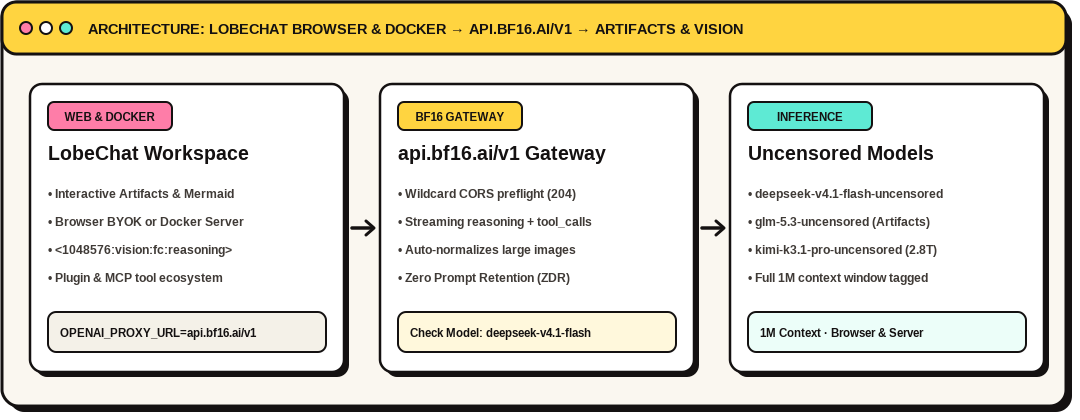
LobeChat (`lobehub/lobe-chat`) offers a polished agent workspace with artifact rendering, multimodal attachments, and two connection modes: **Client-Side Browser Request Mode** (direct browser fetch to `https://api.bf16.ai/v1` — supported natively by bf16.ai’s CORS headers) and **Self-Hosted Docker Server Mode**.
For Docker deployments, LobeChat’s `OPENAI_MODEL_LIST` syntax (`<1048576:vision:fc:reasoning>`) lets you pre-register every bf16.ai model with exact 1M context, function-calling, vision, and reasoning badges out of the box.
Configuração
Entrar para preencher sua chave de API →Os comandos mostram $BF16_API_KEY. Entre na conta para preencher sua chave real automaticamente.
One-Command LobeChat Docker Launch Pre-Configured for bf16.ai
Verifies your key and starts LobeChat on http://127.0.0.1:3210 with all three flagship/flash uncensored models pre-tagged for 1M context, Vision, Function Calling, and Reasoning.
export BF16_API_KEY="sk-bf16-v1-..."
curl -fsS "https://api.bf16.ai/v1/models" -H "Authorization: Bearer $BF16_API_KEY" >/dev/null && \
docker run -d --name lobe-chat --restart unless-stopped \
  -p 3210:3210 \
  -e OPENAI_API_KEY="$BF16_API_KEY" \
  -e OPENAI_PROXY_URL="https://api.bf16.ai/v1" \
  -e 'OPENAI_MODEL_LIST=-all,+deepseek/deepseek-v4.1-flash-uncensored=DeepSeek V4.1 Flash (Uncensored)<1048576:vision:fc:reasoning>,+zai-org/glm-5.3-uncensored=GLM-5.3 Flagship (Uncensored)<1048576:fc:reasoning>,+moonshotai/kimi-k3.1-pro-uncensored=Kimi K3.1 Pro 2.8T (Uncensored)<1048576:vision:fc:reasoning>' \
  lobehub/lobe-chat:latest && \
echo "LobeChat live at http://127.0.0.1:3210"- 1
Configure AI Service Provider in LobeChat Settings
Open LobeChat Settings → AI Service Provider → Add Custom Provider (OpenAI format) or configure OpenAI: set API Proxy URL to https://api.bf16.ai/v1 and paste your key.
API Proxy URL: https://api.bf16.ai/v1 API Key: $BF16_API_KEY - 2
Switch Connectivity Check Model & Fetch List
Change the "Connectivity Check" test model from gpt-4o-mini to deepseek/deepseek-v4.1-flash-uncensored, click Check, and fetch the model list.
Referência Exata de Campos
https://api.bf16.ai/v1sk-bf16-v1-••••••••••••Supported (api.bf16.ai/v1 allows CORS preflight)<1048576:vision:fc:reasoning>Modelos Recomendados por Função
Combine modelos Flagship para planejamento com modelos Flash para subtarefas e capturas de tela.
| Função | Model ID | Motivo | USD / 1M Tokens |
|---|---|---|---|
| Everyday Multimodal Workspace | deepseek/deepseek-v4.1-flash-uncensored | Fast Artifact rendering, Vision uploads, and 1M context. | $0.26 in / $0.045 cached / $1.00 out |
| Coding & Complex Artifacts | zai-org/glm-5.3-uncensored | Clean React/HTML/Mermaid artifact generation and tool use. | $1.35 in / $0.25 cached / $4.20 out |
Como saber se funcionou
- Connectivity Check passes with green checkmark.
- Reasoning traces expand cleanly above assistant messages.
- curl https://api.bf16.ai/v1/models -H "Authorization: Bearer $BF16_API_KEY"
Proteções de Produção e Limites de Gasto
- Set `ACCESS_CODE` on public Docker LobeChat servers so unauthenticated visitors cannot invoke your `OPENAI_API_KEY`.